Difference between revisions of "Manual:Extension/BlueSpiceUserSidebar"
| [quality revision] | [quality revision] |
(Tag: 2017 source edit) |
m (Tag: Visual edit) |
The extension UserSideBar lets users create their personal sidebar navigation.
Contents
- 1 Where to find BlueSpiceUserSidebar? Accessing the personal navigation
- 2 Default content
- 3 Customizing the sidebar
- 4 Related info
Where to find BlueSpiceUserSidebar?[edit | edit source]
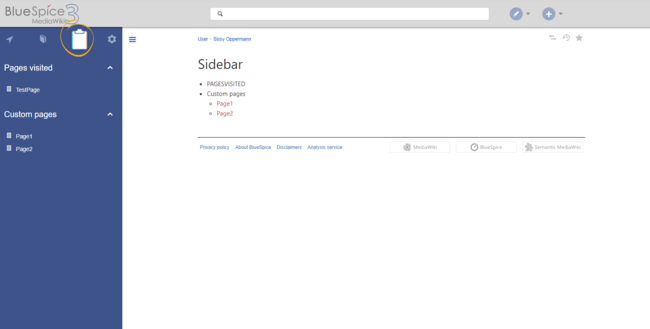

Every logged-in user has their own UserSidebar. It is located in the left navigation , as the "Personal navigation" tab (clipboard icon).
Default content[edit | edit source]
Initially, for users who haven't customized their personal sidebar, the navigation shows the following widgets:
- Pages visited (widget PAGESVISITED)
- My edits (widget YOUREDITS)
- Watchlist (widget WATCHLIST)
These widgets can be removed individually when a user customizes the sidebar.
Customizing the sidebar[edit | edit source]
To customize the content of this sidebar, click on Edit sidebar at the bottom of the sidebar after hovering over any menu item. This opens the page User:<username>/Sidebar.
The syntax used to define the sidebar corresponds to the main MediaWiki sidebar (MediaWiki:Sidebar). Entries starting with a single star ("*") are considered menu headings or sections while entries with two stars ("**") are considered menu items.
* My favourite pages
** [[Wiki_Page1|Label]]
** [External_Page2 Label]
The sidebar can contain multiple sections. Also, users can use widgets to display predefined lists of pages, as described above. Widgets should be inserted as sections (with one star), like:
* WATCHLIST
* My custom section
** [[Page1]]
...
Related info
{{DISPLAYTITLE:Personal navigation}}


        The extension '''UserSideBar''' lets users create their personal sidebar navigation.


        ==Where to find BlueSpiceUserSidebar?Accessing the personal navigation==

        [[File:UserSidebar1a.png|thumb|alt=Personal navigation|center|650x650px|Personal navigation]]

        Every logged-in user has their own UserSidebar. It is located in the left navigation, as the "''Personal navigation"'' tab (clipboard icon).


        ==Default content==

        Initially, for users who haven't customized their personal sidebar, the navigation shows the following widgets:


        *Pages visited (widget PAGESVISITED)

        *My edits (widget YOUREDITS)

        *Watchlist (widget WATCHLIST)


        These widgets can be removed individually when a user customizes the sidebar.


        ==Customizing the sidebar==

        To customize the content of this sidebar, click on ''Edit sidebar'' at the bottom of the sidebar after hovering over any menu item. This opens the page ''User:<username>/Sidebar''.


        The syntax used to define the sidebar corresponds to the main MediaWiki sidebar (<nowiki>MediaWiki:Sidebar</nowiki>). Entries starting with a single star ("*") are considered menu headings or sections while entries with two stars ("**") are considered menu items.


        <pre>

        * My favourite pages

        ** [[Wiki_Page1|Label]]

        ** [External_Page2 Label]


        </pre>


        The sidebar can contain multiple sections.

        Also, users can use widgets to display predefined lists of pages, as described above. Widgets should be inserted as sections (with one star), like:


        <pre>

        * WATCHLIST

        * My custom section

        ** [[Page1]]

        ...


        </pre>{{Box Links-en|Topic1=[[Reference:BlueSpiceUserSidebar]]}}

        {{Translation}}

        __FORCETOC__

[[Category:Personalization]]| Line 3: | Line 3: | ||
The extension '''UserSideBar''' lets users create their personal sidebar navigation. | The extension '''UserSideBar''' lets users create their personal sidebar navigation. | ||
| − | == | + | ==Accessing the personal navigation== |
[[File:UserSidebar1a.png|thumb|alt=Personal navigation|center|650x650px|Personal navigation]] | [[File:UserSidebar1a.png|thumb|alt=Personal navigation|center|650x650px|Personal navigation]] | ||
| − | Every logged-in user has their UserSidebar. It is located in the left navigation | + | Every logged-in user has their own UserSidebar. It is located in the left navigation as the ''Personal navigation'' tab (clipboard icon). |
==Default content== | ==Default content== | ||