Difference between revisions of "Reference:BlueSpiceBookshelf"
(→User manual) |
(Tag: 2017 source edit) |
Extension: BlueSpiceBookshelf
| Overview | |||
|---|---|---|---|
| Description: | enables you to combine different wiki articles to create books and also to export those as a pdf documentEnables BlueSpice to manage and export hierarchical collections of articles. | ||
| State: | stable | Dependency: | BlueSpice |
| Developer: | HalloWelt | License: |
GPL-3.0-onlyProperty "BSExtensionInfoLicense" (as page type) with input value "</br>GPL-3.0-only" contains invalid characters or is incomplete and therefore can cause unexpected results during a query or annotation process. |
| Type: | BlueSpice | Category: | Book |
| Edition: | BlueSpice pro, BlueSpice Farm, BlueSpice Cloud | ||
Features
Contents
Description[edit | edit source]
Bookshelf combines wiki pages to create books and also to export those pages as a
PDF document.
Manage books[edit | edit source]
Click on "Manage books" in your WidgetBar and it leas you to the special page Special:BookManager, which provides an overview of all available books.
The following actions can be performed:
| Button | Action |
|---|---|

|
Add book: opens a dialogue for inserting the title of the new book. |

|
Copy book: Copy an existing book and edit it afterwards. |

|
Edit book: leads you to the book editor, where you can add articles to the book, delete them or change the position in the book structure with drag & drop. |

|
Delete book: completely deletes the article collection (but not the articles). |
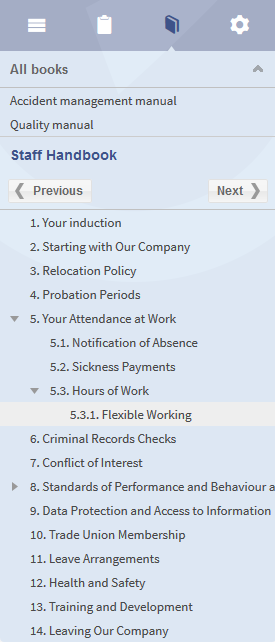 Screenshot: Chapter navigation in the sidebar
Technical information[edit | edit source]
Configuration[edit | edit source]
Rights (permissions)[edit | edit source]The right to create a book depends on the "write" permission in the "book" namespace.
Requirements[edit | edit source]
User manual[edit | edit source]
For detailed description and usage please visit our user manual.
Try free our BlueSpice[edit | edit source]
- Sets of different pages (chapters) can be put together individually to a book.
- The table of contents of the book is displayed in the left navigation bar.
- The chapters are displayed in a collapsible tree structure.
- The book or parts of the book can be exported to PDF.
Configuration manager
Some aspects of this extension can be configured on Special:BlueSpiceConfigManager. Here, wiki administrators can:
- prepend the article table of contents and headlines of a page with book numeration.
- supress the namespace prefix of book articles in the PDF output.
- apply the display title from the book source to a wiki page.
Technical Information[edit source]
This information applies to BlueSpice 3 . Technical details for BlueSpice cloud can differ in some cases.
Requirements[edit source]
- MediaWiki: 1.31
- BlueSpiceFoundation: 3.1
Integrates into[edit source]
- BlueSpiceBookshelf
Special pages[edit source]
- Bookshelf
- BookshelfBookEditor
- BookshelfBookManager
Permissions[edit source]
| Name | Description | Role |
|---|---|---|
| bookshelf-viewspecialpage | Access the special page Special:Bookshelf | reader |
| bookshelfbookmanager-viewspecialpage | Access the special page Special:BookshelfBookManager | reader |
Configuration[edit source]
| Name | Value |
|---|---|
| BookShelfDefaultCoverImage | 'resources/images/assets/coverimage/dummy.png' |
| BookShelfShowChapterNavigationPagerAfterContent | false |
| BookShelfShowChapterNavigationPagerBeforeContent | false |
| BookshelfPrependPageTOCNumbers | true |
| BookshelfSupressBookNS | true |
| BookshelfTitleDisplayText | true |
User options[edit source]
| Name | Value |
|---|---|
| bs-bookshelf-defaultview | 'gridviewpanel' |
API Modules[edit source]
- bs-bookshelf-bookstore
- bs-bookshelf-manage
- bs-bookshelf-mass-add-page-store
- bs-bookshelf-page-collection-store
- bs-bookshelf-store
Hooks[edit source]
{{BSExtensionInfoboxBSExtensionInfo

        |desc=enables you to combine different wiki articlesCombines wiki pages to create books and also to export those pages as a pdfPDF document.

        |status=stable

        |developer=HalloWelt

        |type=BlueSpice

        |edition=BlueSpice pro

            |active=Yes

            |compatible=BlueSpice

            |package=Bookmaker

            |category=Book

            }}

            __TOC__


            ==Description==


            '''Bookshelf''' is an extension of the package [[Bookmaker|BlueSpice Bookmaker]]. Bookshelf enables you to combine different wiki articles, BlueSpice Farm, BlueSpice Cloud

            |compatible=BlueSpice

            |category=Book

            |license=GPL v3 only

            |features=

            '''Bookshelf''' combines wiki pages to create books and also to export those pages as a pdfPDF document.


        ==Usage/ Features==


            ===Manage books===

            Click on "Manage books" in your WidgetBar and it leas you to the special page <code>Special:BookManager</code>, which provides an overview of all available books.<br />

            The following actions can be performed:


            {|

            |-

            !|'''Button'''

            !|'''Action'''

            |-

            ||[[File:Button_Add.png]]

            ||

            '''Add book''': opens a dialogue for inserting the title of the new book.


            |-

            ||[[File:Btn-BookCopy.png]]

            ||

            '''Copy book''': Copy an existing book and edit it afterwards.


            |-

            ||[[File:Button_Edit.png|65x62px]]

            ||

            '''Edit book''': leads you to the book editor, where you can add articles to the book, delete them or change the position in the book structure with drag & drop.


            |-

            ||[[File:Button_Delete.png]]

            ||

            '''Delete book''': completely deletes the article collection (but not the articles).


            |}

            [[File:BlueSpice223-Bookmaker-Kapitelnavigation-en.png|thumb|none|275px|Screenshot: Chapter navigation in the sidebar]]


            ==Technical information==


            ===Configuration===


            ===Rights (permissions)===

            The right to create a book depends on the "write" permission in the "book" namespace.


            ===Requirements===


            ==User manual==

            For detailed description and usage please visit our [Https://en.help.bluespice.com/wiki/Extensions/Bookshelf| user manual.]


            ==Try free our BlueSpice==

            [https://en.demo.bluespice.com/wiki/Main_Page BlueSpice Demo.]


            [[de:{{FULLPAGENAME}}]][[en:{{FULLPAGENAME}}]]

            [[Category:Extension]]*Sets of different pages (chapters) can be put together individually to a book.

            *The table of contents of the book is displayed in the left navigation bar.

            *The chapters are displayed in a collapsible tree structure.

            *The book or parts of the book can be exported to PDF.


            ===Configuration manager===

            Some aspects of this extension can be configured on <code>Special:BlueSpiceConfigManager</code>. Here, wiki administrators can:


            *prepend the article table of contents and headlines of a page with book numeration.

            *supress the namespace prefix of book articles in the PDF output.

            *apply the display title from the book source to a wiki page.


}}| (27 intermediate revisions by 4 users not shown) | |||
| Line 1: | Line 1: | ||
| − | {{ | + | {{BSExtensionInfo |
| − | |desc= | + | |desc=Combines wiki pages to create books and also to export those pages as a PDF document. |
|status=stable | |status=stable | ||
|developer=HalloWelt | |developer=HalloWelt | ||
|type=BlueSpice | |type=BlueSpice | ||
| − | |edition=BlueSpice pro | + | |edition=BlueSpice pro, BlueSpice Farm, BlueSpice Cloud |
| − | |||
|compatible=BlueSpice | |compatible=BlueSpice | ||
| − | |||
|category=Book | |category=Book | ||
| − | + | |license=GPL v3 only | |
| − | + | |features= | |
| + | '''Bookshelf''' combines wiki pages to create books and also to export those pages as a PDF document. | ||
| − | + | *Sets of different pages (chapters) can be put together individually to a book. | |
| + | *The table of contents of the book is displayed in the left navigation bar. | ||
| + | *The chapters are displayed in a collapsible tree structure. | ||
| + | *The book or parts of the book can be exported to PDF. | ||
| − | + | ===Configuration manager=== | |
| + | Some aspects of this extension can be configured on <code>Special:BlueSpiceConfigManager</code>. Here, wiki administrators can: | ||
| − | + | *prepend the article table of contents and headlines of a page with book numeration. | |
| + | *supress the namespace prefix of book articles in the PDF output. | ||
| + | *apply the display title from the book source to a wiki page. | ||
| − | + | }} | |
| − | |||
| − | |||
| − | |||
| − | |||
| − | |||
| − | |||
| − | |||
| − | |||
| − | |||
| − | |||
| − | |||
| − | |||
| − | |||
| − | |||
| − | |||
| − | |||
| − | |||
| − | |||
| − | |||
| − | |||
| − | |||
| − | |||
| − | |||
| − | |||
| − | |||
| − | |||
| − | |||
| − | |||
| − | |||
| − | |||
| − | |||
| − | |||
| − | |||
| − | |||
| − | |||
| − | |||
| − | |||
| − | |||
| − | |||
| − | |||
| − | |||
| − | |||
| − | |||
| − | |||
| − | |||
| − | |||
| − | |||
| − | |||