Difference between revisions of "Reference:BlueSpiceDashboards"
(Tag: 2017 source edit) |
Extension: BlueSpiceDashboards
| Overview | |||
|---|---|---|---|
| Description: | Provides individual dashboards with information about what is going on in the wiki for users and administrators | ||
| State: | stable | Dependency: | MediaWiki, BlueSpice |
| Developer: | HalloWelt | License: |
GPL-3.0-onlyProperty "BSExtensionInfoLicense" (as page type) with input value "</br>GPL-3.0-only" contains invalid characters or is incomplete and therefore can cause unexpected results during a query or annotation process. |
| Type: | BlueSpice | Category: | Reporting |
| Edition: | BlueSpiceFree"BlueSpiceFree" is not in the list (BlueSpice pro, BlueSpice free, BlueSpice Farm, BlueSpice Cloud, BlueSpice free (deactivated), BlueSpice pro (deactivated), BlueSpice Farm (deactivated), BlueSpice Cloud (deactivated)) of allowed values for the "BSExtensionInfoEdition" property., BlueSpicePro"BlueSpicePro" is not in the list (BlueSpice pro, BlueSpice free, BlueSpice Farm, BlueSpice Cloud, BlueSpice free (deactivated), BlueSpice pro (deactivated), BlueSpice Farm (deactivated), BlueSpice Cloud (deactivated)) of allowed values for the "BSExtensionInfoEdition" property. | ||
Features
Get an overview of important information on the wiki.
In BlueSpice there are two Dashboards: the User-Dashboard and the Admin-Dashboard. Every user can adapt his dashboard according to his needs.
Technical background[edit | edit source]
Information is available in small windows (Portlets). Every portlet can be added, adjusted or deleted.
Where do I find Dashboards?[edit | edit source]Where do I find the user dashboard?[edit | edit source]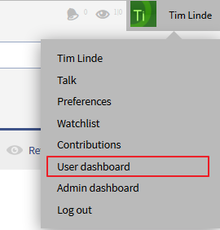 Screenshots:Zugang zum Benutzerdashboard über den Benutzerbereich.Where do I find the admin dashboard?[edit | edit source]
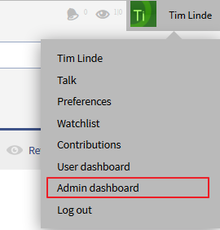 Screenshots:Zugang zum Admincockpit über den Benutzerbereich.
Add Portlets[edit | edit source]
Adjust you dashboard by clicking on the green plus symbol  . Choose from the list of portlets the ones you want to use.
Available portlets for the user dashboard[edit | edit source]
Dashboards consists of an admin and a user dashboard. It provides several portlets a user/admin can choose.
Choose available portlets and integrate them in your dashboard.
Available portlets:
- Assignments
- Calendar
- Most active users (by edits)
- Most edited pages
- Most viewed pages
- My edits
- Number of
- content pages
- Number of edits
- Number of pages
Available portlets for the admin dashboard[edit | edit source]
- RSS feed
- My edits
- Most edited pages
- Most viewed pages
- Number of users
- Number of edits
- Number of pages
- Recent search terms
Edit dashboards[edit | edit source]
Add, adjust, edit or delete portlets:
| Symbol | Meaning |
|---|---|

|
Fold out portlets |

|
Fold in portlets |

|
Edit a portlet (settings vary from portlet to portlet) |

|
Delete a portlet (stop displaying this information - the portlet can be reactivated at any time) |
Use drag and drop to change the order of the portlets.
Example[edit | edit source]
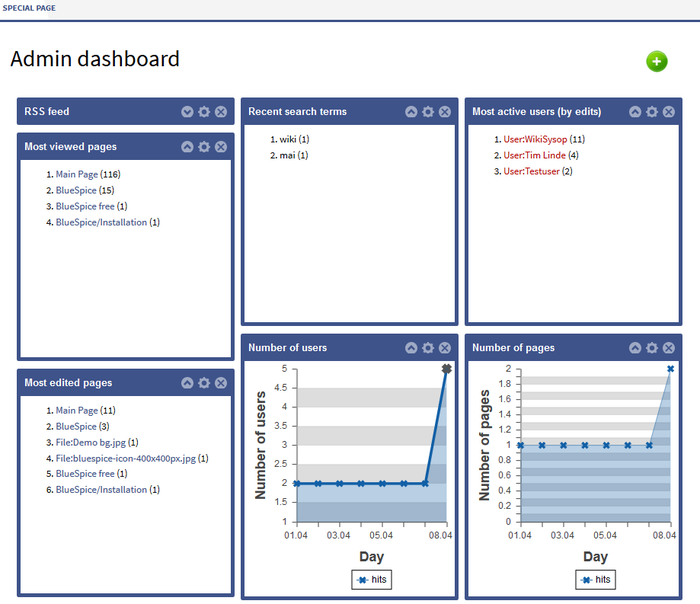 Screenshot:Example of an admin dashboard
- Number of users
- RSS feed
- WikiPage (custom portlets)
Technical Information[edit source]
This information applies to BlueSpice 3 . Technical details for BlueSpice cloud can differ in some cases.
Requirements[edit source]
- MediaWiki: 1.31
- BlueSpiceFoundation: 3.2
Integrates into[edit source]
Special pages[edit source]
- AdminDashboard
- UserDashboard
Permissions[edit source]
| Name | Description | Role |
|---|---|---|
| dashboards-viewspecialpage-userdashboard | Access to the special page Special:UserDashboard | accountmanager, admin, author, commenter, editor, maintenanceadmin, reader, reviewer, structuremanager |
User options[edit source]
| Name | Value |
|---|---|
| bs-dashboards-userdashboardonlogo | false |
API Modules[edit source]
- bs-dashboards-store
- bs-dashboards-tasks
- bs-dashboards-widgets-tasks
Hooks[edit source]
{{BSExtensionInfoboxBSExtensionInfo

        |desc=Provides individual dashboards with information about what is going on in the wiki for users and administrators.

        |status=stable

        |developer=HalloWelt

        |type=BlueSpice

        |edition=BlueSpiceFree, BlueSpicePro

            |active=Yes

            |compatible=MediaWiki, BlueSpice

            |category=Reporting

            |docu=https://www.mediawiki.org/wiki/Extension:Dashboards

            }}

            __NOTOC__


            Get an overview of important information on the wiki. <br />

            In BlueSpice there are two Dashboards: the User-Dashboard and the Admin-Dashboard. Every user can adapt his dashboard according to his needs.


            ==Technical background==

            Information is available in small windows (Portlets). Every portlet can be added, adjusted or deleted.


            ==Where do I find Dashboards?==

            ===Where do I find the user dashboard?===

            [[File:BlueSpice223-UserDashboard-Dropdown-en.png|thumb|none|220px|Screenshots:Zugang zum Benutzerdashboard über den Benutzerbereich.]]


            ===Where do I find the admin dashboard?===

            [[File:BlueSpice223-AdminDashboard-Dropdown-en.png|thumb|none|220px|Screenshots:Zugang zum Admincockpit über den Benutzerbereich.]]


            ==Add Portlets==

            Adjust you dashboard by clicking on the green plus symbol [[File:Btn-plus.png|Btn-plus.png]]. Choose from the list of portlets the ones you want to use.


            ===Available portlets for the user dashboard===

            * RSS feed

            * Calendar

            * My edits

            * Most edited pages

            * Most viewed pages

            * Most active users (by edits)

            * Your responsibilities

            * Number of users

            * Number of edits

            * Number of pages


            ===Available portlets for the admin dashboard===

            * RSS feed

            * My edits

            * Most edited pages

            * Most viewed pages

            * Number of users

            * Number of edits

            * Number of pages

            * Recent search terms


            ==Edit dashboards==

            Add, adjust, edit or delete portlets:


            {| class="contenttable" style="width: 700px;"

            |-

            !|'''Symbol'''

            !|'''Meaning'''

            |-

            ||[[File:Btn-Cockpit-Portlet_ausklappen.png|Btn-Cockpit-Portlet_ausklappen.png]]

            ||Fold out portlets

            |-

            ||[[File:Btn-Cockpit-Portlet_einklappen.png|Btn-Cockpit-Portlet_einklappen.png]]

            ||Fold in portlets

            |-

            ||[[File:Btn-Cockpit-Portlet_bearbeiten.png|Btn-Cockpit-Portlet_bearbeiten.png]]

            ||Edit a portlet (settings vary from portlet to portlet)

            |-

            ||[[File:Btn-Cockpit-Portlet_löschen.png|Btn-Cockpit-Portlet_löschen.png]]

            ||Delete a portlet (stop displaying this information - the portlet can be reactivated at any time)

            |}


            Use drag and drop to change the order of the portlets.


            ==Example==

            [[File:BlueSpice223-AdminDashboard-en.png|thumb|none|700px|Screenshot:Example of an admin dashboard]]


            {{Box_Links-en | Thema1 =[[PagesVisited|Visited pages]] | Thema2 =[[WhoIsOnline| Who is online?]] | Thema3 =[[UserSideBar|Personal navigation]] | Thema4 = }}


            [[Category:BlueSpice free]]

            [[Category:Extension]]

            [[en:{{FULLPAGENAME}}]][[de:DashBoards]]BlueSpice free, BlueSpice pro, BlueSpice Farm, BlueSpice Cloud

            |active=Yes

            |compatible=BlueSpice

            |category=Reporting

            |license=GPL v3 only

            |features='''Dashboards''' consists of an admin and a user dashboard. It provides several portlets a user/admin can choose.


            Choose available portlets and integrate them in your dashboard.


            Available portlets:


            *Assignments

            *Calendar

            *Most active users (by edits)

            *Most edited pages

            *Most viewed pages

            *My edits

            *Number of content pages

            *Number of edits

            *Number of pages

            *Number of users

            *RSS feed

            *WikiPage (custom portlets)

}}| (35 intermediate revisions by 7 users not shown) | |||
| Line 1: | Line 1: | ||
| − | {{ | + | {{BSExtensionInfo |
| − | |desc=Provides | + | |desc=Provides dashboards for users and administrators. |
| − | users and administrators | ||
|status=stable | |status=stable | ||
|developer=HalloWelt | |developer=HalloWelt | ||
|type=BlueSpice | |type=BlueSpice | ||
| − | |edition= | + | |edition=BlueSpice free, BlueSpice pro, BlueSpice Farm, BlueSpice Cloud |
|active=Yes | |active=Yes | ||
| − | |compatible= | + | |compatible=BlueSpice |
|category=Reporting | |category=Reporting | ||
| − | | | + | |license=GPL v3 only |
| − | + | |features='''Dashboards''' consists of an admin and a user dashboard. It provides several portlets a user/admin can choose. | |
| − | |||
| − | + | Choose available portlets and integrate them in your dashboard. | |
| − | |||
| − | + | Available portlets: | |
| − | |||
| − | + | *Assignments | |
| − | + | *Calendar | |
| − | + | *Most active users (by edits) | |
| − | + | *Most edited pages | |
| − | + | *Most viewed pages | |
| − | + | *My edits | |
| − | + | *Number of content pages | |
| − | + | *Number of edits | |
| − | + | *Number of pages | |
| − | + | *Number of users | |
| − | + | *RSS feed | |
| − | + | *WikiPage (custom portlets) | |
| − | + | }} | |
| − | * | ||
| − | * Calendar | ||
| − | * | ||
| − | * Most edited pages | ||
| − | * Most viewed pages | ||
| − | * | ||
| − | |||
| − | * Number of | ||
| − | * Number of edits | ||
| − | * Number of | ||
| − | |||
| − | |||
| − | |||
| − | |||
| − | |||
| − | |||
| − | * Number of users | ||
| − | * | ||
| − | * | ||
| − | |||
| − | |||
| − | |||
| − | |||
| − | |||
| − | |||
| − | |||
| − | |||
| − | |||
| − | |||
| − | |||
| − | |||
| − | |||
| − | |||
| − | |||
| − | |||
| − | |||
| − | |||
| − | |||
| − | |||
| − | |||
| − | |||
| − | |||
| − | |||
| − | |||
| − | |||
| − | |||
| − | |||
| − | |||
| − | |||
| − | |||
| − | |||
| − | |||
| − | |||
| − | |||