Difference between revisions of "Reference:BlueSpiceHideTitle"
(→Requirements) |
(Tag: 2017 source edit) |
Extension: BlueSpiceHideTitle
| Overview | |||
|---|---|---|---|
| Description: |
provides a Adds the magic word '"`UNIQ--nowiki-00000001-QINU`"' to hide the title of the page .
|
||
| State: | stable | Dependency: | BlueSpice |
| Developer: | HalloWelt | License: |
GPL-3.0-onlyProperty "BSExtensionInfoLicense" (as page type) with input value "</br>GPL-3.0-only" contains invalid characters or is incomplete and therefore can cause unexpected results during a query or annotation process. |
| Type: | BlueSpice | Category: | Rich Articles |
| Edition: | BlueSpice free, BlueSpice pro, BlueSpice Farm, BlueSpice Cloud | ||
Features
Contents
Description[edit | edit source]
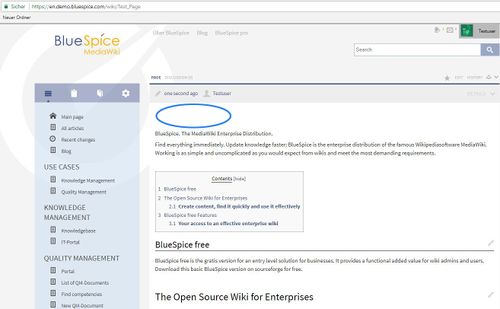
HideTitle enables hiding of the title on the page, if it's necessary.
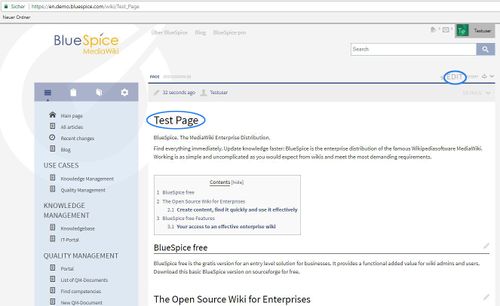
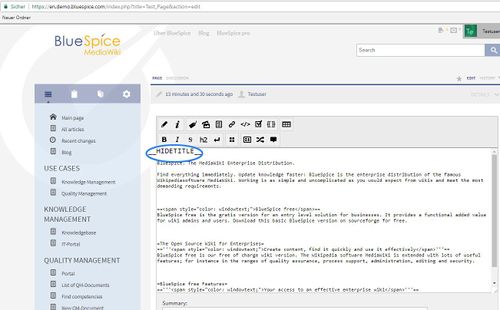
To hide a page's title, use __HIDETITLE__
anywhere in its source code.
Changing an existing article's title completely is not possible that way, but you can move the article
to have the correct
title.
Technical
Information[edit
Configuration[edit | edit source]
Rights (permissions)[edit | edit source]Requirements[edit | edit source]
HideTitle requires BlueSpiceFoundation.
Screenshots[edit | edit source]
Save and:
Tips for working[edit | edit source]
This extension is very useful on the main page. There you won't see "Main page" but nothing or maybe a "Welcome".
External documentation[edit | edit source]
You will find a documentation on this MediaWiki extension at MediaWiki.org.
This information applies to BlueSpice 3 . Technical details for BlueSpice cloud can differ in some cases.
{{BSExtensionInfoboxBSExtensionInfo

        |desc=providesProvides a magic word to hide the title of the page.

        |status=stable

        |developer=HalloWelt

        |type=BlueSpice

        |edition=BlueSpice free, BlueSpice pro

            |active=Yes


        , BlueSpice Farm, BlueSpice Cloud


        |compatible=BlueSpice

        |category=Rich Articles

        |docu=https://www.mediawiki.org/wiki/Extension:HideTitle

            }}

            __TOC__


            ==Description==


        license=GPL v3 only

            |features='''HideTitle''' enables hiding of the title on the page, if it's necessary.


        ==Usage / Features==


            To hide title use <nowiki>__HIDETITLE__</nowiki>  switch at the top of the page in edit mode. To hide a page's title, use <code><nowiki>__HIDETITLE__</nowiki></code> anywhere in its source code.


        Changing an existing article's title completely is not possible that way, but you can move the article's content  to another article with the correct name.


            ==Technical information==


            ===Configuration===


            ===Rights (permissions)===


            ===Requirements===


            HideTitle requires [[BlueSpiceFoundation|BlueSpiceFoundation.]]


            ==Screenshots==


            ::: [[File:EditPageEng.jpg|500x306px]]


            ::: [[File:HideTitleEng.jpg|500x310px]]


            Save and:


            ::: [[File:HideTitle2.jpg|500x309px]]


            ==Tips for working==


            This extension is very useful on the main page. There you won't see "Main page" but nothing or maybe a "Welcome".


            ==External documentation==


            You will find a documentation on this MediaWiki extension at [http://www.mediawiki.org/wiki/Manual:$wgAllowDisplayTitle MediaWiki.org].


            {{Box_Links-en | Thema1 =[[Redirects|Using redirects]] | Thema2 =[[Move_Article|Moving articles]] | Thema3 = | Thema4 = }}


            [[de:{{FULLPAGENAME}}]][[en:{{FULLPAGENAME}}]]

            [[Category:Extension]]have the correct title.


}}| (22 intermediate revisions by 5 users not shown) | |||
| Line 1: | Line 1: | ||
| − | {{ | + | {{BSExtensionInfo |
| − | |desc= | + | |desc=Provides a magic word to hide the title of the page. |
|status=stable | |status=stable | ||
|developer=HalloWelt | |developer=HalloWelt | ||
|type=BlueSpice | |type=BlueSpice | ||
| − | |edition=BlueSpice free, BlueSpice pro | + | |edition=BlueSpice free, BlueSpice pro, BlueSpice Farm, BlueSpice Cloud |
| − | |||
|compatible=BlueSpice | |compatible=BlueSpice | ||
|category=Rich Articles | |category=Rich Articles | ||
| − | | | + | |license=GPL v3 only |
| − | + | |features='''HideTitle''' enables hiding of the title on the page, if it's necessary. | |
| − | |||
| − | + | To hide a page's title, use <code><nowiki>__HIDETITLE__</nowiki></code> anywhere in its source code. | |
| − | ' | + | Changing an existing article's title completely is not possible that way, but you can move the article to have the correct title. |
| − | + | }} | |
| − | |||
| − | |||
| − | |||
| − | |||
| − | |||
| − | |||
| − | |||
| − | |||
| − | |||
| − | |||
| − | |||
| − | |||
| − | |||
| − | |||
| − | |||
| − | |||
| − | |||
| − | |||
| − | |||
| − | |||
| − | |||
| − | |||
| − | |||
| − | |||
| − | |||
| − | |||
| − | |||
| − | |||
| − | |||
| − | |||
| − | |||
| − | |||
| − | |||
| − | |||
| − | |||
| − | |||
| − | |||
| − | |||
| − | |||
| − | |||