Difference between revisions of "Reference:BlueSpiceExpiry"
(Tag: 2017 source edit) |
Extension: BlueSpiceExpiry
| Overview | |||
|---|---|---|---|
| Description: | Setting an expiration date mark articles as outdated Pages can be marked as expired. | ||
| State: | stable | Dependency: | BlueSpice |
| Developer: | HalloWelt | License: |
GPL-3.0-onlyProperty "BSExtensionInfoLicense" (as page type) with input value "</br>GPL-3.0-only" contains invalid characters or is incomplete and therefore can cause unexpected results during a query or annotation process. |
| Type: | BlueSpice | Category: | Quality Assurance |
| Edition: | BlueSpice pro, BlueSpice Farm, BlueSpice Cloud | ||
Features
Expiry marks — after a certain period of time — a chosen article as "obsolete". The article can be updated by editing or by confirming that the article is still up-to-date. Expiry is the ideal basis for an archiving system. Outdated articles can be moved to an archive after being queried.
- An author can add an expiration date to an article.
- The expiry date can automatically be postponed to the future for a specific period of time.
- Several authors: There can only be one expiration date. The user who originally entered the expiration date will be informed of the change.
- There is no limit to the number of expiration dates with respect to users.
Technical Information[edit source]
Pages can be marked as expired
Set an expiry date for an articleThis information applies to BlueSpice 3 . Technical details for BlueSpice cloud can differ in some cases.
Requirements[edit source]
- MediaWiki: 1.31
- BlueSpiceFoundation: 3.2
BlueSpiceReminder: 3.2
Integrates into[edit source]
 Set an expiry date for an article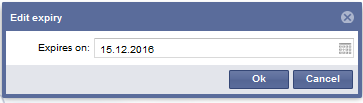
- BlueSpiceEchoConnector
- BlueSpiceReminder
- BlueSpiceSMWConnector
Special pages[edit source]
- Expiry
Permissions[edit source]
| Name | Description | Role |
|---|---|---|
| expirearticle | Expire pages | admin, editor, maintenanceadmin |
| expiry-delete | Remove expiration from pages | admin, editor, maintenanceadmin |
Configuration[edit source]
| Name | Value |
|---|---|
| ExpiryEnablePDFWatermark | true |
| ExpiryEnablePageWatermark | true |
| ExpiryEnablePrintWatermark | true |
API Modules[edit source]
- bs-expiry-store
- bs-expiry-tasks
Hooks[edit source]
{{BSExtensionInfoboxBSExtensionInfo

        |desc=Setting an expiration date mark articles as outdatedPages can be marked as expired.

        |status=stable

        |developer=HalloWelt

        |type=BlueSpice

        |edition=BlueSpice pro

            |compatible=BlueSpice

            |package=Reminder

            |category=Quality Assurance

            |docu=https://www.mediawiki.org/wiki/Extension:Expiry

            }}

            Pages can be marked as expired


            ==Use==

            [[File:expiry_en.PNG|thumb|center|850x550px|Set an expiry date for an article]]


            [[File:expiry2_en.PNG|thumb|center|450x128px|Set an expiry date for an article]]

            [[en:{{FULLPAGENAME}}]][[de:Expiry]]

            [[Category:Extension]], BlueSpice Farm, BlueSpice Cloud

            |compatible=BlueSpice

            |category=Quality Assurance

            |license=GPL v3 only

            |features='''Expiry''' marks  — after a certain period of time — a chosen article as "obsolete". The article can be updated by editing or by confirming that the article is still up-to-date. Expiry is the ideal basis for an archiving system. Outdated articles can be moved to an archive after being queried.


            *An author can add an expiration date to an article.

            *The expiry date can automatically be postponed to the future for a specific period of time.

            *Several authors: There can only be one expiration date. The user who originally entered the expiration date will be informed of the change.

            *There is no limit to the number of expiration dates with respect to users.

}}| (30 intermediate revisions by 6 users not shown) | |||
| Line 1: | Line 1: | ||
| − | {{ | + | {{BSExtensionInfo |
| − | |desc= | + | |desc=Pages can be marked as expired. |
|status=stable | |status=stable | ||
|developer=HalloWelt | |developer=HalloWelt | ||
|type=BlueSpice | |type=BlueSpice | ||
| − | |edition=BlueSpice pro | + | |edition=BlueSpice pro, BlueSpice Farm, BlueSpice Cloud |
|compatible=BlueSpice | |compatible=BlueSpice | ||
| − | |||
|category=Quality Assurance | |category=Quality Assurance | ||
| − | | | + | |license=GPL v3 only |
| + | |features='''Expiry''' marks — after a certain period of time — a chosen article as "obsolete". The article can be updated by editing or by confirming that the article is still up-to-date. Expiry is the ideal basis for an archiving system. Outdated articles can be moved to an archive after being queried. | ||
| + | |||
| + | *An author can add an expiration date to an article. | ||
| + | *The expiry date can automatically be postponed to the future for a specific period of time. | ||
| + | *Several authors: There can only be one expiration date. The user who originally entered the expiration date will be informed of the change. | ||
| + | *There is no limit to the number of expiration dates with respect to users. | ||
}} | }} | ||
| − | |||
| − | |||
| − | |||
| − | |||
| − | |||
| − | |||
| − | |||
| − | |||
| − | |||