You are viewing an old version of this page. Return to the latest version.
Difference between revisions of "Reference:BlueSpiceWhoIsOnline"
Extension: BlueSpiceWhoIsOnline
| Overview | |||
|---|---|---|---|
| Description: | shows which users have been logged-in in the last 10 minutes. | ||
| State: | stable | Dependency: | BlueSpice |
| Developer: | HalloWelt | License: | - |
| Type: | BlueSpice | Category: | Rich Articles |
| Edition: | BlueSpice free, BlueSpice pro | ||
Features[edit source]
With "Who's online"Contents
Description[edit | edit source]
WhoIsOnline you can see, which users have been logged-in in the last 10 minutes.
Usage / Features[edit | edit source]
- WhoIsOnline displays a list of logged in users.
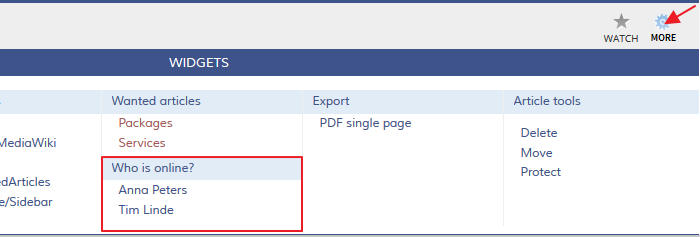
- In the widgetbar WhoIsOnline is integrated as a widget and contains beside the headline a foldable list with the names of the users. (see sketch)
- As a tag, WhoIsOnline can be installed on any editable page.
Technical information[edit | edit source]
Configuration[edit | edit source]
Rights (permissions)[edit | edit source]
Requirements[edit | edit source]
WhoIsOnline requires BlueSpiceFoundation.
Widgetbar[edit | edit source]
If you want to see this information in your widget bar please go to User:USERNAME/Widgetbar and enter
* WHOISONLINE
Now you find links to all logged-in users in your widget bar.
Content area[edit | edit source]
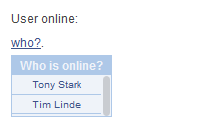


To use this extension in an article (usually main page) you can show this information with a flyout that is customizable. For example:
{{#userslink:(who?)|top:270px;right:300px;background:white;border: 2px solid black;padding:5px;}}.
Or show all logged-in users in a list:
<bs:whoisonline:popup anchortext='Wer ist online?' />
Try free our BlueSpice[edit | edit source]
{{BSExtensionInfobox

        |desc=shows which users have been logged-in in the last 10 minutes.

        |status=stable

        |developer=HalloWelt

        |type=BlueSpice

        |edition=BlueSpice free, BlueSpice pro

        |active=Yes

        |compatible=BlueSpice

        |category=Rich Articles

        |docu=https://www.mediawiki.org/wiki/Extension%CB%90WhoIsOnline

        }}

        __NOTOC__

            With "Who's online" TOC__


            ==Description==


            '''WhoIsOnline''' you can see, which users have been logged-in in the last 10 minutes.


        ==Usage / Features==


            * WhoIsOnline displays a list of logged in users.

            * In the widgetbar WhoIsOnline is integrated as a widget and contains beside the headline a foldable list with the names of the users. (see sketch)

            * As a tag, WhoIsOnline can be installed on any editable page.


            ==Technical information==


            ===Configuration===


            ===Rights (permissions)===


            ===Requirements===


            WhoIsOnline requires [[BlueSpiceFoundation]].


            ==Widgetbar==

        If you want to see this information in your [[Archive:Widgetbar|widget bar]] please go to <code>User:USERNAME/Widgetbar</code> and enter


        <pre>* WHOISONLINE


        </pre>

        Now you find links to all logged-in users in your widget bar.

        [[File:BlueSpice2-WhoIsOnline-WidgetBar-en.png|thumb|none|700px|Screenshot: All logged-in users appera in the WidgetBar]]


        ==Content area==

        [[File:BlueSpice-WhoIsOnline-Text-en.png|thumb|left|220px|Screenshot: All logged-in users are shown in the content.]]

        To use this extension in an article (usually main page) you can show this information with a flyout that is customizable. For example:


        <pre>{{#userslink:(who?)|top:270px;right:300px;background:white;border: 2px solid black;padding:5px;}}.


        </pre>


        Or show all logged-in users in a list:


        <pre><bs:whoisonline:popup anchortext='Wer ist online?' />


        </pre>


            [[==Try free our BlueSpice==


            [https://en.demo.bluespice.com/wiki/Main_Page BlueSpiceDemo.]


            [[de:{{FULLPAGENAME}}]][[en:{{FULLPAGENAME}}]]

[[Category:Extension]]| Line 10: | Line 10: | ||
|docu=https://www.mediawiki.org/wiki/Extension%CB%90WhoIsOnline | |docu=https://www.mediawiki.org/wiki/Extension%CB%90WhoIsOnline | ||
}} | }} | ||
| − | + | __TOC__ | |
| − | + | ||
| + | ==Description== | ||
| + | |||
| + | '''WhoIsOnline''' you can see, which users have been logged-in in the last 10 minutes. | ||
| + | |||
| + | ==Usage / Features== | ||
| + | |||
| + | * WhoIsOnline displays a list of logged in users. | ||
| + | * In the widgetbar WhoIsOnline is integrated as a widget and contains beside the headline a foldable list with the names of the users. (see sketch) | ||
| + | * As a tag, WhoIsOnline can be installed on any editable page. | ||
| + | |||
| + | ==Technical information== | ||
| + | |||
| + | ===Configuration=== | ||
| + | |||
| + | ===Rights (permissions)=== | ||
| + | |||
| + | ===Requirements=== | ||
| + | |||
| + | WhoIsOnline requires [[BlueSpiceFoundation]]. | ||
==Widgetbar== | ==Widgetbar== | ||
| Line 34: | Line 53: | ||
| + | ==Try free our BlueSpice== | ||
| + | [https://en.demo.bluespice.com/wiki/Main_Page BlueSpiceDemo.] | ||
[[de:{{FULLPAGENAME}}]][[en:{{FULLPAGENAME}}]] | [[de:{{FULLPAGENAME}}]][[en:{{FULLPAGENAME}}]] | ||
[[Category:Extension]] | [[Category:Extension]] | ||