Difference between revisions of "Manual:Extension/BlueSpiceReadConfirmation"
| [unchecked revision] | [quality revision] |
(Tag: 2017 source edit) |
(Tag: Visual edit) |
Contents
Read Confirmation asks for confirmation that an article was read by certain users.
Using BlueSpiceReadConfirmation[edit | edit source]
The prompt to confirm reading the page will appear for any user that is assigned to a page. It helps make sure all assigned users actually read the page they are assigned to.
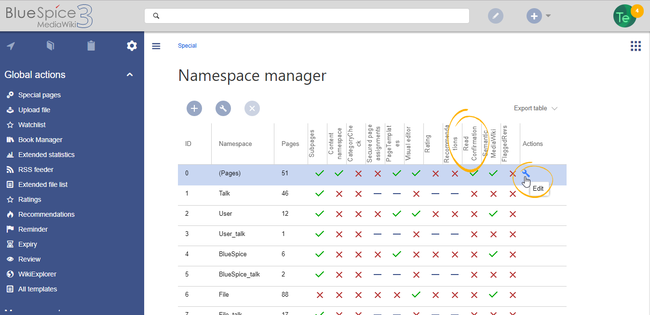
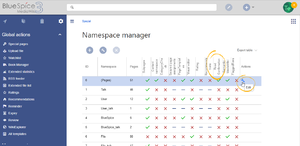 Enabling read confirmation
The extension ReadConfirmation allows to request read confirmations from users. If a user is assigned to a page, a mandatory read confirmation can be added to the page.
Contents
Enabling read confirmations[edit | edit source]
Before read confirmation prompt will appear on a page, BlueSpiceReadConfirmation must previously be enabled An administrator must enable read confirmations for the namespace the page belongs to. This can be set using the BlueSpiceNamespaceManager.
Confirming reading a page
Display[edit | edit source]
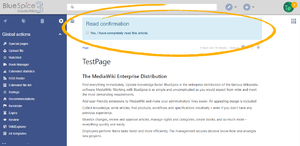 Once BlueSpiceReadConfirmation is enabled for the namespace, upon opening a page, assigned user will see read
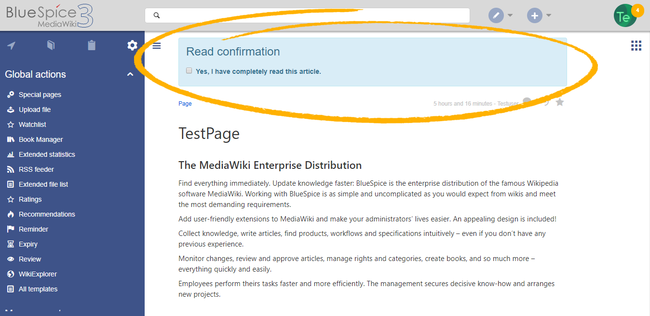
When read confirmations are active on a namespace, assigned users see a confirmation prompt. After checking the checkbox "Yes, I have completely read this article", and clicking on "Confirm", the page will be marked as read by that user.
Administration of read confirmations[edit | edit source]
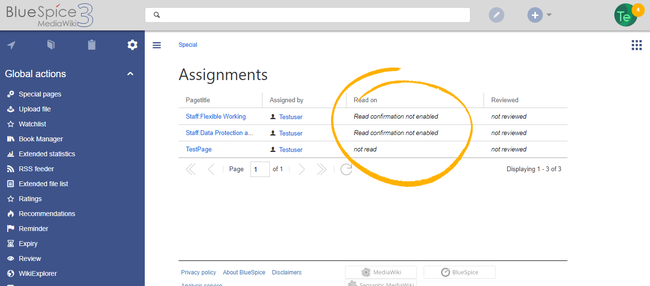
Wiki admins can also see an overview of all read confirmation. This information is built in the overview of BlueSpicePageAssignments. Read confirmation information are located in "Read on" column. Page confirmations by navigating to Global actions > Management > Assignment management. Read confirmation information is shown in the column Read on. A page can have multiple states:
- Read confirmation not enabled - in case : BlueSpiceReadConfirmation is not enabled for the namespace that to which the page belongs to.
- Not read - in case : BlueSpiceReadConfirmation is enabled, but the assigned user has users have not yet read the page.
- [timestamp] - date and time when the page was read.
-
Actions: In the columns for actions, there are two items related to read confirmations.
- Read confirmation log: Link to the read confirmation log for the page.
- Request read confirmation: Users get a reminder for their read confirmation.


Read confirmation in connection with page approval[edit | edit source]
Our reference page.
If the approval feature is activated in a namespace at the same time, the read confirmation is triggered when a new draft is created. This can be changed via server configuration so that the read confirmaation is required after the draft page has been approved.Related info
__TOC__


            ==What is BlueSpiceReadConfirmation?==

            '''Read Confirmation''' asks for confirmation that an article was read by certain users.


            ==Using BlueSpiceReadConfirmation==

            The prompt to confirm reading the page will appear for any user that is [[Manual:Extension/BlueSpicePageAssignments|{{DISPLAYTITLE:Read confirmation}}


            The extension '''ReadConfirmation''' allows to request read confirmations from users. If a user is assigned to a page]].

            It helps make sure all assigned users actually read the page they are assigned to.


            [[File:ReadConfirmation2.png|thumb]]

            ===Enabling read confirmation===


            Before read confirmation prompt will appear on a page, BlueSpiceReadConfirmation must previously be enabled for the [[HowTo:Namespaces|namespace]], a mandatory read confirmation can be added to the page.


            ==Enabling read confirmations==

            An administrator must enable read confirmations for the namespace the page belongs to.

        This can be set using the [[Manual:Extension/BlueSpiceNamespaceManager|BlueSpiceNamespaceManager]].


            ===Confirming reading a page===

            [[File:ReadConfirmation1.png|thumb]]

            Once BlueSpiceReadConfirmation is enabled for the namespace, upon opening a page, assigned user will see readNamespaceManager|Namespace manager]]:


            <br />


            [[File:ReadConfirmation2.png|center|650x650px|alt=Activating read confirmations|thumb|Activating read confirmations in a namespace]]

            ==Display==

            [[File:ReadConfirmation1.png|center|650x650px|alt=Read confirmation checkbox|thumb|Read confirmation checkbox]]

            When read confirmations are active on a namespace, assigned users see a confirmation prompt. After checking the checkbox "''Yes, I have completely read this article",'' and clicking on "''Confirm", ,'' the page will be marked as read by that user.


        [[File:ReadConfirmation3.png|thumb]]

            ===Overview of read confirmations===

            Wiki admins can also <br />

            ==Administration of read confirmations==

            Wiki admins can see an overview of all read confirmation. This  information is built in the overview of [[Manual:Extension/BlueSpicePageAssignments|BlueSpicePageAssignments]].

            Read confirmation information are located in "Read on" column. Page confirmations by navigating to ''Global actions > Management > Assignment management.'' Read confirmation information is shown in  the column ''Read on''. A page can have multiple states:


        *

            *''Read confirmation not enabled - in case :'' BlueSpiceReadConfirmation is not enabled for the namespace that page belongs to.

            * Not read - in case to which the page belongs.

            *''Not read:'' BlueSpiceReadConfirmation is enabled, but the assigned user hasusers have not yet read the page.

        * [timestamp] - date and time when the page was read.


            ==See also==


            Our [[BlueSpiceReadConfirmation|reference page.]]''Actions:'' In the columns for actions, there are two items related to read confirmations.

            **''Read confirmation log:'' Link to the read confirmation log for the page.

            **''Request read confirmation:'' Users get a reminder for their read confirmation.


            [[File:ReadConfirmation3.png|thumb|link=https://en.wiki.bluespice.com/wiki/File:ReadConfirmation3.png|alt=Reviewing read confirmations|center|650x650px|Reviewing read confirmations]]<br />


            == Read confirmation in connection with page approval ==

            If the approval feature is activated in a namespace at the same time, the read confirmation is triggered when a new draft is created. This [[Reference:BlueSpiceReadConfirmation|can be changed via  server configuration]] so that the read confirmaation is required after the draft page has been approved.{{Box Links-en|Topic1=[[Reference:BlueSpiceReadConfirmation]]}}


            <br />


            [[en:{{FULLPAGENAME}}]]

            [[de:Handbuch:Erweiterung/BlueSpiceReadConfirmation]]

            [[Category:Quality]]
| (23 intermediate revisions by 5 users not shown) | |||
| Line 1: | Line 1: | ||
| − | + | {{DISPLAYTITLE:Read confirmation}} | |
| − | + | The extension '''ReadConfirmation''' allows to request read confirmations from users. If a user is assigned to a page, a mandatory read confirmation can be added to the page. | |
| − | ''' | ||
| − | == | + | ==Enabling read confirmations== |
| − | + | An administrator must enable read confirmations for the namespace the page belongs to. | |
| − | + | This can be set using the [[Manual:Extension/NamespaceManager|Namespace manager]]: | |
| − | + | <br /> | |
| − | |||
| − | + | [[File:ReadConfirmation2.png|center|650x650px|alt=Activating read confirmations|thumb|Activating read confirmations in a namespace]] | |
| − | + | ==Display== | |
| + | [[File:ReadConfirmation1.png|center|650x650px|alt=Read confirmation checkbox|thumb|Read confirmation checkbox]] | ||
| + | When read confirmations are active on a namespace, assigned users see a confirmation prompt. After checking the checkbox ''Yes, I have completely read this article'' and clicking ''Confirm,'' the page will be marked as read by that user. | ||
| + | <br /> | ||
| + | ==Administration of read confirmations== | ||
| + | Wiki admins can see an overview of all read confirmations by navigating to ''Global actions > Management > Assignment management.'' Read confirmation information is shown in the column ''Read on''. A page can have multiple states: | ||
| − | + | *''Read confirmation not enabled:'' BlueSpiceReadConfirmation is not enabled for the namespace to which the page belongs. | |
| − | + | *''Not read:'' BlueSpiceReadConfirmation is enabled, but the assigned users have not yet read the page. | |
| − | + | *''Actions:'' In the columns for actions, there are two items related to read confirmations. | |
| + | **''Read confirmation log:'' Link to the read confirmation log for the page. | ||
| + | **''Request read confirmation:'' Users get a reminder for their read confirmation. | ||
| − | [[File:ReadConfirmation3.png|thumb | + | [[File:ReadConfirmation3.png|thumb|link=https://en.wiki.bluespice.com/wiki/File:ReadConfirmation3.png|alt=Reviewing read confirmations|center|650x650px|Reviewing read confirmations]]<br /> |
| − | |||
| − | |||
| − | |||
| − | |||
| − | |||
| − | |||
| − | == | + | == Read confirmation in connection with page approval == |
| + | If the approval feature is activated in a namespace at the same time, the read confirmation is triggered when a new draft is created. This [[Reference:BlueSpiceReadConfirmation|can be changed via server configuration]] so that the read confirmaation is required after the draft page has been approved.{{Box Links-en|Topic1=[[Reference:BlueSpiceReadConfirmation]]}} | ||
| + | <br /> | ||
| − | + | [[en:{{FULLPAGENAME}}]] | |
| + | [[de:Handbuch:Erweiterung/BlueSpiceReadConfirmation]] | ||
| + | [[Category:Quality]] | ||