Difference between revisions of "Manual:Extension/BlueSpiceInsertMagic"
| [unchecked revision] | [quality revision] |
(Tag: 2017 source edit) |
m (Tag: 2017 source edit) |
BlueSpiceInsertMagic The extension InsertMagic provides a dialog for inserting Magic Words in Visual the visual editor.
Where to find BlueSpiceInsertMagic?Contents
Inserting magic words[edit | edit source]
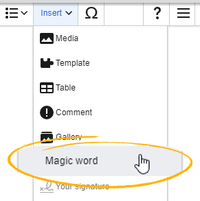
While in In edit mode, in both Visual and Wiki text mode, click on "Insert" in the editor toolbar and select "Magic word" from the dropdown menu.
BlueSpiceInsertMagic provides an overview of many Magic words that can be inserted to the page and features all of the magic words provided by BlueSpice extensions.

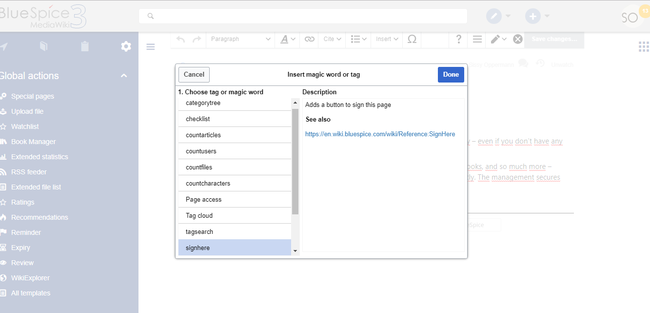
Once the magic word is selected in the list on the left, a description, including usage examples, will appear on the right.
See also[edit | edit source]
Reference page for this extension.
Related info
<bs:bookshelf src="Book:User manual" />


            __TOC__


            ==What is BlueSpiceInsertMagic?==


            '''BlueSpiceInsertMagic{{DISPLAYTITLE:Insert tags and magic words}}


            The extension '''InsertMagic''' provides a dialog for inserting Magic Words in the [[Manual:Extension/VisualEditor|Visualvisual editor]].


        ==Where to find BlueSpiceInsertMagic?==


            While in edit mode, in both Visual and Wiki text mode, click on "Insert" and select "Magic word"Inserting magic words==

            In  edit mode, click on ''Insert'' in the editor toolbar and select ''Magic word'' from the dropdown menu.


            BlueSpiceInsertMagic provides an overview of many Magic words that can be inserted to the page and features all of the magic words provided by BlueSpice extensions.


        <br />

            [[File:Manual:ve-magicword.png|alt=Insert Magic words|center|thumb|201x201px|Insert Magic words]]


        Once the magic word is selected in the list on the left, a description, including usage examples, will appear on the right.


            ==See also==


            [[InsertMagic|Reference page]] for this extension.<br />

            [[File:InsertMagic2a.png|InsertMagic dialog|alt=InsertMagic dialog|border|center|650x650px]]After saving the dialog, further parameters can be set for the selected magic word or tag.

            {{Box Links-en

            |Topic1=[[Reference:CategoryTree|Category tree]]

            |Topic2=[[Manual:Extension/BlueSpiceChecklist|Checklists]]

            |Topic3=[[Manual:Extension/BlueSpiceCountThings|Count things]]

            |Topic4=[[Manual:Extension/BlueSpiceTagCloud|Drawio]]

            |Topic5=[[Manual:Extension/BlueSpicePageAccess|Page access]]

            |Topic6=[[Manual:Extension/BlueSpiceSignHere|Sign here]]

            |Topic7=[[Manual:Extension/BlueSpiceSmartList|Smartlist]]

            |Topic8=[[Manual:Extension/BlueSpiceTagCloud|Tag cloud]]

            |Topic9=[[Manual:Extension/BlueSpiceTagSearch|Tag search]]

            |Topic10=[[Reference:BlueSpiceInsertMagic]]

            }}

            {{Translation}}

            __FORCETOC__

            [[Category:Editing]]
| (13 intermediate revisions by 4 users not shown) | |||
| Line 1: | Line 1: | ||
| − | + | {{DISPLAYTITLE:Insert tags and magic words}} | |
| − | + | The extension '''InsertMagic''' provides a dialog for inserting Magic Words in the [[Manual:Extension/VisualEditor|visual editor]]. | |
| − | == | + | ==Inserting magic words== |
| + | In edit mode, click on ''Insert'' in the editor toolbar and select ''Magic word'' from the dropdown menu. | ||
| + | <br /> | ||
| + | [[File:Manual:ve-magicword.png|alt=Insert Magic words|center|thumb|201x201px|Insert Magic words]] | ||
| − | |||
| − | |||
| − | |||
| − | |||
| − | |||
| − | |||
Once the magic word is selected in the list on the left, a description, including usage examples, will appear on the right. | Once the magic word is selected in the list on the left, a description, including usage examples, will appear on the right. | ||
| − | + | <br /> | |
| − | + | [[File:InsertMagic2a.png|InsertMagic dialog|alt=InsertMagic dialog|border|center|650x650px]]After saving the dialog, further parameters can be set for the selected magic word or tag. | |
| − | + | {{Box Links-en | |
| − | == | + | |Topic1=[[Reference:CategoryTree|Category tree]] |
| − | + | |Topic2=[[Manual:Extension/BlueSpiceChecklist|Checklists]] | |
| − | [[ | + | |Topic3=[[Manual:Extension/BlueSpiceCountThings|Count things]] |
| + | |Topic4=[[Manual:Extension/BlueSpiceTagCloud|Drawio]] | ||
| + | |Topic5=[[Manual:Extension/BlueSpicePageAccess|Page access]] | ||
| + | |Topic6=[[Manual:Extension/BlueSpiceSignHere|Sign here]] | ||
| + | |Topic7=[[Manual:Extension/BlueSpiceSmartList|Smartlist]] | ||
| + | |Topic8=[[Manual:Extension/BlueSpiceTagCloud|Tag cloud]] | ||
| + | |Topic9=[[Manual:Extension/BlueSpiceTagSearch|Tag search]] | ||
| + | |Topic10=[[Reference:BlueSpiceInsertMagic]] | ||
| + | }} | ||
| + | {{Translation}} | ||
| + | __FORCETOC__ | ||
| + | [[Category:Editing]] | ||