Difference between revisions of "Manual:Extension/BlueSpiceArticlePreviewCapture"
| [unchecked revision] | [quality revision] |
m (Copied from Manual:Extension/BlueSpiceWikiExplorer, revision 11581) |
(Tag: Visual edit) |
ArticlePreviewCapture shows current snapshots of wiki pages as thumbnails throughout the wiki.
Contents
-
Where to find BlueSpiceWikiExplorer
- 1 What is BlueSpiceWikiExplorer? 2
- Where can you find page previews?
- 2.1 Choosing the sorting criteria
- 2.2 Sorting sequence
- 2.3 Using filters
- 3 See also
BlueSpiceWikiExplorer provides a special page with an article list, which can be filtered and sorted.
Where to find BlueSpiceWikiExplorerWhere can you find page previews?[edit | edit source]
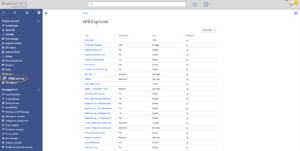
BlueSpiceWikiExplorer provides a special page - Special:WikiExplorer, which is availble through left navigation, under Global actions tab, or by directly navigating to the page.
Choosing the sorting criteria[edit | edit source]
Sorting criteria and columns to show can be changed by clicking in the arrow icon in the header of any column of the list. Select additional columns from "Columns" menu to display additional columns.
Sorting sequence Thumbnail snapshots of pages are used in: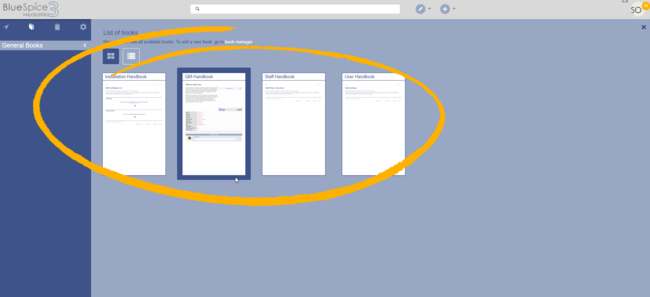

- the page Special:SearchCenter - to show previews of pages in search results,
- the search box, to show the top search result,
- the Recent Changes fly-out layer,
- the Book manager fly-out layer, and
- the Timeline.
Underlying technology[edit | edit source]
Clicking on the header of any column (not on the arrow part) will sort the values for that column. Changing the sorting order (ascending, descending) can be cycled trough by clicking on the header multiple times.
Using filters[edit | edit source]
For some content, there are some specially adapted filters available, that can be used to further sort the list. Filters can be accessed by clicking on the "arrow" icon in the column that should be filtered.
Following columns are supporting filtering:
| Content | Possible filters | Sortable |
|---|---|---|
|
Title (Page name) |
starts with, ends with, contains, contains not, equals, equals not | Yes |
| Namespace | starts with, ends with, contains, contains not, equals, equals not | Yes |
| Accesses | less than, greater than, equals | Yes |
| Creation date | None | No |
| Is redirect | None | Yes |
| Last comment | None | Yes |
| Last edit date | None | No |
| Size | less than, greater than, equals | Yes |
| Last editor | None | Yes |
| Categories | None | No |
| Linked files | None | No |
| Linked pages | None | No |
| Links to this page | None | No |
| Assigned editors | None | Yes |
|
Released (only visible when package Teamwork is installed) |
yes, no | Yes |
|
Release date (only visible when package Teamwork is installed) |
less than, greater than, equals | Yes |
|
New version waits for release |
None | Yes |
See also[edit | edit source]
Reference page for this extension. This extension relies on PhantomJS (for Linux | for Windows) to render the thumbnails.
Related info
<bs:bookshelf src="Book:User manual" />


            __TOC__


            ==What is BlueSpiceWikiExplorer?==


            '''BlueSpiceWikiExplorer''' provides a special page with an article list, which can be filtered and sorted.


            ==Where to find BlueSpiceWikiExplorer?==

            [[File:WikiExplorer1a.png|thumb]]


            BlueSpiceWikiExplorer provides a special page - <code>Special:WikiExplorer</code>, which is availble through left navigation, under Global actions tab, or by directly navigating to the page.


            ===Choosing the sorting criteria===

            Sorting criteria and columns to show can be changed by clicking in the arrow icon in the header of any column of the list. Select additional columns from "Columns" menu to display additional columns.


            ===Sorting sequence===

            Clicking on the header of any column (not on the arrow part) will sort the values for that column. Changing the sorting order (ascending, descending) can be cycled trough by clicking on the header multiple times.


            ===Using filters===


            For some content, there are some specially adapted filters available, that can be used to further sort the list. Filters can be accessed by clicking on the "arrow" icon in the column that should be filtered.


            Following columns are supporting filtering:


            {| class="contenttable cuscosky" style="width: 100%; margin-left: auto; margin-right: auto;" cellspacing="0" cellpadding="0" border="0"

            |-

            ! style="width: 40%;"|'''Content'''

            ! style="width: 25%;"|'''Possible filters'''

            ! style="width: 25%;"|'''Sortable'''

            |-

            | height="34"|

            Title (Page name)


            | width="208"|starts with, ends with, contains, contains not, equals, equals not

            | style="width: 208px; text-align: center;" width="208"|'''<span style="color: #008000;">Yes</span>'''

            |-

            | height="34"|Namespace

            | width="208"|starts with, ends with, contains, contains not, equals, equals not

            | style="width: 208px; text-align: center;" width="208"|'''<span style="color: #008000;">Yes</span>'''

            |-

            | height="51"|Accesses

            | width="208"|less than, greater than, equals

            | style="width: 208px; text-align: center;" width="208"|'''<span style="color: #008000;">Yes</span>'''

            |-

            | height="51"|Creation date

            | style="width: 208px; text-align: center;" width="208"|'''<span style="color: #d92727;">None</span>'''

            | style="width: 208px; text-align: center;" width="208"|'''<span style="color: #d92727;">No</span>'''

            |-

            | height="51"|Is redirect

            | style="width: 208px; text-align: center;" width="208"|'''<span style="color: #d92727;">None</span>'''

            | style="width: 208px; text-align: center;" width="208"|<span style="color: #008000;">'''Yes'''</span>

            |-

            | height="51"|Last comment

            | style="width: 208px; text-align: center;" width="208"|'''<span style="color: #d92727;">None</span>'''

            | style="width: 208px; text-align: center;" width="208"|<span style="color: #008000;">'''Yes'''</span>

            |-

            | height="51"|Last edit date

            | style="width: 208px; text-align: center;" width="208"|'''<span style="color: #d92727;">None</span>'''

            | style="width: 208px; text-align: center;" width="208"|<span style="color: #008000;">'''<span style="color: #d92727;">No</span>'''</span>

            |-

            | height="51"|Size

            | width="208"|less than, greater than, equals

            | style="width: 208px; text-align: center;" width="208"|<span style="color: #008000;">'''Yes'''</span>

            |-

            | height="51"|Last editor

            | style="width: 208px; text-align: center;" width="208"|'''<span style="color: #d92727;">None</span>'''

            | style="width: 208px; text-align: center;" width="208"|<span style="color: #008000;">'''Yes'''</span>

            |-

            | height="51"|Categories

            | style="width: 208px; text-align: center;" width="208"|'''<span style="color: #d92727;">None</span>'''

            | style="width: 208px; text-align: center;" width="208"|<span style="color: #008000;">'''<span style="color: #d92727;">No</span>'''</span>

            |-

            | height="51"|Linked files

            | style="width: 208px; text-align: center;" width="208"|'''<span style="color: #d92727;">None</span>'''

            | style="width: 208px; text-align: center;" width="208"|<span style="color: #008000;">'''<span style="color: #d92727;">No</span>'''</span>

            |-

            | height="51"|Linked pages

            | style="width: 208px; text-align: center;" width="208"|'''<span style="color: #d92727;">None</span>'''

            | style="width: 208px; text-align: center;" width="208"|<span style="color: #008000;">'''<span style="color: #d92727;">No</span>'''</span>

            |-

            | height="51"|Links to this page

            | style="width: 208px; text-align: center;" width="208"|'''<span style="color: #d92727;">None</span>'''

            | style="width: 208px; text-align: center;" width="208"|<span style="color: #008000;">'''<span style="color: #d92727;">No</span>'''</span>

            |-

            | height="51"|Assigned editors

            | style="width: 208px; text-align: center;" width="208"|'''<span style="color: #d92727;">None</span>'''

            | style="width: 208px; text-align: center;" width="208"|<span style="color: #008000;">'''Yes'''</span>

            |-

            | height="51"|

            Released


            (only visible when package '''Teamwork''' is installed)


            | width="208"|yes, no

            | style="width: 208px; text-align: center;" width="208"|<span style="color: #008000;">'''Yes'''</span>

            |-

            | height="51"|

            Release date


            (only visible when package '''Teamwork''' is installed)


            | width="208"|less than, greater than, equals

            | style="width: 208px; text-align: center;" width="208"|<span style="color: #008000;">'''Yes'''</span>

            |-

            | height="51"|

            New version waits for release


            | style="width: 208px; text-align: center;" width="208"|'''<span style="color: #d92727;">None</span>'''

            | style="width: 208px; text-align: center;" width="208"|<span style="color: #008000;">'''Yes'''</span>

            |}


            ==See also==


            [[Reference:WikiExplorer|Reference page]] for this extension.{{DISPLAYTITLE:Page preview thumbnails}}


            '''ArticlePreviewCapture''' shows current snapshots of wiki pages as thumbnails throughout the wiki.


            ==Where can you find page previews?==

            [[File:ArticlePreviewCapture1a.png|Page captures in book overview|alt=Page captures in book overview|center|650x650px|link=https://en.wiki.bluespice.com/wiki/File:ArticlePreviewCapture1a.png|thumb]]Thumbnail snapshots of pages are used in:


            *the page ''Special:SearchCenter'' - to show previews of pages in search results,

            *the search box, to show the top search result,

            *the Recent Changes fly-out layer,

            *the Book manager fly-out layer, and

            *the Timeline.


            ==Underlying technology==

            This extension relies on PhantomJS ([[Setup:Installation Guide/System Preparation/Linux/PhantomJS|for Linux]] | [[Setup:Installation Guide/System Preparation/Windows/PhantomJS|for Windows]]) to render the thumbnails.


            {{Box Links-en|Topic1=[[Reference:BlueSpiceArticlePreviewCapture]]}}


            {{Translation}}

            __FORCETOC__
| (11 intermediate revisions by 3 users not shown) | |||
| Line 1: | Line 1: | ||
| − | + | {{DISPLAYTITLE:Page preview thumbnails}} | |
| − | + | '''ArticlePreviewCapture''' shows current snapshots of wiki pages as thumbnails throughout the wiki. | |
| − | == | + | ==Where can you find page previews?== |
| + | [[File:ArticlePreviewCapture1a.png|Page captures in book overview|alt=Page captures in book overview|center|650x650px|link=https://en.wiki.bluespice.com/wiki/File:ArticlePreviewCapture1a.png|thumb]]Thumbnail snapshots of pages are used in: | ||
| − | ''' | + | *the page ''Special:SearchCenter'' - to show previews of pages in search results, |
| + | *the search box, to show the top search result, | ||
| + | *the Recent Changes fly-out layer, | ||
| + | *the Book manager fly-out layer, and | ||
| + | *the Timeline. | ||
| − | == | + | ==Underlying technology== |
| − | [[ | + | This extension relies on PhantomJS ([[Setup:Installation Guide/System Preparation/Linux/PhantomJS|for Linux]] | [[Setup:Installation Guide/System Preparation/Windows/PhantomJS|for Windows]]) to render the thumbnails. |
| − | + | {{Box Links-en|Topic1=[[Reference:BlueSpiceArticlePreviewCapture]]}} | |
| − | + | {{Translation}} | |
| − | + | __FORCETOC__ | |
| − | |||
| − | |||
| − | |||
| − | |||
| − | |||
| − | |||
| − | |||
| − | |||
| − | |||
| − | |||
| − | { | ||
| − | |||
| − | |||
| − | |||
| − | |||
| − | |||
| − | |||
| − | |||
| − | |||
| − | |||
| − | |||
| − | |||
| − | |||
| − | |||
| − | |||
| − | |||
| − | |||
| − | |||
| − | |||
| − | |||
| − | |||
| − | |||
| − | |||
| − | |||
| − | |||
| − | |||
| − | |||
| − | |||
| − | |||
| − | |||
| − | |||
| − | |||
| − | |||
| − | |||
| − | |||
| − | |||
| − | |||
| − | |||
| − | |||
| − | |||
| − | |||
| − | |||
| − | |||
| − | |||
| − | |||
| − | |||
| − | |||
| − | |||
| − | |||
| − | |||
| − | |||
| − | |||
| − | |||
| − | |||
| − | |||
| − | |||
| − | |||
| − | |||
| − | |||
| − | |||
| − | |||
| − | |||
| − | |||
| − | |||
| − | |||
| − | |||
| − | |||
| − | |||
| − | |||
| − | |||
| − | |||
| − | |||
| − | |||
| − | |||
| − | |||
| − | |||
| − | |||
| − | |||
| − | |||
| − | |||
| − | |||
| − | |||
| − | |||
| − | |||
| − | |||
| − | |||
| − | |||
| − | |||
| − | |||
| − | |||