Difference between revisions of "Special admin pages"
m (Tag: Visual edit) |
(Tag: 2017 source edit) |
Contents
Management pages[edit | edit source]
The most important pages for administrators are listed as navigation links under Global actions > Management. Some pages that are linked from here can also be viewed and/or edited by users with edit rights:
| Page and access by role | sysop | editor |
|---|---|---|
| About BlueSpice | set visibility | view |
| Assignment management | edit | edit |
| Category manager | edit | edit |
| Config manager | edit | - |
| Group manager | edit | - |
| Interwiki links | edit | view |
| Namespace manager | edit | view |
| Namespace-CSS manager | edit | - |
| Page templates | edit | - |
| Permission manager | edit | - |
| Privacy admin | edit | - |
| Quality management overview | edit | - |
| User manager | edit |
Other admin pages[edit | edit source]
While most pages on Special:SpecialPages are available for users with edit rights, the following pages are only accessible to users in the group sysop.
Unwatched pages[edit | edit source]
This page provides a list of pages that are not on the watchlist of any wiki users. This is helpful in combination with other quality management tools. An administrator can quickly find pages that might be neglected by the user community. By clicking on the page link, the administrator can then review the quality of the document.
Replace text[edit | edit source]
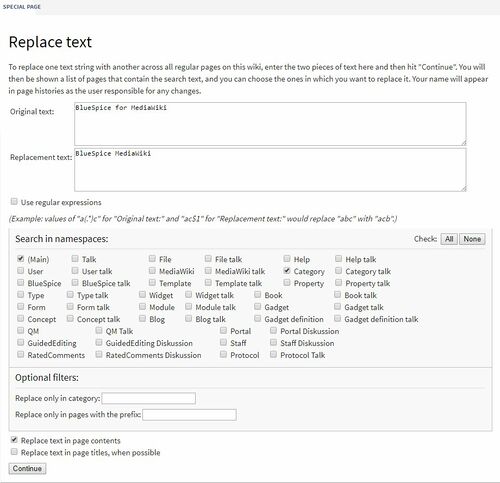
The special page Special:ReplaceText allows an administrator to perform a find-and-replace action across wiki pages. It is a MediaWiki extension and, therefore, documented at mediawiki.org/wiki/Extension:Replace_Text.
You can read a good summary of this feature on the BlueSpice blog: Replace Text – Search and replace in your wiki.
Page tools[edit | edit source]
Change content model of a page[edit | edit source]
In general, wiki pages use the content model wikitext. But MediaWiki also uses some other content models. Core content models are css, javscript, json, text and wikitext. This page allows to change the content model of existing pages.
Documentation: mediawiki.org/wiki/Manual:ContentHandler.
Import pages[edit | edit source]
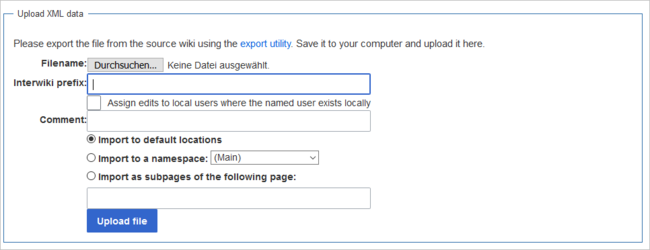
An administrator can import an xml file that was previously exported from another wiki. The xml file should contain no more than 100 wiki pages to avoid connection and timeout issues.
Documentation: mediawiki.org/wiki/Manual:Importing_XML_dumps
Mass delete[edit | edit source]
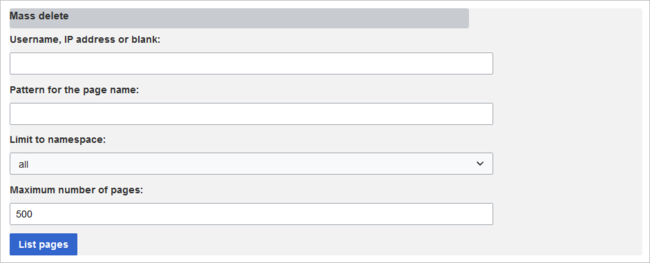
The page Special:Nuke can be used to mass-delete recent pages. The pages to be deleted can be selected by various criteria. Like individually deleted pages, the mass-deleted pages are still in the database and administrators can restore them afterwards.
The search for pages that should be deleted is limited to recentely changed pages. By default, these are pages changed or added in the last 90 days.
Documentation: mediawiki.org/wiki/Help:Extension:Nuke.
Merge page histories[edit | edit source]
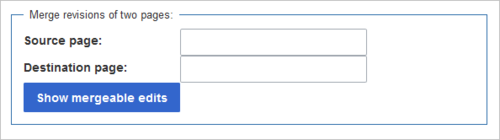
It is possible that the content of two pages is consolidated into one page, for example by pasting most or all of the content of page A into page B. In some cases it is important to keep the entire change history of the source page A. This tools allows to merge the histories of both pages. The merges are logged in a special "merge log".
Documentation: mediawiki.org/wiki/Help:Merge_history
View deleted pages[edit | edit source]
This link leads to the page Special:Undelete. It contains a simple search field to look for deleted pages with their page title.
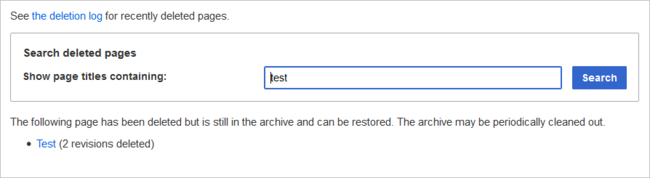
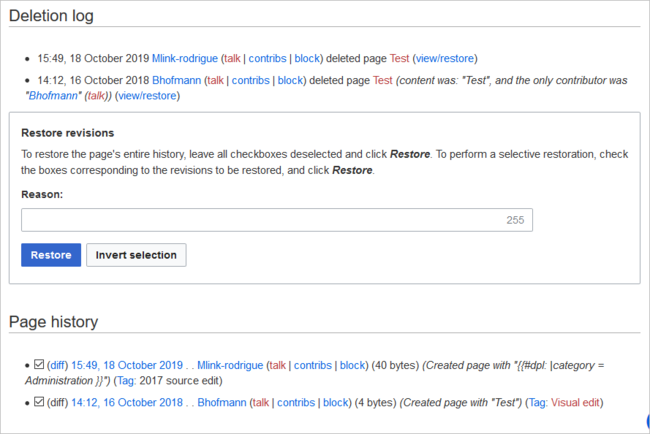
Clicking on the page title of the search results loads the page View and restore deleted pages. From here, the deleted page can be restored after reviewing the deletion log and the page history. The page can be restored with the entire page history or with selected revisions only.
Clicking Invert selection selects and deselects the checkboxes for restoring the page revisions.
Documentation: mediawiki.org/wiki/Help:Deletion_and_undeletion
        ==Management pages==

        The most important pages for administrators are listed as navigation links under ''Global actions > Management''. Some pages that are linked from here can also be viewed and/or edited by users with edit rights:

        {| class="contenttable-blue"

        |+

        !Page and access by role

        !sysop

        !editor

        |-

        |About BlueSpice

            |set visibility

            |view

            |-

            |Assignment management

            |edit

            |edit

            |-

            |Category manager

            |edit

            |edit

            |-

            |[[Manual:Extension/[[Special:BlueSpiceAbout|About BlueSpice]]

            |set visibility

            |view

            |-

            |[[Special:ManagePageAssignments|Assignment management]]

            |edit

            |edit

            |-

            |[[Special:BlueSpiceConfigManager|Category manager]]

            |edit

            |edit

            |-

            |[[Special:BlueSpiceConfigManager|Config manager]]

        |edit

        | -

        |-

        |[[Manual:Extension/BlueSpiceGroupManagerSpecial:GroupManager|Group manager]]

        |edit

        | -

        |-

        |[[Manual:Extension/BlueSpiceInterWikiLinksSpecial:InterWikiLinks|Interwiki links]]

        |edit

        |view

        |-

        |[[Manual:Extension/BlueSpiceNamespaceManagerSpecial:NamespaceManager|Namespace manager]]

        |edit

        |view

        |-

        |[[Special:NamespaceCSSManager|Namespace-CSS manager]]

        |edit

        | -

        |-

        |[[Manual:Extension/BlueSpicePageTemplatesSpecial:PageTemplatesAdmin|Page templates]]

        |edit

        | -

        |-

        |[[Manual:Extension/BlueSpicePermissionManagerSpecial:PermissionManager|Permission manager]]

        |edit

        | -

        |-

        |[[Manual:Extension/BlueSpicePrivacySpecial:Privacy_Admin|Privacy admin]]

        |edit

        | -

        |-

        |[[Special:QM_overview|Quality management overview]]

        |edit

        | -

        |-

        |[[Manual:Extension/BlueSpiceUserManagerSpecial:UserManager|User manager]]

        |edit

        |

        |}


        ==Other admin pages==

        While most  pages on ''Special:SpecialPages'' are available for users with edit rights, the following pages are only accessible to users in the group ''sysop''.


        ===Unwatched pages===

        This page provides a list of pages that are not on the watchlist of any wiki users. This is helpful in combination with other quality management tools. An administrator can quickly find pages that might be neglected by the user community. By clicking on the page link, the administrator can then review the quality of the document.


        ===Replace text===

        The special page ''Special:ReplaceText''  allows an administrator to perform a find-and-replace action across wiki pages. It is a MediaWiki extension and, therefore, documented at [[mediawikiwikiMediawikiwiki:Extension:Replace_ Text|mediawiki.org/wiki/Extension:Replace_Text]].


        You can read a good summary of this feature on the BlueSpice blog: [https://blog.bluespice.com/2017/08/02/replace-text-search-replace-wiki/ Replace Text – Search and replace in your wiki].

        [[File:ReplaceText2 en.jpg|alt=Screenshot: replace tet|center|500x500px]]


        ===Page tools===


        ====Change content model of a page====

        In general, wiki pages use the content model wikitext. But MediaWiki also uses some other content models. Core content models are css, javscript, json, text and wikitext. This page allows to change the content model of existing pages.


        Documentation: [[mediawikiwikiMediawikiwiki:Manual:ContentHandler|mediawiki.org/wiki/Manual:ContentHandler]].


        ====Import pages====

        An administrator can import an xml file that was previously exported from another wiki.  The xml file should contain no more than 100 wiki pages to avoid connection and timeout issues.


        <br />

        [[File:pagetool-import.png|alt=Screenshot: import xml dump|center|650x650px]]

        Documentation: [[mediawikiwikiMediawikiwiki:Manual:Importing_ XML_ dumps|mediawiki.org/wiki/Manual:Importing_XML_dumps]]


        ====Mass delete====

        The page Special:Nuke can be used to mass-delete recent pages. The pages to be deleted can be selected by various criteria. Like individually deleted pages, the mass-deleted pages are still in the database and administrators can restore them afterwards.


        The search for pages that should be deleted is limited to recentely changed pages. By default, these are pages changed or added in the last 90 days.

        [[File:pagetool-massdelete.png|alt=Screenshot: mass-delete|center|650x650px]]


        Documentation: [[mediawikiwikiMediawikiwiki:Help:Extension:Nuke|mediawiki.org/wiki/Help:Extension:Nuke]].


        ====Merge page histories====

        It is possible that the content of two pages is consolidated into one page, for example by pasting most or all of the content of page A into page B. In some cases it is important to keep the entire change history of the source page A. This tools allows to merge the histories of both pages. The merges are logged in a special "merge log".

        [[File:pagetool-merge.png|alt=Screenshot: merge histories|center|500x500px]]

        Documentation: [[mediawikiwikiMediawikiwiki:Help:Merge_ history|mediawiki.org/wiki/Help:Merge_history]]


        ====View deleted pages====

        This link leads to the page ''Special:Undelete''. It contains a simple search field to look for deleted pages with their page title.

        [[File:pagetool-undelete.png|alt=Screenshot: undelete page|center|650x650px]]

        Clicking on the page title of the search results loads the page ''View and restore deleted pages''. From here, the deleted page can be restored after reviewing the deletion log and the page history. The page can be restored with the entire page history or with selected revisions only.


        Clicking Invert selection selects and deselects the checkboxes for restoring the page revisions.


        <br />

        [[File:pagetool-undelete2.png|alt=Screenshot: undelete page revisions|center|650x650px]]

        Documentation: [[mediawikiwikiMediawikiwiki:Help:Deletion_ and_ undeletion|mediawiki.org/wiki/Help:Deletion_and_undeletion]]


        <br />


            [[en:{{FULLPAGENAME}}]]

            [[de:Handbuch:Andere_Admin-Seiten]]
| (15 intermediate revisions by 2 users not shown) | |||
| Line 1: | Line 1: | ||
| + | |||
==Management pages== | ==Management pages== | ||
The most important pages for administrators are listed as navigation links under ''Global actions > Management''. Some pages that are linked from here can also be viewed and/or edited by users with edit rights: | The most important pages for administrators are listed as navigation links under ''Global actions > Management''. Some pages that are linked from here can also be viewed and/or edited by users with edit rights: | ||
| Line 7: | Line 8: | ||
!editor | !editor | ||
|- | |- | ||
| − | |About BlueSpice | + | |[[Special:BlueSpiceAbout|About BlueSpice]] |
|set visibility | |set visibility | ||
|view | |view | ||
|- | |- | ||
| − | |Assignment management | + | |[[Special:ManagePageAssignments|Assignment management]] |
|edit | |edit | ||
|edit | |edit | ||
|- | |- | ||
| − | |Category manager | + | |[[Special:BlueSpiceConfigManager|Category manager]] |
|edit | |edit | ||
|edit | |edit | ||
|- | |- | ||
| − | |[[ | + | |[[Special:BlueSpiceConfigManager|Config manager]] |
|edit | |edit | ||
| - | | - | ||
|- | |- | ||
| − | |[[ | + | |[[Special:GroupManager|Group manager]] |
|edit | |edit | ||
| - | | - | ||
|- | |- | ||
| − | |[[ | + | |[[Special:InterWikiLinks|Interwiki links]] |
|edit | |edit | ||
|view | |view | ||
|- | |- | ||
| − | |[[ | + | |[[Special:NamespaceManager|Namespace manager]] |
|edit | |edit | ||
|view | |view | ||
|- | |- | ||
| − | |Namespace-CSS manager | + | |[[Special:NamespaceCSSManager|Namespace-CSS manager]] |
|edit | |edit | ||
| - | | - | ||
|- | |- | ||
| − | |[[ | + | |[[Special:PageTemplatesAdmin|Page templates]] |
|edit | |edit | ||
| - | | - | ||
|- | |- | ||
| − | |[[ | + | |[[Special:PermissionManager|Permission manager]] |
|edit | |edit | ||
| - | | - | ||
|- | |- | ||
| − | |[[ | + | |[[Special:Privacy_Admin|Privacy admin]] |
|edit | |edit | ||
| - | | - | ||
|- | |- | ||
| − | |Quality management overview | + | |[[Special:QM_overview|Quality management overview]] |
|edit | |edit | ||
| - | | - | ||
|- | |- | ||
| − | |[[ | + | |[[Special:UserManager|User manager]] |
|edit | |edit | ||
| | | | ||
| Line 67: | Line 68: | ||
===Replace text=== | ===Replace text=== | ||
| − | The special page ''Special:ReplaceText'' allows an administrator to perform a find-and-replace action across wiki pages. It is a MediaWiki extension and, therefore, documented at [[ | + | The special page ''Special:ReplaceText'' allows an administrator to perform a find-and-replace action across wiki pages. It is a MediaWiki extension and, therefore, documented at [[Mediawikiwiki:Extension:Replace Text|mediawiki.org/wiki/Extension:Replace_Text]]. |
You can read a good summary of this feature on the BlueSpice blog: [https://blog.bluespice.com/2017/08/02/replace-text-search-replace-wiki/ Replace Text – Search and replace in your wiki]. | You can read a good summary of this feature on the BlueSpice blog: [https://blog.bluespice.com/2017/08/02/replace-text-search-replace-wiki/ Replace Text – Search and replace in your wiki]. | ||
| Line 77: | Line 78: | ||
In general, wiki pages use the content model wikitext. But MediaWiki also uses some other content models. Core content models are css, javscript, json, text and wikitext. This page allows to change the content model of existing pages. | In general, wiki pages use the content model wikitext. But MediaWiki also uses some other content models. Core content models are css, javscript, json, text and wikitext. This page allows to change the content model of existing pages. | ||
| − | Documentation: [[ | + | Documentation: [[Mediawikiwiki:Manual:ContentHandler|mediawiki.org/wiki/Manual:ContentHandler]]. |
====Import pages==== | ====Import pages==== | ||
| Line 83: | Line 84: | ||
<br /> | <br /> | ||
[[File:pagetool-import.png|alt=Screenshot: import xml dump|center|650x650px]] | [[File:pagetool-import.png|alt=Screenshot: import xml dump|center|650x650px]] | ||
| − | Documentation: [[ | + | Documentation: [[Mediawikiwiki:Manual:Importing XML dumps|mediawiki.org/wiki/Manual:Importing_XML_dumps]] |
====Mass delete==== | ====Mass delete==== | ||
| Line 92: | Line 93: | ||
| − | Documentation: [[ | + | Documentation: [[Mediawikiwiki:Help:Extension:Nuke|mediawiki.org/wiki/Help:Extension:Nuke]]. |
====Merge page histories==== | ====Merge page histories==== | ||
It is possible that the content of two pages is consolidated into one page, for example by pasting most or all of the content of page A into page B. In some cases it is important to keep the entire change history of the source page A. This tools allows to merge the histories of both pages. The merges are logged in a special "merge log". | It is possible that the content of two pages is consolidated into one page, for example by pasting most or all of the content of page A into page B. In some cases it is important to keep the entire change history of the source page A. This tools allows to merge the histories of both pages. The merges are logged in a special "merge log". | ||
[[File:pagetool-merge.png|alt=Screenshot: merge histories|center|500x500px]] | [[File:pagetool-merge.png|alt=Screenshot: merge histories|center|500x500px]] | ||
| − | Documentation: [[ | + | Documentation: [[Mediawikiwiki:Help:Merge history|mediawiki.org/wiki/Help:Merge_history]] |
====View deleted pages==== | ====View deleted pages==== | ||
| Line 107: | Line 108: | ||
<br /> | <br /> | ||
[[File:pagetool-undelete2.png|alt=Screenshot: undelete page revisions|center|650x650px]] | [[File:pagetool-undelete2.png|alt=Screenshot: undelete page revisions|center|650x650px]] | ||
| − | Documentation: [[ | + | Documentation: [[Mediawikiwiki:Help:Deletion and undeletion|mediawiki.org/wiki/Help:Deletion_and_undeletion]] |
| + | |||
| + | |||
| + | <br /> | ||
| − | + | [[en:{{FULLPAGENAME}}]] | |
| + | [[de:Handbuch:Andere_Admin-Seiten]] | ||