Difference between revisions of "Reference:BlueSpicePageAssignments"
(Tag: Visual edit) |
(Tag: 2017 source edit) |
Contents
Extension: BlueSpicePageAssignments
Extension: BlueSpicePageAssignments
| Overview | |||
|---|---|---|---|
| Description: | Assigns individual Enables you to assign users or whole groups to pages, e.g. as responsible editors. a page | ||
| State: | stable | Dependency: | BlueSpice |
| Developer: | HalloWelt | License: |
GPL v3 only-3.0-onlyProperty "BSExtensionInfoLicense" (as page type) with input value "</br>GPL-3.0-only" contains invalid characters or is incomplete and therefore can cause unexpected results during a query or annotation process. |
| Type: | BlueSpice | Category: | Quality Assurance |
| Edition: | BlueSpice free, BlueSpice pro, BlueSpice Farm, BlueSpice Cloud | ||
Features
PageAssignments allows to assign pages to single users or user groups. Assigned users are notified about assignment changes via email or internal notifications.
- Assign responsible users to a page.
- Assign individual users or groups.
- The responsible editor(s) for the page can be viewed in the flyout "Page assignments" in the quality management tools.
- Users can view their assignments on the page Special:PageAssignments.
- Users with admin, maintenanceadmin or reviewer rights can manage all assignments on the page Special:ManagePageAssignments.
Technical information[edit | edit source]
Configuration[edit | edit source]
Display assignments in the title section
The page assignments can be displayed in the title section of the page. Activate this page assignments display in LocalSettings.php (or in the php file in the d.settings folder):
$GLOBALS['bsgBlueSpiceCalummaPageHeaderBeforeContentEnabledProviders'] = [ "pageheader-assignments" ];
Set the limit:
$GLOBALS['bsgPageAssignmentsPageHeaderLimit'] = 25;
Assign all users (with option to exclude some users)
To activate the option to assign all users to a page, a group everyone can be created. For this, the following code needs to be set in <bluepsice-installationpath>/extensions/BlueSpicePageAssignments/extension.json:
                        "PageAssignmentsActivatedTypes": {
			"value": [
				"user",
				"group",
				"everyone"
			]
},
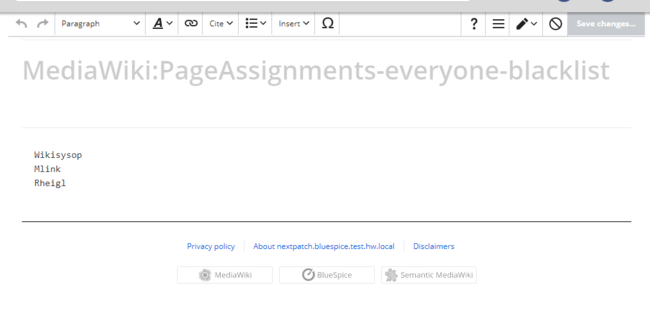

Pages can only be assigned to users with the pageassignable permission (by default, this right is assigned to the reader, editor and author roles). Only users with pageassignments permission can assign pages to others (by default, this right is assigned to the reviewer, admin and maintenanceadmin roles).
Requirements[edit | edit source]
PageAssignments requires BlueSpiceFoundation.
More info[edit | edit source]
For detailed description and usage, visit our help page.
Demo[edit | edit source]
Try out page assignments in our BlueSpiceDemo.
Technical Information[edit source]
This information applies to BlueSpice 3 . Technical details for BlueSpice cloud can differ in some cases.
Requirements[edit source]
- MediaWiki: 1.31
- BlueSpiceFoundation: 3.2
Integrates into[edit source]
- BlueSpiceExtendedStatistics
- BlueSpicePageAssignments
- BlueSpicePrivacy
- BlueSpiceSMWConnector
Special pages[edit source]
- ManagePageAssignments
- PageAssignments
Permissions[edit source]
| Name | Description | Role |
|---|---|---|
| pageassignable | Appear in the list of assignable users | reader, admin, author, editor, maintenanceadmin, reviewer |
| pageassignments | Edit the assignments of a page | admin, maintenanceadmin, reviewer |
Configuration[edit source]
| Name | Value |
|---|---|
| PageAssignmentsActivatedTypes | array ( 0 => 'user', 1 => 'group', ) |
| PageAssignmentsLockdownGroups | array ( 0 => 'user', ) |
| PageAssignmentsPageHeaderLimit | 3 |
| PageAssignmentsSecureEnabledNamespaces | array ( ) |
| PageAssignmentsSecureRemoveRightList | array ( 0 => 'edit', ) |
| PageAssignmentsTarget | 'title' |
| PageAssignmentsUseAdditionalPermissions | false |
User options[edit source]
| Name | Value |
|---|---|
| echo-subscriptions-email-bs-pageassignments-action-cat | true |
| echo-subscriptions-web-bs-pageassignments-action-cat | true |
API Modules[edit source]
- bs-mypageassignment-store
- bs-pageassignable-store
- bs-pageassignment-store
- bs-pageassignment-tasks
Hooks[edit source]
- ArticleDeleteComplete
- BSApiNamespaceStoreMakeData
- BSBookshelfBookManager
- BSBookshelfManagerGetBookDataRow
- BSDashboardsUserDashboardPortalConfig
- BSDashboardsUserDashboardPortalPortlets
- BSGroupManagerGroupDeleted
- BSGroupManagerGroupNameChanged
- BSUEModulePDFcollectMetaData
- BSUsageTrackerRegisterCollectors
- BSUserManagerAfterDeleteUser
- BSUserManagerAfterSetGroups
- BeforePageDisplay
- EchoGetDefaultNotifiedUsers
- LoadExtensionSchemaUpdates
- NamespaceManager::editNamespace
- NamespaceManager::getMetaFields
- NamespaceManager::writeNamespaceConfiguration
- PersonalUrls
- SkinTemplateNavigation
- SkinTemplateOutputPageBeforeExec
- TitleMoveComplete
- WikiExplorer::buildDataSets
- WikiExplorer::getColumnDefinitions
- WikiExplorer::getFieldDefinitions
- WikiExplorer::queryPagesWithFilter
{{DISPLAYTITLE:PageAssignments}}

            {{BSExtensionInfobox


        BSExtensionInfo


        |desc=Assigns individual users or whole groups to pages, e.g. as responsible editors.

        |status=stable

        |developer=HalloWelt

        |type=BlueSpice

        |edition=BlueSpice free


        , BlueSpice pro, BlueSpice Farm, BlueSpice Cloud


        |active=Yes

        |compatible=BlueSpice

        |category=Quality Assurance

        |license=GPL v3 only

        |docu=https://www.mediawiki.org/wiki/Extension:PageAssignments

            }}


        features='''PageAssignments''' allows to assign pages to single users or user groups.  Assigned users are notified about assignment changes  via email or internal notifications.


        ==Usage / features==


        *Assign responsible users  to a page.

        *Assign individual users or groups.

        *The responsible editor(s) for the page can be viewed in the flyout "Page assignments" in the quality management tools.

        *Users can view their assignments on the page ''Special:PageAssignments''.

        *Users with ''admin, maintenanceadmin'' or ''reviewer'' rights can manage all assignments on the page ''Special:ManagePageAssignments.''


        ==Technical information==


            ===Configuration===


            ==== = Display assignments in the title section ====

        The page assignments can be displayed in the title section of the page. Activate this page assignments display in ''LocalSettings.php'' (or in the php file in the ''d.settings'' folder):

         $GLOBALS['bsgBlueSpiceCalummaPageHeaderBeforeContentEnabledProviders'] = [ "pageheader-assignments" ];

        Set the limit:

         $GLOBALS['bsgPageAssignmentsPageHeaderLimit'] = 25;


        ==== Assign all users (with option to exclude some users) ====

        To activate the option to assign all users to a page, a group ''everyone'' can be created. For this, the following code needs to be set in ''<bluepsice-installationpath>/extensions/BlueSpicePageAssignments/extension.json'':<syntaxhighlight lang="json">

        "PageAssignmentsActivatedTypes": {

        			"value": [

        				"user",

        				"group",

        				"everyone"

        			]

        },


        </syntaxhighlight>This allows users to add the group everyone to a page assignment. Individual users can be excluded from the assignment by creating the file ''MediaWiki:PageAssignments-everyone-blacklist''. Users can be added to this blacklist with using line breaks.


        <br />

        [[File:pageassignments-blacklist.png|alt=Exclude users from page assignment "everyone"|center|thumb|650x650px|Exclude users from page assignment "everyone"]]


            ===Rights (permissions)===

            Pages can only be assigned to users with the ''pageassignable'' permission (by default, this right is assigned to the ''reader, editor'' and a''uthor'' roles). Only users with ''pageassignments'' permission can assign pages to others (by default, this right is assigned to the ''reviewer, admin'' and ''maintenanceadmin'' roles).


            ===Requirements===


            PageAssignments requires [[Reference:BlueSpiceFoundation|BlueSpiceFoundation]].


            ==More info==


            For detailed description and usage, visit our [[Manual:Extension/PageAssignments|help page.]]


            ==Demo==


            Try out page assignments in our [https://en.demo.bluespice.com/wiki/Main_Page BlueSpiceDemo.]


            {{Translation}}


            [[Category:BlueSpice free]]

            [[Category:Extension]]

__FORCETOC__}}| (2 intermediate revisions by 2 users not shown) | |||
| Line 1: | Line 1: | ||
| − | {{ | + | {{BSExtensionInfo |
| − | |||
|desc=Assigns individual users or whole groups to pages, e.g. as responsible editors. | |desc=Assigns individual users or whole groups to pages, e.g. as responsible editors. | ||
|status=stable | |status=stable | ||
|developer=HalloWelt | |developer=HalloWelt | ||
|type=BlueSpice | |type=BlueSpice | ||
| − | |edition=BlueSpice free | + | |edition=BlueSpice free, BlueSpice pro, BlueSpice Farm, BlueSpice Cloud |
|active=Yes | |active=Yes | ||
|compatible=BlueSpice | |compatible=BlueSpice | ||
|category=Quality Assurance | |category=Quality Assurance | ||
|license=GPL v3 only | |license=GPL v3 only | ||
| − | | | + | |features='''PageAssignments''' allows to assign pages to single users or user groups. Assigned users are notified about assignment changes via email or internal notifications. |
| − | |||
| − | '''PageAssignments''' allows to assign pages to single users or user groups. Assigned users are notified about assignment changes via email or internal notifications. | ||
| − | |||
| − | |||
*Assign responsible users to a page. | *Assign responsible users to a page. | ||
| Line 22: | Line 17: | ||
*Users with ''admin, maintenanceadmin'' or ''reviewer'' rights can manage all assignments on the page ''Special:ManagePageAssignments.'' | *Users with ''admin, maintenanceadmin'' or ''reviewer'' rights can manage all assignments on the page ''Special:ManagePageAssignments.'' | ||
| − | + | === Display assignments in the title section === | |
| − | |||
| − | |||
| − | |||
| − | |||
The page assignments can be displayed in the title section of the page. Activate this page assignments display in ''LocalSettings.php'' (or in the php file in the ''d.settings'' folder): | The page assignments can be displayed in the title section of the page. Activate this page assignments display in ''LocalSettings.php'' (or in the php file in the ''d.settings'' folder): | ||
$GLOBALS['bsgBlueSpiceCalummaPageHeaderBeforeContentEnabledProviders'] = [ "pageheader-assignments" ]; | $GLOBALS['bsgBlueSpiceCalummaPageHeaderBeforeContentEnabledProviders'] = [ "pageheader-assignments" ]; | ||
| Line 32: | Line 23: | ||
$GLOBALS['bsgPageAssignmentsPageHeaderLimit'] = 25; | $GLOBALS['bsgPageAssignmentsPageHeaderLimit'] = 25; | ||
| − | + | === Assign all users (with option to exclude some users) === | |
To activate the option to assign all users to a page, a group ''everyone'' can be created. For this, the following code needs to be set in ''<bluepsice-installationpath>/extensions/BlueSpicePageAssignments/extension.json'':<syntaxhighlight lang="json"> | To activate the option to assign all users to a page, a group ''everyone'' can be created. For this, the following code needs to be set in ''<bluepsice-installationpath>/extensions/BlueSpicePageAssignments/extension.json'':<syntaxhighlight lang="json"> | ||
"PageAssignmentsActivatedTypes": { | "PageAssignmentsActivatedTypes": { | ||
| Line 44: | Line 35: | ||
<br /> | <br /> | ||
[[File:pageassignments-blacklist.png|alt=Exclude users from page assignment "everyone"|center|thumb|650x650px|Exclude users from page assignment "everyone"]] | [[File:pageassignments-blacklist.png|alt=Exclude users from page assignment "everyone"|center|thumb|650x650px|Exclude users from page assignment "everyone"]] | ||
| − | + | }} | |
| − | |||
| − | |||
| − | |||
| − | |||
| − | |||
| − | |||
| − | |||
| − | |||
| − | |||
| − | |||
| − | |||
| − | |||
| − | |||
| − | |||
| − | |||
| − | |||
| − | |||
| − | |||
| − | |||
| − | |||