Difference between revisions of "Manual:Extension/ExtensionInfo"
| [unchecked revision] | [unchecked revision] |
(Created page with "__HIDETITLE__ <bs:bookshelf src="Book:User manual" /> __TOC__ ==What is ExtensionInfo?== ==Where to find ExtensionInfo?== Image:BlueSpice223-Extensions-Navigation-en.p...") |
m (Text replacement - "<bs:bookshelf src="Book:User manual" />" to "") |
Contents
What is ExtensionInfo?[edit | edit source]
ExtensionInfo creates a special page with basic information about loaded extensions of a wiki: extension name, description, version or status.
Where to find ExtensionInfo?[edit | edit source]
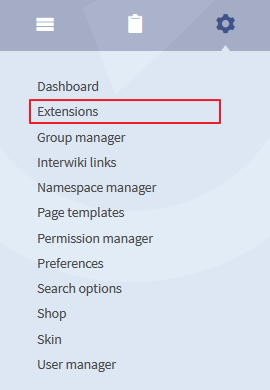 Screenshot: Open the
The list of
extensionsYou will find the list ofall extension in the admin area.
It is onlyOnly visible for users with administration rights.
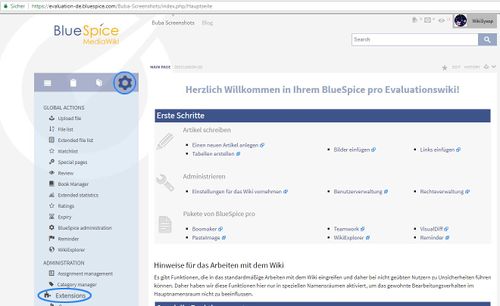
Functionality[edit | edit source]
Next to a list of extension names you will find the following information:
- Description: a short description of the extension's functionality.
- Version: here you can see the version.
- Status: information about the level of development (alpha / beta / stable)
- .
Administration[edit | edit source]
If you install a new extension it will be listed in the ExtensionInfo automatically. Further administration is only possible right now in the script path: (/bluespice-mw/config/extension-settings.php)
Note: In the special page Spezial:Version there is an overview as well.
See also[edit | edit source]
Our reference page.
__HIDETITLE__


            <bs:bookshelf src="Book:User manual" />


        __TOC__


        ==What is ExtensionInfo?==


        '''ExtensionInfo''' creates a special page with basic information about loaded extensions of a wiki: extension name, description, version or status.


        ==Where to find ExtensionInfo?==


        [[Image:BlueSpice223-Extensions-Navigation-en.png|thumb|left|270px|Screenshot: Open the list of extensions]]You will find the list of

            The list of all extension in the admin area. It is only Only visible for users with administration rights.<br /><br /><br /><br /><br /><br /><br /><br /><br /><br /><br /><br /><br /><br /><br /><br /><br /><br />


            ::: [[File:ext1.jpg|500x306px]]


        ==Functionality==


        Next to a list of extension names you will find the following information:


        * Description: a short description of the extension's functionality.

        * Version: here you can see the version.

        * Status: information about the level of development (alpha / beta / stable)


            Behind the name of the extension there is a link to an article in this helpdesk.


            ==Administration==


        .


            ==Administration==


        If you install a new extension it will be listed in the ExtensionInfo automatically. Further administration is only possible right now in the script path: <code>(/bluespice-mw/config/extension-settings.php)</code>


        {{Box_Note|Note text = In the special page <code>Spezial:Version</code> there is an overview as well.}}


        ==See also==


            Our [[ExtensionInfo|reference page]].


        {{Box_Links-en | Thema1 =[[Preferences|Preferences for Administrators]] | Thema2 =[[Setup:Installation_Manual|Installation manual]]}}
| (19 intermediate revisions by one other user not shown) | |||
| Line 1: | Line 1: | ||
| − | + | ||
| − | |||
__TOC__ | __TOC__ | ||
| Line 6: | Line 5: | ||
==What is ExtensionInfo?== | ==What is ExtensionInfo?== | ||
| + | '''ExtensionInfo''' creates a special page with basic information about loaded extensions of a wiki: extension name, description, version or status. | ||
| + | |||
| + | ==Where to find ExtensionInfo?== | ||
| − | + | The list of all extension in the admin area. Only visible for users with administration rights. | |
| − | [[ | + | ::: [[File:ext1.jpg|500x306px]] |
==Functionality== | ==Functionality== | ||
| Line 16: | Line 18: | ||
Next to a list of extension names you will find the following information: | Next to a list of extension names you will find the following information: | ||
| − | * Description: a short description of the extension's functionality | + | * Description: a short description of the extension's functionality. |
| − | * Version: here you can see the version | + | * Version: here you can see the version. |
| − | * Status: information about the level of development (alpha / beta / stable) | + | * Status: information about the level of development (alpha / beta / stable). |
| − | + | ==Administration== | |
| − | |||
If you install a new extension it will be listed in the ExtensionInfo automatically. Further administration is only possible right now in the script path: <code>(/bluespice-mw/config/extension-settings.php)</code> | If you install a new extension it will be listed in the ExtensionInfo automatically. Further administration is only possible right now in the script path: <code>(/bluespice-mw/config/extension-settings.php)</code> | ||
{{Box_Note|Note text = In the special page <code>Spezial:Version</code> there is an overview as well.}} | {{Box_Note|Note text = In the special page <code>Spezial:Version</code> there is an overview as well.}} | ||
| + | |||
| + | ==See also== | ||
| + | |||
| + | Our [[ExtensionInfo|reference page]]. | ||
{{Box_Links-en | Thema1 =[[Preferences|Preferences for Administrators]] | Thema2 =[[Setup:Installation_Manual|Installation manual]]}} | {{Box_Links-en | Thema1 =[[Preferences|Preferences for Administrators]] | Thema2 =[[Setup:Installation_Manual|Installation manual]]}} | ||