Difference between revisions of "Manual:Extension/BlueSpiceWikiExplorer"
| [unchecked revision] | [quality revision] |
(→Where to find WikiExplorer?) |
(Tag: 2017 source edit) |
The extension WikiExplorer allows to quickly filter and sort all Wiki pages based on your own filter criteria. WikiExplorer combines the functionality of many maintenance pages. By combining different filters, you can quickly find matching pages.
Contents
- 1What is Accessing WikiExplorer?
- 2.1 Choose columns as viewing criteria 2.2 2 Where to find WikiExplorer?Choosing the sorting criteria
- 3 Sorting sequence 2.3
- 4 Using filters
- 3 Working hints
- 4 See also
Accessing WikiExplorer[edit | edit source]
WikiExplorer provides a special page with an article list, which can be filtered and sorted.
Where to find WikiExplorer?[edit | edit source]You can find WikiExplorer on To access Wiki Exporer, go to Global actions and select WikiExplorer. This opens the special page Special:WikiExplorer, and can also be found in the overview list of all special pages. Click on More in the upper right corner of the article to open the Widgetbar. Under the header "Tools" the link to the special pages can be found.
You can then find WikiExplorer under the header BlueSpice.
Alternatively, you can attach the code Special:WikiExplorer to your domain in the address line of your browser.
Choosing the sorting criteria[edit | edit source]
In the header of the list, you can choose the sorting criteria and metadata you want to see. Move your mouse to the top of any column and click on the arrow that appears there. Under the subitem Columns you can decide what information you want to see.
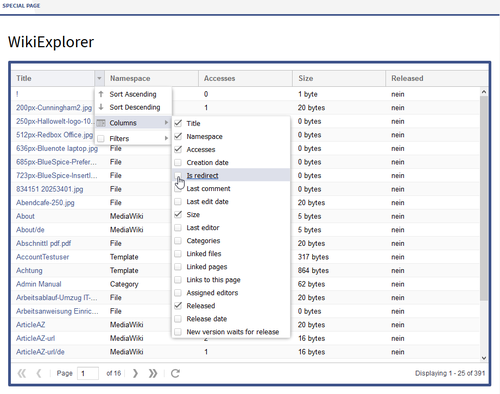 Screenshot: Choose your desired criteria and metadata
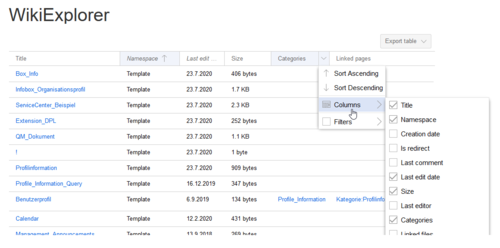
Sorting criteria and visible columns can be changed by clicking on the arrow icon in the header of any list column.

Sorting sequence[edit | edit source]
Click Clicking on the title header of a column to sort the list based on this criteria, either upwards or downwardsany column (not on the arrow) sorts the table based on the values of that column. Changing the sorting order (ascending, descending) can be switched by clicking on the header multiple times.
Using filters[edit | edit source]
For some content, there are some specially adapted filters available , that which can be used to further sort the list. Move your mouse to the head of the respective column and click on the arrow. Under the subitem Filter you can now narrow the list further down.
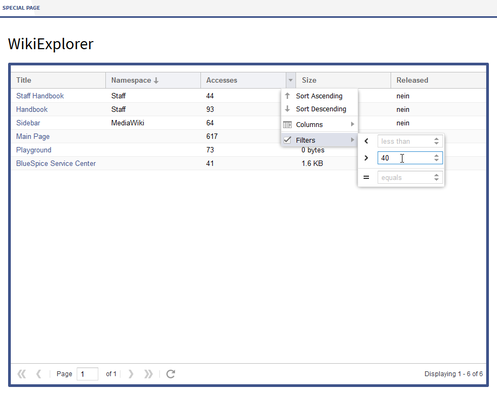 Screenshot: Example for filter criteria
You can use filters for the following contentFilters can be accessed by clicking on the "arrow" icon in the column that should be filtered.
The following columns support filtering:
| Content | Possible filters | Sortable |
|---|---|---|
|
Title (Page name) |
Note: the title is linked to the corresponding article
| starts with, ends with, contains, contains not, equals, equals not | Yes | |
| Namespace | starts with, ends with, contains, contains not, equals, equals not | Yes |
| Accesses | less than, greater than, equals | Yes |
| Creation date | None | No |
| Is redirect | None | Yes |
| Last comment | None | Yes |
| Last edit date | None | No |
| Size | less than, greater than, equals | Yes |
| Last editor | None | Yes |
| Categories | None | No |
| Linked files | None | No |
| Linked pages | None | No |
| Links to this page | None | No |
| Assigned editors | None | Yes |
|
Released |
(only visible when package Teamwork is installed)
| yes, no | Yes |
|
Release date |
(only visible when package Teamwork is installed)
| less than, greater than, equals | Yes | |
|
New version waits for release |
None | Yes |
Working hints[edit | edit source]
Use WikiExplorer to initialize maintenance measures. You can for example point out articles that have not been approved yet, or check with articles with a low view count if they can be deleted or advertised (e.g. by linking it on the main page).
See also[edit | edit source]
Our reference page.
|
The BlueSpice extension WikiEplorer is part of BlueSpice pro. It can also be purchased as a single extension in the Shop. |
Related info
<bs:bookshelf src="Book:User manual" />


            __TOC__


            ==What is WikiExplorer?==


            '''WikiExplorer''' provides a special page with an article list, which can be filtered and sorted.


            ==Where to find WikiExplorer?==


            You can find WikiExplorer on the special page <code>Special:WikiExplorer</code>, and can also be found in the overview list of all special pages. Click on ''More'' in the upper right corner of the article to open the Widgetbar. Under the header "Tools" the link to the special pages can be found.


            You can then find WikiExplorer under the header ''BlueSpice''.


            Alternatively, you can attach the code <code>Special:WikiExplorer</code> to your domain in the address line of your browser.


            ===Choose columns as viewing criteria===


            In the header of the list, you can choose the sorting criteria and metadata you want to see. Move your mouse to the top of any column and click on the arrow that appears there. Under the subitem ''Columns'' you can decide what information you want to see.


            ::: [[File:BlueSpice223-wikiexplorer-Spaltenauswahl-en.png|thumb|center|alt=Screenshot: Choose your desired criteria and metadata|500x394px|Screenshot: Choose your desired criteria and metadata]]


            ===Sorting sequence===


            Click on the title of a column to sort the list based on this criteria, either upwards or downwards.


            ===Using filters==={{DISPLAYTITLE:WikiExplorer}}The extension '''WikiExplorer''' allows to quickly filter and sort all Wiki pages based on your own filter criteria. WikiExplorer combines the functionality of many maintenance pages. By combining different filters, you can quickly find matching pages.


            ==Accessing WikiExplorer==

            To access Wiki Exporer, go to ''Global actions''  and select ''WikiExplorer.''  This opens the special page ''Special:WikiExplorer.''


            ==Choosing the sorting criteria==

            Sorting criteria and visible columns can be changed by clicking on the arrow icon in the header of any list column.

            [[File:Manual:Mediawiki Extension WikiExplorer.png|alt=WikiExplorer|center|thumb|500x500px|WikiExplorer]]


            ==Sorting sequence==

            Clicking on the header of any column (not on the arrow) sorts the table based on the values of that column. Changing the sorting order (ascending, descending) can be switched by clicking on the header multiple times.


            ==Using filters==


        For some content, there are some specially adapted filters available, that which can be used to further sort the list. Move your mouse to the head of the respective column and click on the arrow. Under the subitem ''Filter'' you can now narrow the list further down.


            ::: [[File:BlueSpice223-wikiexplorer-Filter-en.png|thumb|center|alt=Screenshot: Example for filter criteria|500x394px|Screenshot: Example for filter criteria]]


            You can use filters for the following content:


            {| class="contenttable cuscosky" style="width: 100%; margin-left: auto; margin-right: auto;Filters can be accessed by clicking on the "arrow" icon in the column that should be filtered.


            The following columns support filtering:


            <br />


            {| class="contenttable-blue" style="width:100%;" cellspacing="0" cellpadding="0" border="0"

        |-

        ! style="width: 40%;" class="background-color" |'''Content'''

        ! style="width: 25%;" class="background-color" |'''Possible filters'''

        ! style="width: 25%;" class="background-color" |'''Sortable'''

        |-

        | height="34" |

        Title (Page name)


        Note: the title is linked to the corresponding article


            | width="208"| width="208" |starts with, ends with, contains, contains not, equals, equals not

        | style="width: 208px; text-align: center;" width="208"" class="background-color" width="208" |'''<span style="color: #008000;">Yes</span>'''

        |-

        | height="34" |Namespace

        | width="208" |starts with, ends with, contains, contains not, equals, equals not

        | style="width: 208px; text-align: center;" width="208"" class="background-color" width="208" |'''<span style="color: #008000;">Yes</span>'''

        |-

        | height="51" |Accesses

        | width="208" |less than, greater than, equals

        | style="width: 208px; text-align: center;" width="208"" class="background-color" width="208" |'''<span style="color: #008000;">Yes</span>'''

        |-

        | height="51" |Creation date

        | style="width: 208px; text-align: center;" width="208"" class="background-color" width="208" |'''<span style="color: #d92727;">None</span>'''

        | style="width: 208px; text-align: center;" width="208"" class="background-color" width="208" |'''<span style="color: #d92727;">No</span>'''

        |-

        | height="51" |Is redirect

        | style="width: 208px; text-align: center;" width="208"" class="background-color" width="208" |'''<span style="color: #d92727;">None</span>'''

        | style="width: 208px; text-align: center;" width="208"" class="background-color" width="208" |<span style="color: #008000;">'''Yes'''</span>

        |-

        | height="51" |Last comment

        | style="width: 208px; text-align: center;" width="208"" class="background-color" width="208" |'''<span style="color: #d92727;">None</span>'''

        | style="width: 208px; text-align: center;" width="208"" class="background-color" width="208" |<span style="color: #008000;">'''Yes'''</span>

        |-

        | height="51" |Last edit date

        | style="width: 208px; text-align: center;" width="208"" class="background-color" width="208" |'''<span style="color: #d92727;">None</span>'''

        | style="width: 208px; text-align: center;" width="208"" class="background-color" width="208" |<span style="color: #008000;">'''<span style="color: #d92727;">No</span>'''</span>

        |-

        | height="51" |Size

        | width="208" |less than, greater than, equals

        | style="width: 208px; text-align: center;" width="208"" class="background-color" width="208" |<span style="color: #008000;">'''Yes'''</span>

        |-

        | height="51" |Last editor

        | style="width: 208px; text-align: center;" width="208"" class="background-color" width="208" |'''<span style="color: #d92727;">None</span>'''

        | style="width: 208px; text-align: center;" width="208"" class="background-color" width="208" |<span style="color: #008000;">'''Yes'''</span>

        |-

        | height="51" |Categories

        | style="width: 208px; text-align: center;" width="208"" class="background-color" width="208" |'''<span style="color: #d92727;">None</span>'''

        | style="width: 208px; text-align: center;" width="208"" class="background-color" width="208" |<span style="color: #008000;">'''<span style="color: #d92727;">No</span>'''</span>

        |-

        | height="51" |Linked files

        | style="width: 208px; text-align: center;" width="208"" class="background-color" width="208" |'''<span style="color: #d92727;">None</span>'''

        | style="width: 208px; text-align: center;" width="208"" class="background-color" width="208" |<span style="color: #008000;">'''<span style="color: #d92727;">No</span>'''</span>

        |-

        | height="51" |Linked pages

        | style="width: 208px; text-align: center;" width="208"" class="background-color" width="208" |'''<span style="color: #d92727;">None</span>'''

        | style="width: 208px; text-align: center;" width="208"" class="background-color" width="208" |<span style="color: #008000;">'''<span style="color: #d92727;">No</span>'''</span>

        |-

        | height="51" |Links to this page

        | style="width: 208px; text-align: center;" width="208"" class="background-color" width="208" |'''<span style="color: #d92727;">None</span>'''

        | style="width: 208px; text-align: center;" width="208"" class="background-color" width="208" |<span style="color: #008000;">'''<span style="color: #d92727;">No</span>'''</span>

        |-

        | height="51" |Assigned editors

        | style="width: 208px; text-align: center;" width="208"" class="background-color" width="208" |'''<span style="color: #d92727;">None</span>'''

        | style="width: 208px; text-align: center;" width="208"" class="background-color" width="208" |<span style="color: #008000;">'''Yes'''</span>

        |-

        | height="51" |

        Released


        (only visible when package '''Teamwork''' is installed)


            | width="208"| width="208" |yes, no

        | style="width: 208px; text-align: center;" width="208"" class="background-color" width="208" |<span style="color: #008000;">'''Yes'''</span>

        |-

        | height="51" |

        Release date


        (only visible when package '''Teamwork''' is installed)


            | width="208"| width="208" |less than, greater than, equals

        | style="width: 208px; text-align: center;" width="208"" class="background-color" width="208" |<span style="color: #008000;">'''Yes'''</span>

        |-

        | height="51" |

        New version waits for release


        | style="width: 208px; text-align: center;" width="208"" class="background-color" width="208" |'''<span style="color: #d92727;">None</span>'''

        | style="width: 208px; text-align: center;" width="208"|<span style="color: #008000;">'''Yes'''</span>

            |}


            ==Working hints==


            Use WikiExplorer to initialize maintenance measures. You can for example point out articles that have not been approved yet, or check with articles with a low view count if they can be deleted or advertised (e.g. by linking it on the main page).


            ==See also==


            Our [[WikiExplorer|reference page.]]


            {| style="border: 1px solid #98A7C4; background-color: #ffffff; border-left: 20px solid #98A7C4; margin-bottom: 0.4em; margin-left: auto; margin-right: auto; width: 100%;" cellspacing="2" cellpadding="5" border="0"

            |-

            ||

            The BlueSpice extension '''WikiEplorer''' is part of [[BlueSpice pro]]. It can also be purchased as a single extension in the [https://shop.bluespice.com/ Shop].


            |}" class="background-color" width="208" |<span style="color: #008000">'''Yes'''</span>

            |}

            {{Box Links-en|Topic1=[[Reference:BlueSpiceWikiExplorer]]}}<br />{{translation}}

            [[Category:Quality]]
| (17 intermediate revisions by 4 users not shown) | |||
| Line 1: | Line 1: | ||
| − | + | {{DISPLAYTITLE:WikiExplorer}}The extension '''WikiExplorer''' allows to quickly filter and sort all Wiki pages based on your own filter criteria. WikiExplorer combines the functionality of many maintenance pages. By combining different filters, you can quickly find matching pages. | |
| − | + | ==Accessing WikiExplorer== | |
| + | To access Wiki Exporer, go to ''Global actions'' and select ''WikiExplorer.'' This opens the special page ''Special:WikiExplorer.'' | ||
| − | == | + | ==Choosing the sorting criteria== |
| + | Sorting criteria and visible columns can be changed by clicking on the arrow icon in the header of any list column. | ||
| + | [[File:Manual:Mediawiki Extension WikiExplorer.png|alt=WikiExplorer|center|thumb|500x500px|WikiExplorer]] | ||
| − | + | ==Sorting sequence== | |
| + | Clicking on the header of any column (not on the arrow) sorts the table based on the values of that column. Changing the sorting order (ascending, descending) can be switched by clicking on the header multiple times. | ||
| − | == | + | ==Using filters== |
| − | + | For some content, there are specially adapted filters available which can be used to sort the list. Filters can be accessed by clicking on the "arrow" icon in the column that should be filtered. | |
| − | + | The following columns support filtering: | |
| − | + | <br /> | |
| − | + | {| class="contenttable-blue" style="width:100%;" cellspacing="0" cellpadding="0" border="0" | |
| − | |||
| − | |||
| − | |||
| − | |||
| − | |||
| − | |||
| − | |||
| − | |||
| − | |||
| − | |||
| − | |||
| − | |||
| − | |||
| − | |||
| − | |||
| − | |||
| − | |||
| − | |||
| − | |||
| − | {| class="contenttable | ||
|- | |- | ||
| − | ! style="width: 40%;"|'''Content''' | + | ! style="width:40%;" class="background-color" |'''Content''' |
| − | ! style="width: 25%;"|'''Possible filters''' | + | ! style="width:25%;" class="background-color" |'''Possible filters''' |
| − | ! style="width: 25%;"|'''Sortable''' | + | ! style="width:25%;" class="background-color" |'''Sortable''' |
|- | |- | ||
| − | | height="34"| | + | | height="34" | |
Title (Page name) | Title (Page name) | ||
| − | + | | width="208" |starts with, ends with, contains, contains not, equals, equals not | |
| − | + | | style="width:208px;" class="background-color" width="208" |'''<span style="color: #008000">Yes</span>''' | |
| − | | width="208"|starts with, ends with, contains, contains not, equals, equals not | ||
| − | | style="width: 208px; | ||
|- | |- | ||
| − | | height="34"|Namespace | + | | height="34" |Namespace |
| − | | width="208"|starts with, ends with, contains, contains not, equals, equals not | + | | width="208" |starts with, ends with, contains, contains not, equals, equals not |
| − | | style="width: 208px; | + | | style="width:208px;" class="background-color" width="208" |'''<span style="color: #008000">Yes</span>''' |
|- | |- | ||
| − | | height="51"|Accesses | + | | height="51" |Accesses |
| − | | width="208"|less than, greater than, equals | + | | width="208" |less than, greater than, equals |
| − | | style="width: 208px; | + | | style="width:208px;" class="background-color" width="208" |'''<span style="color: #008000">Yes</span>''' |
|- | |- | ||
| − | | height="51"|Creation date | + | | height="51" |Creation date |
| − | | style="width: 208px; | + | | style="width:208px;" class="background-color" width="208" |'''<span style="color: #d92727">None</span>''' |
| − | | style="width: 208px; | + | | style="width:208px;" class="background-color" width="208" |'''<span style="color: #d92727">No</span>''' |
|- | |- | ||
| − | | height="51"|Is redirect | + | | height="51" |Is redirect |
| − | | style="width: 208px; | + | | style="width:208px;" class="background-color" width="208" |'''<span style="color: #d92727">None</span>''' |
| − | | style="width: 208px; | + | | style="width:208px;" class="background-color" width="208" |<span style="color: #008000">'''Yes'''</span> |
|- | |- | ||
| − | | height="51"|Last comment | + | | height="51" |Last comment |
| − | | style="width: 208px; | + | | style="width:208px;" class="background-color" width="208" |'''<span style="color: #d92727">None</span>''' |
| − | | style="width: 208px; | + | | style="width:208px;" class="background-color" width="208" |<span style="color: #008000">'''Yes'''</span> |
|- | |- | ||
| − | | height="51"|Last edit date | + | | height="51" |Last edit date |
| − | | style="width: 208px; | + | | style="width:208px;" class="background-color" width="208" |'''<span style="color: #d92727">None</span>''' |
| − | | style="width: 208px; | + | | style="width:208px;" class="background-color" width="208" |<span style="color: #008000">'''<span style="color: #d92727">No</span>'''</span> |
|- | |- | ||
| − | | height="51"|Size | + | | height="51" |Size |
| − | | width="208"|less than, greater than, equals | + | | width="208" |less than, greater than, equals |
| − | | style="width: 208px; | + | | style="width:208px;" class="background-color" width="208" |<span style="color: #008000">'''Yes'''</span> |
|- | |- | ||
| − | | height="51"|Last editor | + | | height="51" |Last editor |
| − | | style="width: 208px; | + | | style="width:208px;" class="background-color" width="208" |'''<span style="color: #d92727">None</span>''' |
| − | | style="width: 208px; | + | | style="width:208px;" class="background-color" width="208" |<span style="color: #008000">'''Yes'''</span> |
|- | |- | ||
| − | | height="51"|Categories | + | | height="51" |Categories |
| − | | style="width: 208px; | + | | style="width:208px;" class="background-color" width="208" |'''<span style="color: #d92727">None</span>''' |
| − | | style="width: 208px; | + | | style="width:208px;" class="background-color" width="208" |<span style="color: #008000">'''<span style="color: #d92727">No</span>'''</span> |
|- | |- | ||
| − | | height="51"|Linked files | + | | height="51" |Linked files |
| − | | style="width: 208px; | + | | style="width:208px;" class="background-color" width="208" |'''<span style="color: #d92727">None</span>''' |
| − | | style="width: 208px; | + | | style="width:208px;" class="background-color" width="208" |<span style="color: #008000">'''<span style="color: #d92727">No</span>'''</span> |
|- | |- | ||
| − | | height="51"|Linked pages | + | | height="51" |Linked pages |
| − | | style="width: 208px; | + | | style="width:208px;" class="background-color" width="208" |'''<span style="color: #d92727">None</span>''' |
| − | | style="width: 208px; | + | | style="width:208px;" class="background-color" width="208" |<span style="color: #008000">'''<span style="color: #d92727">No</span>'''</span> |
|- | |- | ||
| − | | height="51"|Links to this page | + | | height="51" |Links to this page |
| − | | style="width: 208px; | + | | style="width:208px;" class="background-color" width="208" |'''<span style="color: #d92727">None</span>''' |
| − | | style="width: 208px; | + | | style="width:208px;" class="background-color" width="208" |<span style="color: #008000">'''<span style="color: #d92727">No</span>'''</span> |
|- | |- | ||
| − | | height="51"|Assigned editors | + | | height="51" |Assigned editors |
| − | | style="width: 208px; | + | | style="width:208px;" class="background-color" width="208" |'''<span style="color: #d92727">None</span>''' |
| − | | style="width: 208px; | + | | style="width:208px;" class="background-color" width="208" |<span style="color: #008000">'''Yes'''</span> |
|- | |- | ||
| − | | height="51"| | + | | height="51" | |
Released | Released | ||
| − | + | | width="208" |yes, no | |
| − | + | | style="width:208px;" class="background-color" width="208" |<span style="color: #008000">'''Yes'''</span> | |
| − | | width="208"|yes, no | ||
| − | | style="width: 208px; | ||
|- | |- | ||
| − | | height="51"| | + | | height="51" | |
Release date | Release date | ||
| − | + | | width="208" |less than, greater than, equals | |
| − | + | | style="width:208px;" class="background-color" width="208" |<span style="color: #008000">'''Yes'''</span> | |
| − | | width="208"|less than, greater than, equals | ||
| − | | style="width: 208px; | ||
|- | |- | ||
| − | | height="51"| | + | | height="51" | |
New version waits for release | New version waits for release | ||
| − | | style="width: 208px; | + | | style="width:208px;" class="background-color" width="208" |'''<span style="color: #d92727">None</span>''' |
| − | | style="width: 208px; | + | | style="width:208px;" class="background-color" width="208" |<span style="color: #008000">'''Yes'''</span> |
| − | |||
| − | |||
| − | |||
| − | |||
| − | |||
| − | |||
| − | |||
| − | |||
| − | |||
| − | |||
| − | |||
| − | |||
| − | |||
| − | |||
| − | |||
|} | |} | ||
| + | {{Box Links-en|Topic1=[[Reference:BlueSpiceWikiExplorer]]}}<br />{{translation}} | ||
| + | [[Category:Quality]] | ||