Difference between revisions of "Manual:Extension/BlueSpiceExtendedStatistics"
| [unchecked revision] | [unchecked revision] |
(Tag: 2017 source edit) |
Fbaeckmann (talk | contribs) (Tag: 2017 source edit) |
Contents
What is BlueSpiceExtendedStatistics?[edit | edit source]
BlueSpiceExtendedStatistics provides an analytic view of many relevant parameters on the wiki, providing wiki administrators better insight into functioning of the wiki.
Where to find BlueSpiceExtendedStatistics?[edit | edit source]
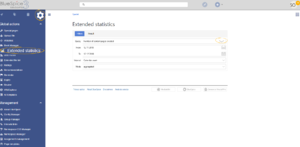
BlueSpiceExtendedStatisticsa special page accessible from Global actions menu in the left navigation.


Choosing a data source[edit | edit source]
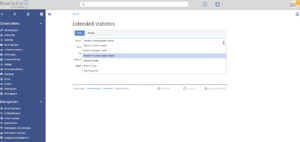
ExtendedStatistics can show data for multiple aspects of the wiki. Available data sources are:
- Number of users: All the users that registered in the period chosen
- Number of pages: All pages created in the period chosen.
- Number of content pages: All articles in content namespaces created in the period chosen
- Number of edits: All edits carried out in the period chosen
- Edits per user: Number of edits per user in the period chosen
- Search queries: All terms users searched for in the period chosen. Only availble if BlueSpiceExtendedSearch is installed.
Choosing filters[edit | edit source]
General filters:
- From - Date from which to display data
- To - Date to which to display data
Some data sources may have additional filters available, like for data sources based on wiki pages, namespace filter is availble.
Display settings[edit | edit source]
The way data will be displayed can be configured in the following aspects:
- Interval - grain of the diagram - determines which time of unit will be used to group the data
-
Mode - display type:
- Absolute - shows changes in data for the given period
- Aggregate - shows running total for the data source choosen
- List - shows data in tabular view - only avaiable for certain data sources
Viewing the results[edit | edit source]
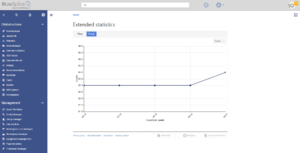
Once all the filters and options are set, click on "Results" tab to show the resulting data.
See also[edit | edit source]
Reference page for this extension.
<bs:bookshelf src="Book:User manual" />


        __TOC__


        ==What is BlueSpiceExtendedStatistics?==


        '''BlueSpiceExtendedStatistics''' provides an analytic view of many relevant parameters on the wiki, providing wiki administrators better insight into functioning of the wiki.


        ==Where to find BlueSpiceExtendedStatistics?==


        BlueSpiceExtendedStatisticsa special page accessible from Global actions menu in the left navigation.


        [[File:ExtendedStatistics1.png|thumb]]

        [[File:ExtendedStatistics2.png|thumb]]

        [[File:ExtendedStatistics3.png|thumb|Results panel]]


        ===Choosing a data source===


        ExtendedStatistics can show data for multiple aspects of the wiki. Available data sources are:


        *Number of users: All the users that registered in the period chosen

        *Number of pages: All pages created in the period chosen.

        *Number of content pages: All articles in content namespaces created in the period chosen

        *Number of edits: All edits carried out in the period chosen

        *Edits per user: Number of edits per user in the period chosen

        *Search queries: All terms users searched for in the period chosen. Only availble if [[Manual:Extension/ExtendedSearch|BlueSpiceExtendedSearch]] is installed.


        ===Choosing filters===


        General filters:


        *From - Date from which to display data

        *To - Date to which to display data


        Some data sources may have additional filters available, like for data sources based on wiki pages, namespace filter is availble.


        ===Display settings===


        The way data will be displayed can be configured in the following aspects:


        *Interval - grain of the diagram - determines which time of unit will be used to group the data

        *Mode - display type:

        **Absolute - shows changes in data for the given period

        **Aggregate - shows running total for the data source choosen

        **List - shows data in tabular view - only avaiable for certain data sources


        ===Viewing the results===


        Once all the filters and options are set, click on "Results" tab to show the resulting data.


        ==See also==


        [[Reference:ExtendedStatistics|Reference page]] for this extension.


            [[de:Handbuch:Erweiterung/{{SUBPAGENAME}}]]

            [[en:Manual:Extension/{{SUBPAGENAME}}]]
| Line 54: | Line 54: | ||
[[Reference:ExtendedStatistics|Reference page]] for this extension. | [[Reference:ExtendedStatistics|Reference page]] for this extension. | ||
| + | |||
| + | [[de:Handbuch:Erweiterung/{{SUBPAGENAME}}]] | ||
| + | [[en:Manual:Extension/{{SUBPAGENAME}}]] | ||