Difference between revisions of "Manual:Extension/BlueSpiceReadConfirmation"
| [quality revision] | [quality revision] |
m (Text replacement - "en:" to "[[en:{{FULLPAGENAME}}]]") |
(Tag: Visual edit) |
The extension ReadConfirmation allows to request read confirmations from users. If a user is assigned to a page, a mandatory read confirmation can be added to the page.
Contents
Enabling read confirmations[edit | edit source]
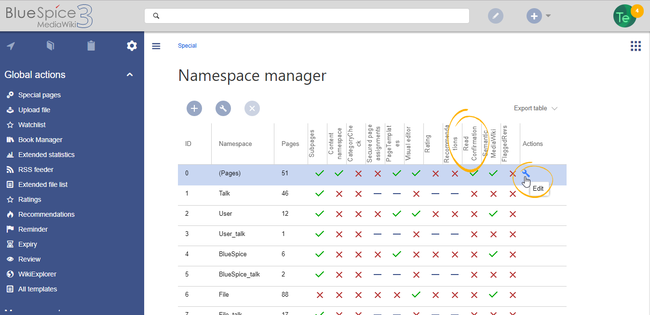
An administrator must enable read confirmations for the namespace the page belongs to. This can be set using the Namespace manager:
Display[edit | edit source]
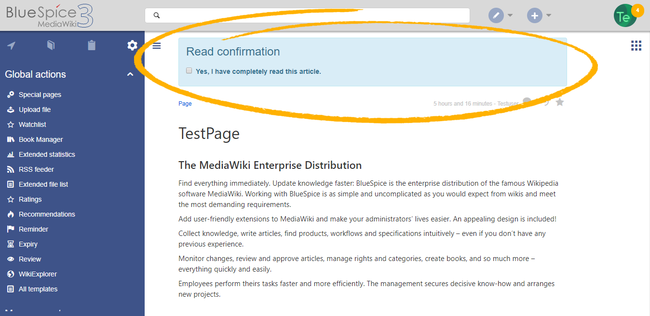
When read confirmations are active on a namespace, assigned users see a confirmation prompt. After checking the checkbox Yes, I have completely read this article and clicking Confirm, the page will be marked as read by that user.
Administration of read confirmations[edit | edit source]
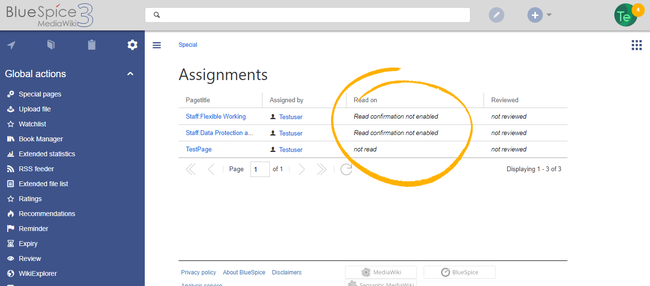
Wiki admins can see an overview of all read confirmations by navigating to Global actions > Management > Assignment management. Read confirmation information is shown in the column Read on. A page can have multiple states:
- Read confirmation not enabled: BlueSpiceReadConfirmation is not enabled for the namespace to which the page belongs.
- Not read: BlueSpiceReadConfirmation is enabled, but the assigned users have not yet read the page.
-
Actions: In the columns for actions, there are two items related to read confirmations.
- Read confirmation log: Link to the read confirmation log for the page.
- Request read confirmation: Users get a reminder for their read confirmation.


Read confirmation in connection with page approval[edit | edit source]
If the approval feature is activated in a namespace at the same time, the read confirmation is triggered when a new draft is created. This can be changed via server configuration so that the read confirmaation is required after the draft page has been approved.Related info
{{DISPLAYTITLE:Read confirmation}}


        The extension '''ReadConfirmation''' allows to request read confirmations from users. If a user is assigned to a page, a mandatory read confirmation can be added to the page.


        ==Enabling read confirmations==

        An administrator must enable read confirmations for the namespace the page belongs to.

        This can be set using the [[Manual:Extension/NamespaceManager|Namespace manager]]:


        <br />


        [[File:ReadConfirmation2.png|center|650x650px|alt=Activating read confirmations|thumb|Activating read confirmations in a namespace]]

        ==Display==

        [[File:ReadConfirmation1.png|center|650x650px|alt=Read confirmation checkbox|thumb|Read confirmation checkbox]]

        When read confirmations are active on a namespace, assigned users see a confirmation prompt. After checking the checkbox ''Yes, I have completely read this article'' and clicking ''Confirm,'' the page will be marked as read by that user.


        <br />

        ==Administration of read confirmations==

        Wiki admins can see an overview of all read confirmations by navigating to ''Global actions > Management > Assignment management.'' Read confirmation information is shown in  the column ''Read on''. A page can have multiple states:


        *''Read confirmation not enabled:'' BlueSpiceReadConfirmation is not enabled for the namespace to which the page belongs.

        *''Not read:'' BlueSpiceReadConfirmation is enabled, but the assigned users have not yet read the page.

        *''Actions:'' In the columns for actions, there are two items related to read confirmations.

        **''Read confirmation log:'' Link to the read confirmation log for the page.

        **''Request read confirmation:'' Users get a reminder for their read confirmation.


        [[File:ReadConfirmation3.png|thumb|link=https://en.wiki.bluespice.com/wiki/File:ReadConfirmation3.png|alt=Reviewing read confirmations|center|650x650px|Reviewing read confirmations]]<br />


            == Read confirmation in connection with page approval ==

            If the approval feature is activated in a namespace at the same time, the read confirmation is triggered when a new draft is created. This [[Reference:BlueSpiceReadConfirmation|can be changed via  server configuration]] so that the read confirmaation is required after the draft page has been approved.{{Box Links-en|Topic1=[[Reference:BlueSpiceReadConfirmation]]}}


        <br />


        [[en:{{FULLPAGENAME}}]]

        [[de:Handbuch:Erweiterung/BlueSpiceReadConfirmation]]

[[Category:Quality]]| Line 24: | Line 24: | ||
**''Request read confirmation:'' Users get a reminder for their read confirmation. | **''Request read confirmation:'' Users get a reminder for their read confirmation. | ||
| − | [[File:ReadConfirmation3.png|thumb|link=https://en.wiki.bluespice.com/wiki/File:ReadConfirmation3.png|alt=Reviewing read confirmations|center|650x650px|Reviewing read confirmations]]<br />{{Box Links-en|Topic1=[[Reference:BlueSpiceReadConfirmation]]}} | + | [[File:ReadConfirmation3.png|thumb|link=https://en.wiki.bluespice.com/wiki/File:ReadConfirmation3.png|alt=Reviewing read confirmations|center|650x650px|Reviewing read confirmations]]<br /> |
| + | |||
| + | == Read confirmation in connection with page approval == | ||
| + | If the approval feature is activated in a namespace at the same time, the read confirmation is triggered when a new draft is created. This [[Reference:BlueSpiceReadConfirmation|can be changed via server configuration]] so that the read confirmaation is required after the draft page has been approved.{{Box Links-en|Topic1=[[Reference:BlueSpiceReadConfirmation]]}} | ||
<br /> | <br /> | ||