Difference between revisions of "Delete article"
m (Tag: Visual edit) |
(Changed categories.) |
Users with edit rights can delete wiki pages. If a page is deleted, it can no longer be found using the search function. However, users have the option to restore a deleted page.
Contents
How to delete a page?[edit | edit source]
To delete the page, click Page Tools > Manage page> Delete .
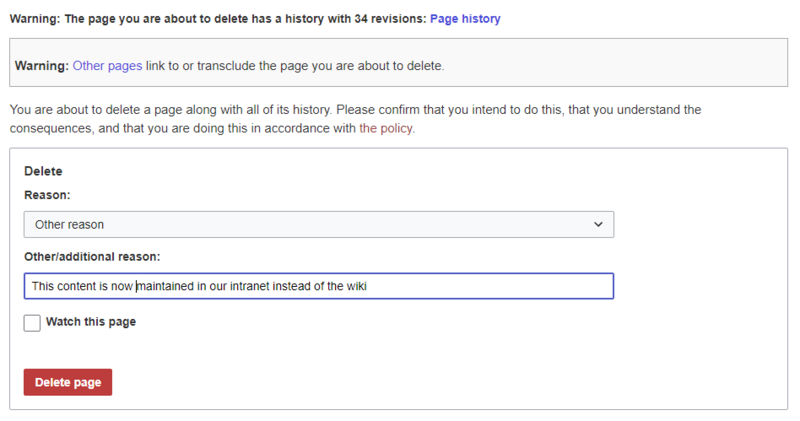

Before deleting the page, you can:
- Check the version history.
- Check which pages link to this page
- Indicate the reason for the deletion: Since deleting a page can raise questions from other users, it makes sense to leave a short explanation here. This text is shown accordingly in the deletion log.
- Watch the page: If the page is restored by another user, you can receive a notification.
Mass-deleting pages[edit | edit source]
Admin users can mass-delete recently added pages from the special page Special:Nuke.
Which pages should be deleted?[edit | edit source]
You can use some pages under Special:SpecialPages to find candidates for deletion:
-
Special:ShortPages: With short pages it can be expected that the content of the article is not relevant enough or is better dealt with as a paragraph in another article. -
Special:LonelyPages: Orphaned pages are characterized by a lack of transclusions or links to the page. -
Special:NewPages: Reviewing recently added pages is useful, for example, to detect spam in public wikis.
Where do I find information about deleted pages?[edit | edit source]
-
Special:Log/delete: Search for and restore deleted pages. -
Special:DeletedContributions: Search for deleted posts of a specific user (or an IP address).
Recover deleted pages[edit | edit source]
Deleted pages can be restored using the Delete log which can be accessed from the page Special:SpecialPages. If the deleted page was linked to other wiki pages, the page can be restored directly via the redlink on that page.
Which pages shouldn't be deleted?[edit | edit source]
There are often more sensible alternatives for deleting:
- Move: If a page has an incorrect or incorrect title, the page can be moved.
- Copy: If the content does not match the page title, the content can be copied to another page
- Redirect: If the page content already exists on another page, the duplicate content can be deleted and a redirect can be created.
- Obsolete: The content is no longer current. You can mark the page as out of date and other wiki users can update the page later.
Related info
{{DISPLAYTITLE:Delete pages}}


        Users with edit rights can delete wiki pages. If a page is deleted, it can no longer be found using the search function. However, users have the option to restore a deleted page.


        ==How to delete a page?==

        To delete the page, click '' Page Tools > Manage page> Delete ''. <br />

        [[File:löschen-dialog-EN.PNG|alt=Deleting a page|center|thumb|800x800px|Deleting a page]]


        Before deleting the page, you can:


        *Check the version history.

        *Check which pages link to this page

        *Indicate the reason for the deletion: Since deleting a page can raise questions from other users, it makes sense to leave a short explanation here. This text is shown accordingly in the deletion log.

        *Watch the page: If the page is restored by another user, you can receive a notification.


        ==Mass-deleting pages==

        Admin users can mass-delete recently added pages from the special page <code>Special:Nuke</code>.

        ==Which pages should be deleted?==

        You can use some pages under <code>Special:SpecialPages</code> to find candidates for deletion:


        *<code>Special:ShortPages</code>: With short pages it can be expected that the content of the article is not relevant enough or is better dealt with as a paragraph in another article.

        *<code>Special:LonelyPages</code>: Orphaned pages are characterized by a lack of transclusions or links to the page.

        *<code>Special:NewPages</code>: Reviewing recently added pages is useful, for example, to detect spam in public wikis.


        ==Where do I find information about deleted pages?==


        *<code>Special:Log/delete</code>: Search for and restore deleted pages.

        *<code>Special:DeletedContributions</code>: Search for deleted posts of a specific user (or an IP address).


        ==Recover deleted pages==

        Deleted pages can be restored using the  ''Delete'' log which can be accessed from the page ''Special:SpecialPages''. If the deleted page was linked to other wiki pages, the page can be restored directly via the redlink on that page.


        ==Which pages shouldn't be deleted?==

        There are often more sensible alternatives for deleting:


        *'''[[Rename and move pages |Move:]]''' If a page has an incorrect or incorrect title, the page can be moved.

        *'''Copy:''' If the content does not match the page title, the content can be copied to another page

        *'''[[Manual:Redirects|Redirect:]]''' If the page content already exists on another page, the duplicate content can be deleted and a redirect can be created.

        *'''[[Manual:Extension/BlueSpiceExpiry |Obsolete:]]''' The content is no longer current. You can mark the page as out of date and other wiki users can update the page later.


        <br />{{Box_Links-en | Topic1 =[[Reference:Nuke|Nuke]]: Extension for mass-deleting pages | Topic2 = [[Redirects|Redirects]] | Topic3 =[[Manual:Extension/BlueSpiceUserManager|Deleting user accounts]] | Thema4 = }}


        [[en:{{FULLPAGENAME}}]]

        [[de:Artikel Löschen]]

        [[Category:Editing]]

[[Category:Content]]| Line 45: | Line 45: | ||
[[de:Artikel Löschen]] | [[de:Artikel Löschen]] | ||
[[Category:Editing]] | [[Category:Editing]] | ||
| − | |||