Difference between revisions of "Templates download/ButtonLink"
(Created page with "<div class="downloadarea"> <span class="getButton">Download</span> 450x450px </div>This template creates a link that is...") (Tag: Visual edit) |
(Tag: 2017 source edit) |
Importing the template[edit | edit source]
The import file is included in the archive file HW-ButtonLink.zip. Unpack the zip file first.
On the page Special:Import follow these steps:
- Select file and choose HW-ButtonLink.xml.
- Enter an Interwiki prefix. Since this field is required, simply add hw (for hallowelt).
- Keep the selection Import to default locations.
- Click Upload file... .
The template is now available in your wiki.
Pages included in the import[edit | edit source]
The xml import creates the following files in your wiki:
- Template:ButtonLink
Using the template[edit | edit source]
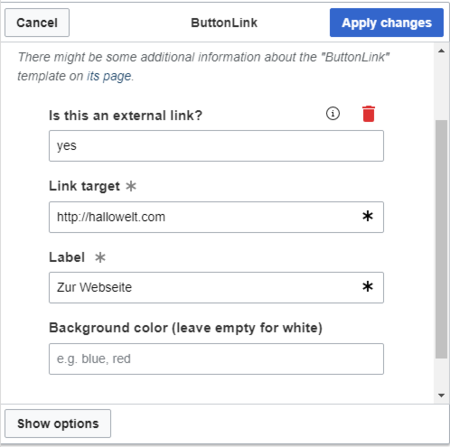
- Add the template from the VisualEditor insert-dialog.
- Fill in the form fields as needed.
Note: If, after importing the template to your wiki, the input fields are not displayed when you first integrate it into a wiki page, you need to open the template in the template namespace, make a change (e.g. insert spaces) and save the template. The input fields should now be displayed correctly.


Settings[edit | edit source]
| Input field | Description |
|---|---|
| Is this an external link? | yes = the link target starts with http:// or https://
Leave blank for internal wiki page |
| Link target | Name of the wiki page or the website |
| Label | Label shown on the button |
| Background color | Possible button colors: red, blue (leave blank for white) |
<div class="downloadarea">


        <span class="getButton">[[Media:HW-ButtonLink.zip|Download]]</span>


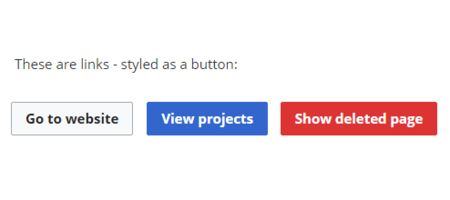
        [[File:HW-ButtonLink.png|450x450px350x350px]]


        </div>This template creates a link that is styled as a button. It can be inserted into a  wiki page via the VisualEditor ''Insert > Template'' menu.

        ==Importing the template==

        The import file is included in the archive file ''HW-ButtonLink.zip''. Unpack the zip file first.


        On the page ''Special:Import'' follow these steps:


        #'''Select file''' and choose ''HW-ButtonLink.xml''.

        #'''Enter''' an Interwiki prefix. Since this field is required, simply add ''hw'' (for hallowelt).

        #'''Keep''' the selection ''Import to default locations''.

        #'''Click''' ''Upload file...'' .


        The template is now available in your wiki.


        ==Pages included in the import==

        The xml import creates the following files in your wiki:


        *Template:ButtonLink


        ==Using the template==


        #Add the template from the  [[Manual:VisualEditor|VisualEditor]] insert-dialog.

        #Fill in the form fields as needed.

        {{Box Note|boxtype=note|Note text=If, after importing the template to your wiki,  the input fields are not displayed when you first integrate it into a wiki page, you need to open the template in the template namespace, make a change (e.g. insert spaces) and save the template. The input fields should now be displayed correctly.}}

        [[File:HW-ButtonLink-templatedata.png|alt=Insert-dialog for button link|center|thumb|450x450px|Insert-dialog for button link]]


        === Settings ===

        {| class="contenttable-blue" style="width:100%;"

        ! style="width:200px;" |Input field

        !Description

        |-

        | style="width:200px;" |Is this an external link?

        |yes = the link target starts with http:// or https://

        Leave blank for internal wiki page

        |-

        | style="width:200px;" |Link target

        |Name of the wiki page or the website

        |-

        | style="width:200px;" |Label

        |Label shown on the button

        |-

        | style="width:200px;" |Background color

        |Possible button colors: red, blue (leave blank for white)

        |}


        <br />


        __NOTOC__
| Line 2: | Line 2: | ||
<span class="getButton">[[Media:HW-ButtonLink.zip|Download]]</span> | <span class="getButton">[[Media:HW-ButtonLink.zip|Download]]</span> | ||
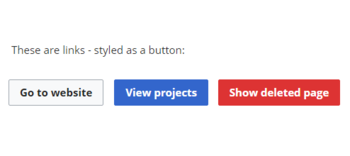
| − | [[File:HW-ButtonLink.png| | + | [[File:HW-ButtonLink.png|350x350px]] |
</div>This template creates a link that is styled as a button. It can be inserted into a wiki page via the VisualEditor ''Insert > Template'' menu. | </div>This template creates a link that is styled as a button. It can be inserted into a wiki page via the VisualEditor ''Insert > Template'' menu. | ||
==Importing the template== | ==Importing the template== | ||