You are viewing an old version of this page. Return to the latest version.
Difference between revisions of "Reference:BlueSpiceExpiry"
Extension: BlueSpiceExpiry
| Overview | |||
|---|---|---|---|
| Description: | Pages can be marked as expired. | ||
| State: | stable | Dependency: | BlueSpice |
| Developer: | HalloWelt | License: | - |
| Type: | BlueSpice | Category: | Quality Assurance |
| Edition: | BlueSpice pro | ||
Features[edit source]
Description[edit | edit source]
Expiry marks after a certain period of time a chosen article as "obsolete". The article can be updated by editing or by confirming that the article is still up-to-date.
Usege / Features[edit | edit source]
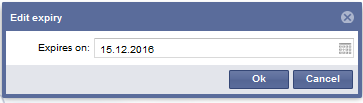
- An author can add an expiration date to an article.



{{BSExtensionInfobox

        |desc=<span style="color: #222222; font-family: sans-serif;">Pages can be marked as expired.</span>

        |status=stable

        |developer=HalloWelt

        |type=BlueSpice

        |edition=BlueSpice pro

        |compatible=BlueSpice

        |package=Reminder

        |category=Quality Assurance

        |docu=https://www.mediawiki.org/wiki/Extension:Expiry

        }}


        __TOC__


        ==Description==


        '''Expiry''' marks after a certain period of time a chosen article as "obsolete". The article can be updated by editing or by confirming that the article is still up-to-date.


        ==Usege / Features==


        *An author can add an expiration date to an article.


        [[File:expiry_en.PNG|thumb|center|850x550px|Set an expiry date for an article]]


        [[File:expiry2_en.PNG|thumb|center|450x128px|Set an expiry date for an article]]


        [[de:{{FULLPAGENAME}}]][[en:{{FULLPAGENAME}}]]


[[Category:Extension]]| Line 19: | Line 19: | ||
==Usege / Features== | ==Usege / Features== | ||
| + | |||
| + | *An author can add an expiration date to an article. | ||
[[File:expiry_en.PNG|thumb|center|850x550px|Set an expiry date for an article]] | [[File:expiry_en.PNG|thumb|center|850x550px|Set an expiry date for an article]] | ||