Difference between revisions of "Manual:Extension/BlueSpiceUniversalExport"
| [unchecked revision] | [unchecked revision] |
(→Universal Export) |
(→UniversalExport PDF module) |
Contents
What is UniversalExport?[edit | edit source]
UniversalExport enables the single page export to PDF.
Where to find UniversalExport?[edit | edit source]
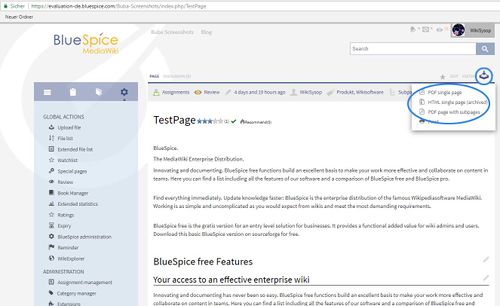
UniversalExport provides also a widget (UNIVERSALEXPORT ) called "Export" for the Widgetbar. This includes links to various export modules. Which modules are displayed depends on the settings of the respective modules and on the permissions of universalexport-export. Access to an export module can also be granted and withheld depending on namespaces.
The functionality of UniversalExport[edit | edit source]
Information on the special page[edit | edit source]
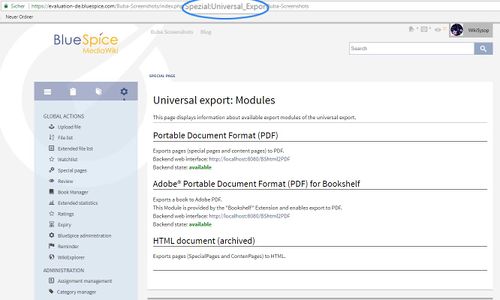
The export modules installed and their status can be viewed at Special:UniversalExport. The information displayed depends on the individual modules.
Settings[edit | edit source]
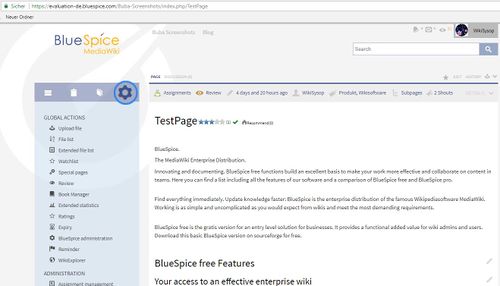
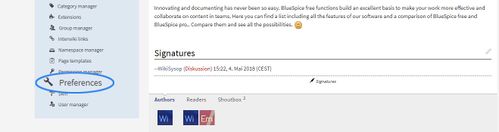
UniversalExport and the individual modules can be configured under "WikiAdmi > Preferences".
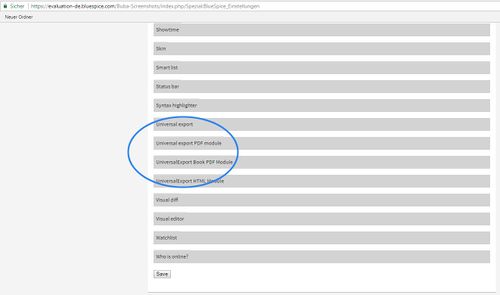
Universal Export[edit | edit source]
| Setting | Description |
|---|---|
|
Metadata (standard, JSON format) |
Additional metadata to include in the template in JSON format, for example:
{"creator":"Hallo Welt! Medienwerkstatt GmbH"} |
|
Metadaten (overriding, JSON format) |
Metadata values to override existing metadata keys
|
UniversalExport PDF module[edit | edit source]
| Setting | Description | |
|---|---|---|
|
Standard template |
Default template to use for exporting to PDF | |
|
Backend |
Depending on the backened of the Java applications server installed, this must be either "PDFServlet" http://localhost:8080/BShtml2PDF |
|
|
Standard template |
BlueSpice | |
|
Template directory: |
extensions/BlueSpiceExtensions/UEModulePDF/data/PDFTemplates
URL |
URL to bshtml2pdf service |
|
Hide namespace prefix in PDF |
Whether to hide namespace part of page name when exporting to PDF | |
|
Template directory: |
Directory path to where PDF templates are located |
Tips for working with UniversalExport[edit | edit source]
- Shoutbox comments are not included when a page is exported.
Classical export with MediaWiki[edit | edit source]
MediaWiki itself only offers the export of content pages in a proprietary XML format. There are, however, extensions which make the creation of ODF, PDF or DocBook files possible.
See also[edit | edit source]
Our reference page.

<bs:bookshelf src="Book:User manual" />


        __TOC__


        ==What is UniversalExport?==


        '''UniversalExport''' enables the single page export to PDF.


        ==Where to find UniversalExport?==


        UniversalExport provides also a widget (<code>UNIVERSALEXPORT</code>

        ) called "Export" for the [[Archive:Widgetbar|Widgetbar]]. This includes links to various export modules. Which modules are displayed depends on the settings of the respective modules and on the permissions of


        <code>universalexport-export</code>. Access to an export module can also be granted and withheld depending on namespaces.


        ::: [[File:UniEx1.jpg|500x306px]]


        ==The functionality of UniversalExport==


        ===Information on the special page===


        The export modules installed and their status can be viewed at <code>Special:UniversalExport</code>. The information displayed depends on the individual modules.

        ::: [[File:UniEx2.jpg|500x300px]]


        ===Settings===

        UniversalExport and the individual modules can be configured under "WikiAdmi > Preferences".


        ::: [[File:UniEx3.jpg|500x286px]]

        ::: [[File:UniEx4.jpg|500x132px]]


        ::: [[File:UniEx5.jpg|500x295px]]


        ===Universal Export===


        {| class="contenttable"

        |-

        !|'''Setting'''

        !|'''Description'''

        |-

        ||

        Metadata (standard, JSON format)


        ||Additional metadata to include in the template in JSON format, for example:

        {"creator":"Hallo Welt! Medienwerkstatt GmbH"}

        |-

        ||

        Metadaten (overriding, JSON format)


        ||

        Metadata values to override existing metadata keys


        |}


        ===UniversalExport PDF module===


        {| class="contenttable"

        |-

        !|'''Setting'''

        !|'''Description'''


        |-

            ||

            Backend


            ||

            Depending on the backened of the Java applications server installed, this must be either "PDFServlet"<code>BShtml2PDF.war</code>

            ) of "PDFWebService" (


            <code>bn2pdf.war</code>

            ).


            <nowiki>http://localhost:8080/BShtml2PDF</nowiki>


            |-

            ||

            Standard template


            ||BlueSpice

            |-

            ||

            Template directory:


            ||extensions/BlueSpiceExtensions/UEModulePDF/data/PDFTemplates

            |-


            |-

            ||

            Standard template


            ||Default template to use for exporting to PDF

            |-

            ||

            Backend URL


            ||URL to bshtml2pdf service

            |-

            ||

            Hide namespace prefix in PDF


            ||Whether to hide namespace part of page name when exporting to PDF

            |-

            ||

            Template directory:


            ||Directory path to where PDF templates are located


        |}


        ==Tips for working with UniversalExport==


        * [[Shoutbox]] comments are not included when a page is exported.


        ==Classical export with MediaWiki==


        MediaWiki itself only offers the export of content pages in a proprietary XML format. There are, however, extensions which make the creation of ODF, PDF or DocBook files possible.


        ==See also==


        Our [[UniversalExport|reference page.]]


        <div id="box-info" style="width: 98%; margin: 20px 0; border: solid 2px #99bbe8; padding: 8px; background-color: #d6e3f2;">

        [[Image:Icon-link.png|left]]<div style="text-transform: uppercase; color: #99bbe8; font-size: 16px; font-weight: bold; margin: 0;">Related topics</div>


        <div color:="" 000="">

        * [[Bookshelf|PDF book of several articles]]

        * [[RSSStandards|RSS Export]]

        * [[Preferences|Admin Preferences]]


        </div>


        </div>
| Line 54: | Line 54: | ||
===UniversalExport PDF module=== | ===UniversalExport PDF module=== | ||
| − | |||
{| class="contenttable" | {| class="contenttable" | ||
|- | |- | ||
!|'''Setting''' | !|'''Setting''' | ||
!|'''Description''' | !|'''Description''' | ||
| + | |||
|- | |- | ||
|| | || | ||
| − | + | Standard template | |
| + | ||Default template to use for exporting to PDF | ||
| + | |- | ||
|| | || | ||
| − | + | Backend URL | |
| − | |||
| − | |||
| − | |||
| − | |||
| − | |||
| + | ||URL to bshtml2pdf service | ||
|- | |- | ||
|| | || | ||
| − | + | Hide namespace prefix in PDF | |
| − | || | + | ||Whether to hide namespace part of page name when exporting to PDF |
|- | |- | ||
|| | || | ||
Template directory: | Template directory: | ||
| − | || | + | ||Directory path to where PDF templates are located |
| − | |||
|} | |} | ||