You are viewing an old version of this page. Return to the latest version.
Difference between revisions of "Reference:BlueSpiceWhoIsOnline"
Fbaeckmann (talk | contribs) |
Fbaeckmann (talk | contribs) (Changed categories.) |
Extension: BlueSpiceWhoIsOnline
| Overview | |||
|---|---|---|---|
| Description: | shows which users have been logged-in in the last 10 minutes. | ||
| State: | stable | Dependency: | BlueSpice |
| Developer: | HalloWelt | License: | GPL v3 only |
| Type: | BlueSpice | Category: | Rich Articles |
| Edition: | BlueSpice"BlueSpice" is not in the list (BlueSpice pro, BlueSpice free, BlueSpice Farm, BlueSpice Cloud, BlueSpice free (deactivated), BlueSpice pro (deactivated), BlueSpice Farm (deactivated), BlueSpice Cloud (deactivated)) of allowed values for the "BSExtensionInfoEdition" property. | ||
Features[edit source]
Contents
Description[edit | edit source]
WhoIsOnline you can see, which users have been logged-in in the last 10 minutes.
Usage / Features[edit | edit source]
- WhoIsOnline displays a list of logged in users.
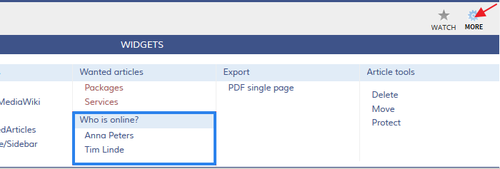
- In the widgetbar WhoIsOnline is integrated as a widget and contains beside the headline a foldable list with the names of the users. (see sketch)
- As a tag, WhoIsOnline can be installed on any editable page.
Technical information[edit | edit source]
Configuration[edit | edit source]
Rights (permissions)[edit | edit source]
Requirements[edit | edit source]
WhoIsOnline requires BlueSpiceFoundation.
Widgetbar[edit | edit source]
If you want to see this information in your widget bar please go to User:USERNAME/Widgetbar and enter
* WHOISONLINE
Now you find links to all logged-in users in your widget bar.
Content area[edit | edit source]
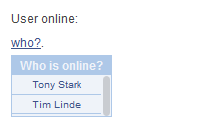

To use this extension in an article (usually main page) you can show this information with a flyout that is customizable. For example:
{{#userslink:(who?)|top:270px;right:300px;background:white;border: 2px solid black;padding:5px;}}.
Or show all logged-in users in a list:
<bs:whoisonline:popup anchortext='Wer ist online?' />
Try free our BlueSpice[edit | edit source]
{{BSExtensionInfobox

        |desc=shows which users have been logged-in in the last 10 minutes.

        |status=stable

        |developer=HalloWelt

        |type=BlueSpice

        |edition=BlueSpice

        |active=Yes

        |compatible=BlueSpice

        |category=Rich Articles

        |license=GPL v3 only

        |docu=https://www.mediawiki.org/wiki/Extension%CB%90WhoIsOnline

        }}

        __TOC__


        ==Description==


        '''WhoIsOnline''' you can see, which users have been logged-in in the last 10 minutes.


        ==Usage / Features==


        * WhoIsOnline displays a list of logged in users.

        * In the widgetbar WhoIsOnline is integrated as a widget and contains beside the headline a foldable list with the names of the users. (see sketch)

        * As a tag, WhoIsOnline can be installed on any editable page.


        ==Technical information==


        ===Configuration===


        ===Rights (permissions)===


        ===Requirements===


        WhoIsOnline requires [[BlueSpiceFoundation]].


        ===Widgetbar===

        If you want to see this information in your [[Archive:Widgetbar|widget bar]] please go to <code>User:USERNAME/Widgetbar</code> and enter


        <pre>* WHOISONLINE


        </pre>

        Now you find links to all logged-in users in your widget bar.


        ::: [[File:WhIsOnl.png|500x169px]]


        ===Content area===

        [[File:BlueSpice-WhoIsOnline-Text-en.png|thumb|left|220px|Screenshot: All logged-in users are shown in the content.]]

        To use this extension in an article (usually main page) you can show this information with a flyout that is customizable. For example:


        <pre>{{#userslink:(who?)|top:270px;right:300px;background:white;border: 2px solid black;padding:5px;}}.


        </pre>


        Or show all logged-in users in a list:


        <pre><bs:whoisonline:popup anchortext='Wer ist online?' />


        </pre>


        ==Try free our BlueSpice==


        [https://en.demo.bluespice.com/wiki/Main_Page BlueSpiceDemo.]


        [[de:{{FULLPAGENAME}}]][[en:{{FULLPAGENAME}}]]


        [[Category:BlueSpice]]

[[Category:Extension]]| Line 59: | Line 59: | ||
[[de:{{FULLPAGENAME}}]][[en:{{FULLPAGENAME}}]] | [[de:{{FULLPAGENAME}}]][[en:{{FULLPAGENAME}}]] | ||
| + | |||
| + | [[Category:BlueSpice]] | ||
[[Category:Extension]] | [[Category:Extension]] | ||