Difference between revisions of "Manual:Extension/BlueSpiceReadConfirmation"
| [unchecked revision] | [unchecked revision] |
(Tag: 2017 source edit) |
(Tag: 2017 source edit) |
Contents
What is BlueSpiceReadConfirmation?[edit | edit source]
Read Confirmation asks for confirmation that an article was read by certain users.
Using BlueSpiceReadConfirmation[edit | edit source]
The prompt to confirm reading the page will appear for any user that is assigned to a page. It helps make sure all assigned users actually read the page they are assigned to.
Enabling read confirmation[edit | edit source]
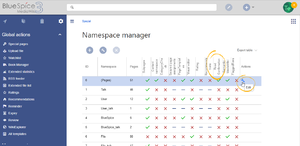
Before read confirmation prompt will appear on a page, BlueSpiceReadConfirmation must previously be enabled for the namespace the page belongs to. This can be set using the BlueSpiceNamespaceManager.
Confirming reading a page[edit | edit source]
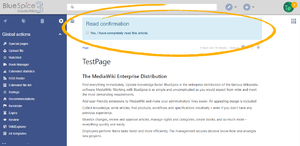


Once BlueSpiceReadConfirmation is enabled for the namespace, upon opening a page, assigned user will see read confirmation prompt. After checking the checkbox "Yes, I have completely read this article", page will be marked as read by that user.
See also[edit | edit source]
Our reference page.
__TOC__


        ==What is BlueSpiceReadConfirmation?==

        '''Read Confirmation''' asks for confirmation that an article was read by certain users.


        ==Using BlueSpiceReadConfirmation==

        The prompt to confirm reading the page will appear for any user that is [[Manual:Extension/BlueSpicePageAssignments|assigned to a page]].

        It helps make sure all assigned users actually read the page they are assigned to.


        ===Enabling read confirmation===

        [[File:ReadConfirmation2.png|thumb]]

        Before read confirmation prompt will appear on a page, BlueSpiceReadConfirmation must previously be enabled for the [[HowTo:Namespaces|namespace]] the page belongs to.

        This can be set using the [[Manual:Extension/BlueSpiceNamespaceManager|BlueSpiceNamespaceManager]].


        ===Confirming reading a page===

            [[File:ReadConfirmation1.png|thumb]]

            Once BlueSpiceReadConfirmation is enabled for the namespace, upon opening a page, assigned user will see read confirmation prompt. After checking the checkbox "Yes, I have completely read this article", page will be marked as read by that user.


            ==See also==


Our [[BlueSpiceReadConfirmation|reference page.]]| Line 13: | Line 13: | ||
Before read confirmation prompt will appear on a page, BlueSpiceReadConfirmation must previously be enabled for the [[HowTo:Namespaces|namespace]] the page belongs to. | Before read confirmation prompt will appear on a page, BlueSpiceReadConfirmation must previously be enabled for the [[HowTo:Namespaces|namespace]] the page belongs to. | ||
This can be set using the [[Manual:Extension/BlueSpiceNamespaceManager|BlueSpiceNamespaceManager]]. | This can be set using the [[Manual:Extension/BlueSpiceNamespaceManager|BlueSpiceNamespaceManager]]. | ||
| + | |||
| + | ===Confirming reading a page=== | ||
| + | [[File:ReadConfirmation1.png|thumb]] | ||
| + | Once BlueSpiceReadConfirmation is enabled for the namespace, upon opening a page, assigned user will see read confirmation prompt. After checking the checkbox "Yes, I have completely read this article", page will be marked as read by that user. | ||
==See also== | ==See also== | ||
Our [[BlueSpiceReadConfirmation|reference page.]] | Our [[BlueSpiceReadConfirmation|reference page.]] | ||