Difference between revisions of "Reference:BlueSpiceTagCloud"
(→Parameters) |
(Changed categories.) |
Description[edit | edit source]
With the Extension BlueSpice TagCloud you can visualize a category overview graphically. You can generate clouds and lists with this extension. The representation is hierarchical, out of the most used category. These categories are shown larger or otherwise highlighted.
Embed TagCloud[edit | edit source]
A tag is provided to integrate the configurable TagCloud into an article. The tag must be inserted in an article of the wiki to make the function visible and usable. You can place it manually in the diting mode of the article. The tag can only be inserted in the Wikicode, not in the Visual Editor.
Tag: <bs:tagcloud>
Permissions[edit | edit source]
Every user who has reading permissions can see the TagCloud. Every user who has editing permissions, can create a TagCloud.
Parameters[edit | edit source]
The TagCloud can be configured using various parameters:
| Parameter | Description |
Value |
Default |
|---|---|---|---|
| width | determines the width of TagCloud | number | 300 |
| showcount | Shows the number how often the category is used in the wiki |
true
|
false |
| float | determines the orientation in the article |
left right |
left |
| count |
defines the number of displayed categories |
number |
40 (all categories = -1) |
| viewtype |
changes the visualization of the list |
viewtype=list viewtype=canvas3d |
simple TagCloud |
Examples[edit | edit source]
<bs:tagcloud/>

<bs:tagcloud width=800 float=right count=15/>

<bs:tagcloud viewtype=canvas3d width=600 count=10/>

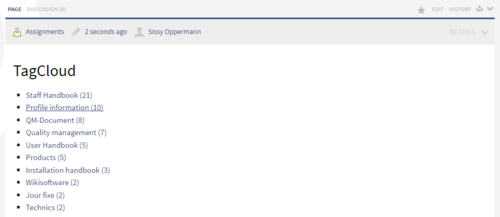
<bs:tagcloud viewtype=list showcount=true count=10/>


==Description==

        With the Extension BlueSpice TagCloud you can visualize a category overview graphically. You can generate clouds and lists with this extension. The representation is hierarchical, out of the most used category. These categories are shown larger or otherwise highlighted.


        ==Embed TagCloud==

        A tag is provided to integrate the configurable TagCloud into an article. The tag must be inserted in an article of the wiki to make the function visible and usable. You can place it manually in the diting mode of the article.  The tag can only be inserted in the Wikicode, not in the Visual Editor.


        Tag: <code><nowiki><bs:tagcloud></nowiki></code>


        ==Permissions==

        Every user who has reading permissions can see the TagCloud. Every user who has editing permissions, can create a TagCloud.


        ==Parameters==

        The TagCloud can be configured using various parameters:


        {| class="contenttable" style="width: 869px; height: 202px;" border="0"

        |-

        !|'''Parameter'''

        !|'''Description'''

        !|

        '''Value'''


        !|'''Default'''

        |-

        ||'''width'''

        ||determines the width of TagCloud

        ||number

        ||300

        |-

        ||'''showcount'''

        ||Shows the number how often the category is used in the wiki

        ||

        true<br /> false


        ||false

        |-

        ||'''float'''

        ||determines the orientation in the article

        ||

        left


        right


        ||left

        |-

        ||'''count'''

        ||

        defines the number of displayed categories


        ||

        number


        ||

        40


        (all categories = -1)


        |-

        ||'''viewtype'''

        ||

        changes the visualization of the list


        ||

        viewtype=list


        viewtype=canvas3d


        ||simple TagCloud

        |}


        ==Examples==


        <code><nowiki><bs:tagcloud/></nowiki></code>

        [[File:TagCloud_en.PNG|thumb|none|500px|Screenshot: Example for TagCloud with default settings, unconfigured]]


        <br/><br/><code><nowiki><bs:tagcloud width=800 float=right count=15/></nowiki></code>

        [[File:TagCloud_2_en.PNG|thumb|none|500px|Screenshot: Example for TagCloud, right-aligned, 15 hits]]


        <br/><br/><code><nowiki><bs:tagcloud viewtype=canvas3d width=600 count=10/></nowiki></code>

        [[File:TagCloud_3D_en.PNG|thumb|none|500px|Screenshot: Example for TagCloud, View 3D, 10 hits, Rotating standard view]]


        <br/><br/><code><nowiki><bs:tagcloud viewtype=list showcount=true count=10/></nowiki></code>

        [[File:TagCloud_list_en.PNG|thumb|none|500px|Screenshot: Example for TagCloud, view Liste]]

[[Category:BlueSpice pro]]| Line 83: | Line 83: | ||
<br/><br/><code><nowiki><bs:tagcloud viewtype=list showcount=true count=10/></nowiki></code> | <br/><br/><code><nowiki><bs:tagcloud viewtype=list showcount=true count=10/></nowiki></code> | ||
[[File:TagCloud_list_en.PNG|thumb|none|500px|Screenshot: Example for TagCloud, view Liste]] | [[File:TagCloud_list_en.PNG|thumb|none|500px|Screenshot: Example for TagCloud, view Liste]] | ||
| + | [[Category:BlueSpice pro]] | ||