Page is a draft due to changes in included resources
You are viewing an old version of this page. Return to the latest version.
Difference between revisions of "Manual:Extension/BlueSpiceAuthors"
| [quality revision] | [quality revision] |
m (Tag: Visual edit) |
m (Tag: Visual edit) |
What is BlueSpiceAuthors?[edit | edit source]
The BlueSpiceAuthors extension displays all users who have contributed to a page.
Where to find Authors[edit | edit source]
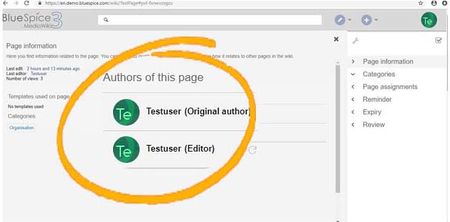
Authors of a page are listed under Authors of this page on the Page information. Each user in the list of authors with an indication for original author or editor.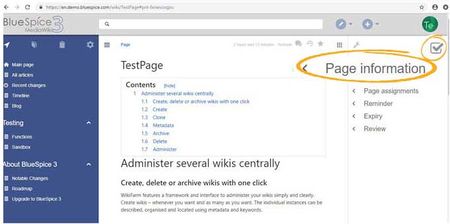
Settings[edit | edit source]
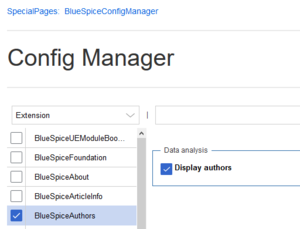
In the Config manager you can change if authores authors are shown on the Page information or not.


Related info
__TOC__
==What is BlueSpiceAuthors?==
The '''BlueSpiceAuthors '''extension displays all users who have contributed to a page.
==Where to find Authors==
Authors of a page are listed under ''Authors of this page'' on the ''Page information.''[[File:Authors2.jpg|thumb|450x450px|link=https://en.wiki.bluespice.com/wiki/File:Authors2.jpg|alt=Page tools|center|Page tools]]Each user in the list of authors with an indication for original author or editor. [[File:Authors3.jpg|thumb|450x450px|link=https://en.wiki.bluespice.com/wiki/File:Authors3.jpg|alt=author info|center|author info]]
==Settings==
In the [[Manual:Extension/BlueSpiceConfigManager|Config manager]] you can change if authoresauthors are shown on the Page information or not.
[[File:Manual:configmanager-authors.png|alt=Config manager|center|thumb|300x300px|Config manager]]
<br />{{Box Links-en|Topic1=[[Reference:BlueSpiceAuthors]]}}
{{Translation}}| Line 11: | Line 11: | ||
| − | In the [[Manual:Extension/BlueSpiceConfigManager|Config manager]] you can change if | + | In the [[Manual:Extension/BlueSpiceConfigManager|Config manager]] you can change if authors are shown on the Page information or not. |
[[File:Manual:configmanager-authors.png|alt=Config manager|center|thumb|300x300px|Config manager]] | [[File:Manual:configmanager-authors.png|alt=Config manager|center|thumb|300x300px|Config manager]] | ||