Difference between revisions of "Manual:Extension/BlueSpiceArticleInfo"
| [quality revision] | [quality revision] |
m (Tag: Visual edit) |
(Tag: Visual edit) |
Contents
- 1 What is BlueSpiceArticleInfo? About the page information
- 2 Using BlueSpiceArticleInfo Configuration
- 3 Configuration
- 4 Related info
BlueSpiceArticleInfo provides additional information on a particular page.
Using BlueSpiceArticleInfoAbout the page information[edit | edit source]
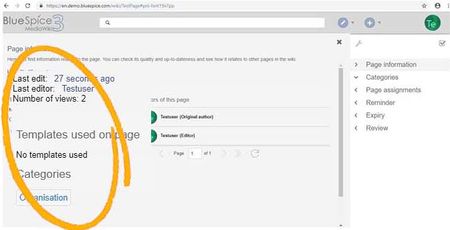
Most The most important information, like the time of the last edit and user who last edited the page, are displayed directly in the view mode of a page. Complete list of information related to the page are displayed in a flyout and are accessible from the right navigationmeta information about a page is displayed on the page information flyout that is part of the quality management tools of the page.
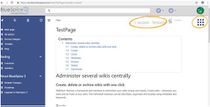
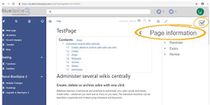
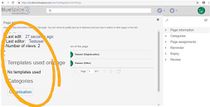
Following The following information are is available here:
- Time of the last edit
- Last editor
- Number of views
- Categories The categories the page belong tobelongs to. These can be edited directly from here.
- Templates used on the page
- Subpages of a page (visible only when the page actually has subpages)
Configuration[edit | edit source]
The page information in the Quality management toolbar is provided by the extension BlueSpiceArticleInfo.
In the Config manager, you can change the following settings: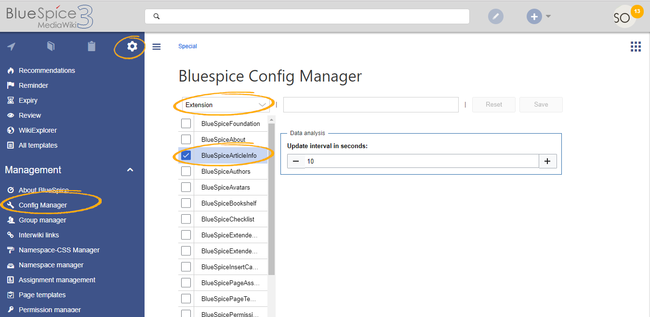
BlueSpiceArticleInfo, together with BlueSpiceAuthors, BlueSpiceReaders, and BlueSpiceExtendedSearch is part of the Page information in the quality management tools.
- Update interval in seconds: Sets the refresh rate for the "Last edit" value. By default, this date is updated every 10 seconds via JavaScript.


Related info
            __TOC__


            :::


            ==What is BlueSpiceArticleInfo?==


            '''BlueSpiceArticleInfo''' provides additional information on a particular page.


            ==Using BlueSpiceArticleInfo==

            Most important information, like the time of the last edit and user who last edited the page, are displayed directly in the view mode of a page.


            Complete list of information related to the page are displayed in a flyout and are accessible from the right navigation{{DISPLAYTITLE:Page information}}

            __TOC__


            ==About the page information==


            The most important meta information about a page is displayed on the page information flyout that is part of the quality management tools of the page.


        {|

        ![[File:ArticleInfo1.jpg|thumb|210px]]

        ![[File:ArticleInfo2.jpg|thumb|210px]]

        ![[File:ArticleInfo3.jpg|thumb|210px]]

        |}


        Following The following information areis available here:


        *Time of the last edit

        *Last editor

        *Number of views

        *Categories page belong to


        The categories the page belongs to. These can be edited directly from here.


        *Templates used on the page

        *Subpages of a page (visible only when the page actually has subpages)


        ==Configuration==


        The page information in the Quality management toolbar is provided by the extension '''BlueSpiceArticleInfo'''.


        In the [[Manual:Extension/BlueSpiceConfigManager|Config manager]], you can change the following settings:<br />[[File:ArticleInfo4.png|Settings in ConfigManager|alt=Settings in ConfigManager|center|650x650px|link=https://en.wiki.bluespice.com/wiki/File:ArticleInfo4.png|thumb]]{{#dpl:title=Manual:Extension/BlueSpiceConfigManager|include=#BlueSpiceArticleInfo}}


        {{Box Links-en|Topic1=[[Reference:BlueSpiceArticleInfo]]}}

        {{Translation}}
| Line 1: | Line 1: | ||
| − | + | {{DISPLAYTITLE:Page information}} | |
__TOC__ | __TOC__ | ||
| − | + | ==About the page information== | |
| − | + | The most important meta information about a page is displayed on the page information flyout that is part of the quality management tools of the page. | |
| − | |||
| − | |||
| − | |||
| − | |||
| − | |||
| − | |||
| − | |||
{| | {| | ||
| Line 19: | Line 12: | ||
|} | |} | ||
| − | + | The following information is available here: | |
*Time of the last edit | *Time of the last edit | ||
*Last editor | *Last editor | ||
*Number of views | *Number of views | ||
| − | * | + | *The categories the page belongs to. These can be edited directly from here. |
*Templates used on the page | *Templates used on the page | ||
*Subpages of a page (visible only when the page actually has subpages) | *Subpages of a page (visible only when the page actually has subpages) | ||
==Configuration== | ==Configuration== | ||
| − | In the [[Manual:Extension/BlueSpiceConfigManager|Config manager]] you can change the following settings:<br />[[File:ArticleInfo4.png|Settings in ConfigManager|alt=Settings in ConfigManager|center|650x650px|link=https://en.wiki.bluespice.com/wiki/File:ArticleInfo4.png|thumb]]{{#dpl:title=Manual:Extension/BlueSpiceConfigManager|include=#BlueSpiceArticleInfo}} | + | The page information in the Quality management toolbar is provided by the extension '''BlueSpiceArticleInfo'''. |
| + | |||
| + | In the [[Manual:Extension/BlueSpiceConfigManager|Config manager]], you can change the following settings:<br />[[File:ArticleInfo4.png|Settings in ConfigManager|alt=Settings in ConfigManager|center|650x650px|link=https://en.wiki.bluespice.com/wiki/File:ArticleInfo4.png|thumb]]{{#dpl:title=Manual:Extension/BlueSpiceConfigManager|include=#BlueSpiceArticleInfo}} | ||
{{Box Links-en|Topic1=[[Reference:BlueSpiceArticleInfo]]}} | {{Box Links-en|Topic1=[[Reference:BlueSpiceArticleInfo]]}} | ||
{{Translation}} | {{Translation}} | ||