Difference between revisions of "Wikitext"
(Tag: Visual edit) |
(Tag: Visual edit) |
Wikitext is a simplified markup language that is used to format and structure text and other data.
While HTML is the most common markup language for web pages, Wikitext is used in wiki systems. Like HTML, it uses tags to mark parts of text or other data.
Contents
- 1 How do I use Wikitext?
-
2 Examples of Wikitext
- 2.1 Text formatting
- 2.2 Structuring
- 2. 2.1 Headings
- 2.2.2 Lists 2.2.
- 3 Tables2.3 Links
- Links / Embedded files
- 2. 3.1 Wiki internal
- 2.3.2 Wiki external 2.2.5
- 4 Files/Images
- Miscellaneous
- 3 Related info
How do I use Wikitext?[edit | edit source]
When you edit a page, you can switch between visual editing and source editing using the editor toolbar.
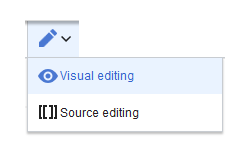
Wikitext can be entered in source editing mode. When you are in visual editing mode, VisualEditor inserts Wikitext "behind the scenes". If VisualEditor doesn't format elements on a page correctly, you can always switch to source editing to correct the issues directly in Wikitext.
Examples of Wikitext[edit | edit source]
Here are some typical examples of Wikitext:
Text formatting[edit | edit source]
-
This is
'''bold''' -
This is
''italic'' -
This is
<u>underlined</u>
Structuring[edit | edit source]
Headings[edit | edit source]
- (1st level): reserved for page title
-
2nd level:
==Section heading== -
3nd level:
===Section sub-heading===
Lists[edit | edit source]
- ordered (numbered):
-
unordered (bulleted):
* -
definition list:
;Fire:provides energy and light
Tables[edit | edit source]
-
This is a
==Heading== -
This is an
*unordered list element -
Table:
{| class="wikitable"
-
|-
-
!header 1
-
!header 2
-
|-
-
|row 1, cell 1
-
|row 1, cell 2
-
|-
-
|row 2, cell 1
-
|row 2, cell 2
-
|}
Links / Embedded files[edit | edit source]
Wiki internal[edit | edit source]
Link to internal wiki page
[[
Wikipage|Label]]
[[Pancake|Best
Pancake]]
Link to external website
                    [url label]
[https://wikipedia.org Wikipedia]
'Link with parameters
<span class="plainlinks">[{{fullurl:{{FULLPAGENAME}}|action=edit}} Edit this page]</span>
Wiki external[edit | edit source]
-
[[http://www.hallowelt.com Hallo Welt!]] -
http://www.hallowelt.com
[[Media:Someimage.png]]
[[File:Someimage.png]]
This link opens the referenced page in edit mode in a new tab.
Embed image/file
-
[[Datei:image-or-pdf-name.png]]- - - Image/PDF is embedded on page- the wiki checks, if a preview can be generated (e.g., for "png", "jpeg", "gif", "svg") and
- embeds
- the preview
- otherwise, a link
- to the
- file description page
[[Media:SomePDF.pdf]]-
is created
- can be embedded: PDF, Tiff (
-
- with extension)
- cannot be embedded: Microsoft Office
-
- - und Libre Office
-
- -Dateien; Shell-
-
- Skripte, ...
-
[[Media:image-or-pdf--name.png]]- - - - Links to image / PDF -
[[:Datei:image-or-pdf--name.png]]- - - Links to file description page
Miscellaneous[edit | edit source]
| Type of wikiText | Example |
|---|---|
| Special character |
ã → ã
UTF-8 is possible |
| Comment |
<!-- unnoticed --> |
| No "wiki translation" |
<nowiki> and </pre> |
| Table of contents |
__TOC__ and __NOTOC__ |
| Signature |
--~~~ |
| Redirect |
#REDIRECT [[targetpage]] |
| Template |
{{template name}} |
Related info
<section begin="training-intro" /> Wikitext is a simplified markup language that is used to format and structure text and other data. <section end="training-intro" /> While HTML is the most common markup language for web pages, Wikitext is used in wiki systems. Like HTML, it uses tags to mark parts of text or other data. ==How do I use Wikitext?== When you edit a page, you can switch between visual editing and source editing using the editor toolbar. [[File:Manual:editing.png|alt=Screenshot: Visual Editor switch edit mode|center]] Wikitext can be entered in source editing mode. When you are in visual editing mode, VisualEditor inserts Wikitext "behind the scenes". If VisualEditor doesn't format elements on a page correctly, you can always switch to source editing to correct the issues directly in Wikitext.<br /> ==Examples of Wikitext== Here are some typical examples of Wikitext: <section begin="wikitextTrainingtraining" /> ===Text formatting=== <section begin="training-slide1" /> *This is <code><nowiki>'''bold'''</nowiki></code> *This is <code><nowiki>''italic''</nowiki></code> *This is <code><nowiki><u>underlined</u></nowiki></code><section end="training-slide1" /> ===Structuring=== ====Headings==== *(1st level): ''reserved for page title'' *2nd level: <code>==Section heading==</code> *3nd level: <code>===Section sub-heading===</code> ====Lists==== *ordered (numbered): <syntaxhighlight lang="html"> # One ## One-point-one ### One-point-one-point-one # Two </syntaxhighlight> *unordered (bulleted): <code>*</code> *definition list: <code>;Fire:provides energy and light</code> ====Tables==== <syntaxhighlight lang="html"> {| class="wikitable" |- !header 1 !header 2 |- <section begin="training-slide2" /> *This is a <code>==Heading==</code> *This is an <code>*unordered list element</code> *Table:<syntaxhighlight lang="text"> {| class="wikitable" |- !header 1 !header 2 |- |row 1, cell 1 |row 1, cell 2 |- |- |row 2, cell 1 |row 2, cell 2 |} |}</syntaxhighlight> <section end="training-slide2" /> ===Links=== ====Wiki internal==== <ul> <li><code><nowiki>[[Page title]]</nowiki></code></li> <li><code><nowiki>[[Pancake | Best pancake]]</nowiki></code> <ul class="slideexclude"> <li>this creates a link to the page "Pancake" with the link description "Best pancake".</li> <li>see also the Mediawiki help page for links: [https://www.mediawiki.org/wiki/Help:Links mediawiki.org/wiki/Help:Links] and the</li> <li>help section about external links to internal pages ([https://www.mediawiki.org/wiki/Help:Links#External_links_to_internal_pages mediawiki.org/wiki/Help:Links#External_links_to_internal_pages])</li> </ul> </li> <li>links with parameters / links that open in a new tab: <code><nowiki> / Embedded files=== <section begin="training-slide3" /> '''Link to internal wiki page''' <syntaxhighlight lang="text"> [[Wikipage|Label]] [[Pancake|Best Pancake]] </syntaxhighlight> '''Link to external website''' <syntaxhighlight lang="text"> [url label] [https://wikipedia.org Wikipedia] </syntaxhighlight> '''Link with parameters'' <syntaxhighlight lang="text"> <span class="plainlinks">[{{fullurl:{{FULLPAGENAME}}|action=edit}} Edit this page]</nowiki><nowiki></span></nowiki></code> </li> </ul> ====Wiki external==== *<code><nowiki>[[http://www.hallowelt.com Hallo Welt!]]</nowiki></code> *<code><nowiki>http://www.hallowelt.com</nowiki></code> ===Files/Images=== <ul> <li>'''Image link:''' <code><nowiki>[[Media:Someimage.png]]</nowiki></code></li> <li>'''Embed an image:''' <code><nowiki>[[File:Someimage.png]]</nowiki></code> <ul class="slideexclude"> <li>This embeds the image ''Someimage.png'' on the page.</li> <li>embedding only happens when a link points to the "File" namespace</li> <li>the wiki checks if a preview/thumbnail can be created automatically (e.g. image formats like </syntaxhighlight> This link opens the referenced page in edit mode in a new tab. <section end="training-slide3" /> '''Embed image/file''' <br /> <section begin="training-slide4" /> *<code>[['''Datei:'''<nowiki>image-or-pdf-name.png]]</nowiki></code> - - - '''Image/PDF is embedded on page'''<section end="training-slide4" /> **the wiki checks, if a preview can be generated (e.g., for "png", "jpeg", "gif", "svg") and then embeds athe preview into the page</li> <li>otherwise a link will be created to the wikipage in the "File" namespace (aka "file description page")</li> </ul> </li> <li>'''Embed a file:''' <code><nowiki>[[Media:SomePDF.pdf]]</nowiki></code> <ul class="slideexclude"> <li>can **otherwise, a link to the file description page is created ***can be embedded: PDF, Tiff (needswith extension)</li> <li> ***cannot be embedded: Microsoft Office and- und Libre Office files-Dateien; Shell-Scripts, ...</li> </ul> </li> </ul> '''Formatting example:'''<syntaxhighlight lang="html"> File:Someimage.png|thumb|50px|left|alt=Screenshot of the edit menu|The edit menu </syntaxhighlight> Skripte, ...<section begin="training-slide4" /> *<code>[['''Media:'''<nowiki>image-or-pdf--name.png]]</nowiki></code> - - - - '''Links to image / PDF''' *<code>[[''':Datei:'''<nowiki>image-or-pdf--name.png]]</nowiki></code> - - - '''Links to file description page''' <section end="training-slide4" /> <section end="training" /> ===Miscellaneous=== {| class="contenttable" !Type of wikiText !Example |- |Special character |'''<code>&atilde;</code> → ã''' '''<code>&ccedil;</code> → ç''' UTF-8 is possible |- |Comment |<code>'''<nowiki><!-- unnoticed --></nowiki>'''</code> |- |No "wiki translation" |<code>'''<nowiki'''></code> and <code>'''</pre'''></code> |- |Table of contents |<code>'''<nowiki>__TOC__</nowiki>'''</code> and <code>'''<nowiki>__NOTOC__</nowiki>'''</code> |- |Signature |<code>'''<nowiki>--~~~</nowiki>'''</code> |- |Redirect |<code>'''<nowiki>#REDIRECT [[targetpage]]</nowiki>'''</code> |- |Template |<code>'''<nowiki>{{template name}}</nowiki>'''</code> |} <section end="wikitextTraining" /> {{Box Links-en |Topic1=[https://meta.wikimedia.org/wiki/Help:Wikitext_examples meta.wikimedia.org/wiki/Help:Wikitext_examples] |Topic2=[[MagicWords|Magic words]]}} [[en:{{FULLPAGENAME}}]] [[de:Wikitext]] [[Category:Training]] [[Category:Term]] [[Category:Concept]]
| Line 1: | Line 1: | ||
| − | Wikitext is a simplified markup language that is used to format and structure text and other data. While HTML is the most common markup language for web pages, Wikitext is used in wiki systems. Like HTML, it uses tags to mark parts of text or other data. | + | <section begin="training-intro" /> |
| + | |||
| + | Wikitext is a simplified markup language that is used to format and structure text and other data. <section end="training-intro" /> | ||
| + | |||
| + | While HTML is the most common markup language for web pages, Wikitext is used in wiki systems. Like HTML, it uses tags to mark parts of text or other data. | ||
==How do I use Wikitext?== | ==How do I use Wikitext?== | ||
| Line 9: | Line 13: | ||
==Examples of Wikitext== | ==Examples of Wikitext== | ||
Here are some typical examples of Wikitext: | Here are some typical examples of Wikitext: | ||
| − | <section begin=" | + | <section begin="training" /> |
===Text formatting=== | ===Text formatting=== | ||
| + | <section begin="training-slide1" /> | ||
*This is <code><nowiki>'''bold'''</nowiki></code> | *This is <code><nowiki>'''bold'''</nowiki></code> | ||
*This is <code><nowiki>''italic''</nowiki></code> | *This is <code><nowiki>''italic''</nowiki></code> | ||
| − | *This is <code><nowiki><u>underlined</u></nowiki></code> | + | *This is <code><nowiki><u>underlined</u></nowiki></code><section end="training-slide1" /> |
===Structuring=== | ===Structuring=== | ||
| + | <section begin="training-slide2" /> | ||
| − | ==== | + | *This is a <code>==Heading==</code> |
| + | *This is an <code>*unordered list element</code> | ||
| + | *Table:<syntaxhighlight lang="text"> | ||
| + | {| class="wikitable" | ||
| + | |- | ||
| + | !header 1 | ||
| + | !header 2 | ||
| + | |- | ||
| + | |row 1, cell 1 | ||
| + | |row 1, cell 2 | ||
| + | |- | ||
| + | |row 2, cell 1 | ||
| + | |row 2, cell 2 | ||
| + | |}</syntaxhighlight><section end="training-slide2" /> | ||
| − | |||
| − | |||
| − | |||
| − | === | + | ===Links / Embedded files=== |
| + | <section begin="training-slide3" /> | ||
| − | + | '''Link to internal wiki page''' | |
| − | <syntaxhighlight lang=" | + | <syntaxhighlight lang="text"> |
| − | + | [[Wikipage|Label]] | |
| − | + | [[Pancake|Best Pancake]] | |
| − | + | </syntaxhighlight> | |
| − | + | '''Link to external website''' | |
| + | <syntaxhighlight lang="text"> | ||
| + | [url label] | ||
| + | [https://wikipedia.org Wikipedia] | ||
</syntaxhighlight> | </syntaxhighlight> | ||
| − | + | '''Link with parameters'' | |
| − | + | <syntaxhighlight lang="text"> | |
| − | + | <span class="plainlinks">[{{fullurl:{{FULLPAGENAME}}|action=edit}} Edit this page]</span> | |
| − | |||
| − | |||
| − | <syntaxhighlight lang=" | ||
| − | |||
| − | |||
| − | |||
| − | |||
| − | |||
| − | |||
| − | |||
| − | |||
| − | |||
| − | |||
| − | |||
</syntaxhighlight> | </syntaxhighlight> | ||
| + | This link opens the referenced page in edit mode in a new tab. | ||
| + | <section end="training-slide3" /> | ||
| − | + | '''Embed image/file''' | |
| − | = | + | <br /> |
| + | <section begin="training-slide4" /> | ||
| − | + | *<code>[['''Datei:'''<nowiki>image-or-pdf-name.png]]</nowiki></code> - - - '''Image/PDF is embedded on page'''<section end="training-slide4" /> | |
| − | + | **the wiki checks, if a preview can be generated (e.g., for "png", "jpeg", "gif", "svg") and embeds the preview | |
| − | + | **otherwise, a link to the file description page is created | |
| − | + | ***can be embedded: PDF, Tiff (with extension) | |
| − | + | ***cannot be embedded: Microsoft Office- und Libre Office-Dateien; Shell-Skripte, ...<section begin="training-slide4" /> | |
| − | + | *<code>[['''Media:'''<nowiki>image-or-pdf--name.png]]</nowiki></code> - - - - '''Links to image / PDF''' | |
| − | + | *<code>[[''':Datei:'''<nowiki>image-or-pdf--name.png]]</nowiki></code> - - - '''Links to file description page''' | |
| − | + | <section end="training-slide4" /> | |
| − | + | <section end="training" /> | |
| − | |||
| − | |||
| − | |||
| − | |||
| − | |||
| − | |||
| − | *<code | ||
| − | |||
| − | |||
| − | |||
| − | |||
| − | |||
| − | |||
| − | |||
| − | |||
| − | |||
| − | |||
| − | |||
| − | |||
| − | </ | ||
| − | < | ||
| − | |||
| − | < | ||
| − | |||
| − | |||
| − | </ | ||
| − | |||
| − | |||
| − | |||
| − | |||
| − | |||
| − | ''' | ||
| − | |||
| − | |||
===Miscellaneous=== | ===Miscellaneous=== | ||