Difference between revisions of "Manual:Extension/BlueSpiceUniversalExport/Customization"
← Manual:Extension/BlueSpiceUniversalExport/Customization
| [unchecked revision] | [unchecked revision] |
(Created page with "{{Compatibility|Note text=In BlueSpice pro Cloud, it is possible to adjust some PDF template settings directly in the wiki. In other editions, the adjustments need to be made...") (Tag: Visual edit) |
(Changed categories.) |
Compatibility info: In BlueSpice pro Cloud, it is possible to adjust some PDF template settings directly in the wiki. In other editions, the adjustments need to be made directly on the server. These instructions only explain the functionality in the Cloud.
[edit | edit source]
By default, the PDF template contains 3 sections for the header and 3 sections for the footer.
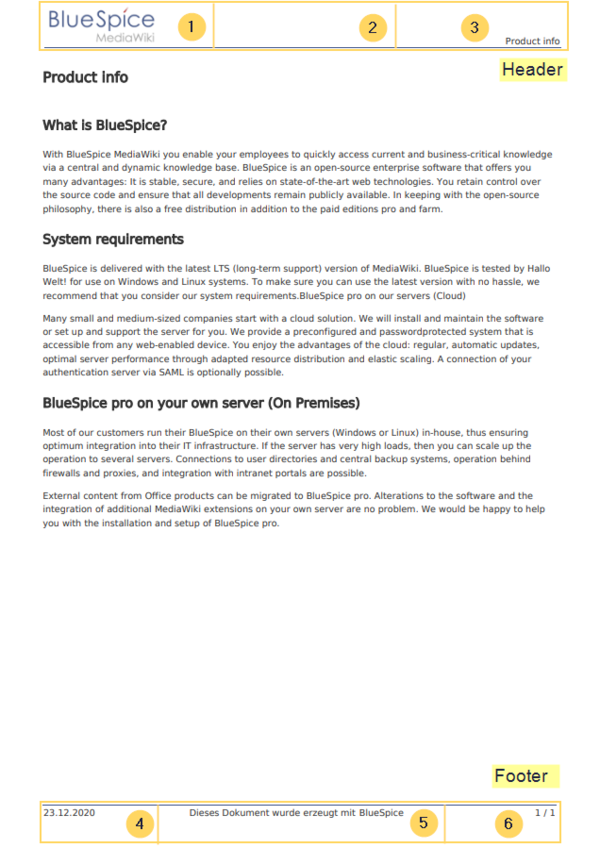
Both the content and the number of columns in the header and footer area can be edited in the following files.
- MediaWiki:UniversalExport/PDF/Default/Header.html
- MediaWiki:UniversalExport/PDF/Default/Footer.html
Available parameters[edit | edit source]
The following content can be added to each section in the header or footer:
| Parameter | Description |
|---|---|
| logo | current wiki logo |
| title | title of the page. In books, this is the title of the book page. |
| subtitle | |
| currentpagenumber | number of the current page |
| totalpagescount | total number of pages |
| url | URL of the wiki page |
| user | username of user who printed the page |
| exportdate | date of PDF-creation |
| exporttime | time of PDF-creation |
Each parameter is added to the header or footer enclosed in three curly brackets, for example: {{{logo}}}.
In addition, you can simply type in regular text in each section.
Customizing the header[edit | edit source]
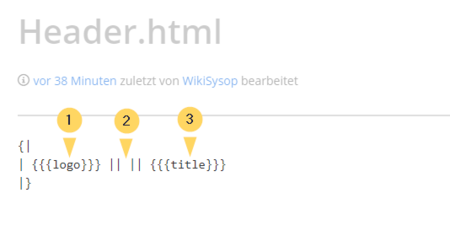
The header contains a wiki table with three columns. The default content for the first column is the logo of the wiki and the last column shows the page title. The middle column is empty.
To make changes to the header:
-
Open the page MediaWiki:UniversalExport/PDF/Default/Header.html in edit mode.


{{Compatibility|Note text=In BlueSpice pro Cloud, it is possible to adjust some PDF template settings directly in the wiki. In other editions, the adjustments need to be made directly on the server. These instructions only explain the functionality in the Cloud.}}


        == Header and footer ==

        By default, the PDF template  contains 3 sections for the header and 3 sections for the footer.


        <br />

        [[File:Manual:PDF-header-footer-standard.png|alt=Standard PDF template|center|thumb|848x848px|Standard PDF template]]

        Both the content and the number of columns in the header and footer area can be edited in the following files.


        * MediaWiki:UniversalExport/PDF/Default/Header.html

        * MediaWiki:UniversalExport/PDF/Default/Footer.html


        === Available parameters ===

        The following content can be added to each section in the header or footer:

        {| class="wikitable" style="width:100%;"

        |+

        !Parameter

        !Description

        |-

        |logo

        |current wiki logo

        |-

        |title

        |title of the page. In books, this is the title of the book page.

        |-

        |subtitle

        |

        |-

        |currentpagenumber

        |number of the current page

        |-

        |totalpagescount

        |total number of pages

        |-

        |url

        |URL of the wiki page

        |-

        |user

        |username of user who printed the page

        |-

        |exportdate

        |date of PDF-creation

        |-

        |exporttime

        |time of PDF-creation

        |}

        Each parameter is added to the header or footer enclosed in three curly brackets, for example:  <code><nowiki>{{{logo}}}</nowiki></code>.


        In addition, you can simply type in regular text in each section.


        === Customizing the header ===

        The header contains a wiki table with three columns. The default content for the first column is the logo of the wiki and the last column shows the page title. The middle column is empty.


        '''To make changes to the header:'''


        # Open the page ''MediaWiki:UniversalExport/PDF/Default/Header.html'' in edit mode. <br />[[File:Manual:PDF-header-table.png|alt=Header table|center|thumb|450x450px|Header table]]<br />

[[Category:BlueSpice Cloud]]| Line 54: | Line 54: | ||
# Open the page ''MediaWiki:UniversalExport/PDF/Default/Header.html'' in edit mode. <br />[[File:Manual:PDF-header-table.png|alt=Header table|center|thumb|450x450px|Header table]]<br /> | # Open the page ''MediaWiki:UniversalExport/PDF/Default/Header.html'' in edit mode. <br />[[File:Manual:PDF-header-table.png|alt=Header table|center|thumb|450x450px|Header table]]<br /> | ||
| + | [[Category:BlueSpice Cloud]] | ||