Difference between revisions of "Templates download/Messagebox"
(Tag: Visual edit) |
(Tag: Visual edit) |
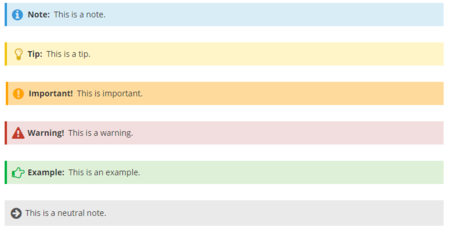
The symbol can be activated and deactivated.
Importing the template[edit | edit source]
The import file is included in the archive file HW-messagebox.zip. Unpack the zip file first.
On the page Special:Import follow these steps:
- Select file and choose HW-messagebox.xml.
- Enter an Interwiki prefix. Since this field is required, simply add hw (for hallowelt).
- Keep the selection Import to default locations.
- Click Sie Upload file... .
The template is now available in your wiki and can be added to a page from the VisualEditor Insert>Template link. The standard background color of a box can be overwritten manually. For example, you can change the gray background of the neutral box to any color you want. A color table with hex values can be found here, for example: https://www.w3schools.com/colors/colors_picker.asp. Since the text color is dark, you should choose a very light background color.
Pages included in the import[edit | edit source]
The xml import creates the following files in your wiki:
- Template:Messagebox
- Template:Messagebox/styles.css
Alignment adjustments[edit | edit source]
By default, the box is displayed in full-width. This means that it is displayed below any image that is used directly before the box.
To change this behavior to keep the box within the text-flow you can make the following change in Template:Messagebox/styles.css:
For the css-selector .hw-messagebox, replace the declaration "clear:both" with "overflow:hidden".
Before:
                    .hw-messagebox {
...
clear:both;
}
                    .hw-messagebox {
...
overflow hidden;
}


<div class="downloadarea">


        <span class="getButton">[[Media:HW-messagebox.zip|Download]]</span>


        [[File:HW-messagebox-en.png|450x450px]]


        </div>This template can be integrated into every wiki page from the editor toolbar (VisualEditor). The type of box (hint, tip, warning, etc.) can be specified as a parameter. This parameter sets the background color as well as the optional icon.


        The symbol can be activated and deactivated.

        ==Importing the template==

        The import file is included in the archive file ''HW-messagebox.zip''. Unpack the zip file first.


        On the page ''Special:Import'' follow these steps:


        #'''Select file''' and choose ''HW-messagebox.xml''.

        #'''Enter''' an Interwiki prefix. Since this field is required, simply add ''hw'' (for hallowelt).

        #'''Keep''' the selection ''Import to default locations''.

        #'''Click''' Sie ''Upload file...'' .


        The template is now available in your wiki and can be added to a page from the VisualEditor ''Insert>Template'' link. The standard background color of a box can be overwritten manually. For example, you can change the gray background of the neutral box to any color you want. A color table with hex values can be found here, for example: https://www.w3schools.com/colors/colors_picker.asp. Since the text color is dark, you should choose a very light background color.


        <br />


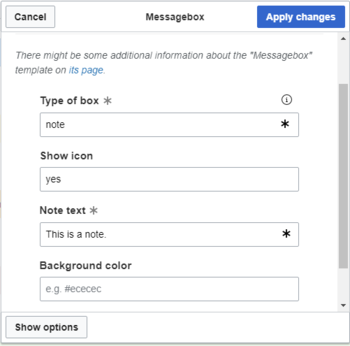
        [[File:HW-messagebox-templatedata.png|alt=Visual editor dialog for the message box|center|thumb|350x350px|Visual editor dialog for the message box]]<br />

        ==Pages included in the import==

        The xml import creates the following files in your wiki:


        *Template:Messagebox

        *Template:Messagebox/styles.css


            == Alignment adjustments ==

            By default, the box is displayed in full-width. This means that it is displayed below any image that is used directly before the box.


            To change this behavior to keep the box within the text-flow you can make the following change in Template:Messagebox/styles.css:


            For the css-selector ''.hw-messagebox'', '''replace''' the declaration "clear:both" with "overflow:hidden".


            Before:<syntaxhighlight lang="css">

            .hw-messagebox {

            ...

            clear:both;

            }


            </syntaxhighlight>Afterwards:<syntaxhighlight lang="css">

            .hw-messagebox {

            ...

            overflow hidden;

            }


            </syntaxhighlight>

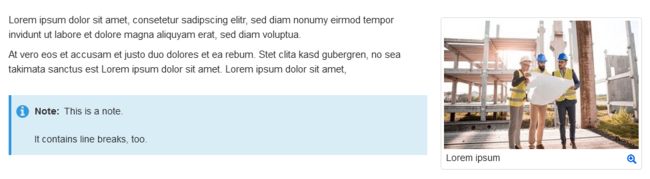
            [[File:hw-messagebox-textflow.png|alt=Messagebox within text-flow|center|thumb|650x650px|Messagebox within text-flow]]
| Line 26: | Line 26: | ||
*Template:Messagebox | *Template:Messagebox | ||
*Template:Messagebox/styles.css | *Template:Messagebox/styles.css | ||
| + | |||
| + | == Alignment adjustments == | ||
| + | By default, the box is displayed in full-width. This means that it is displayed below any image that is used directly before the box. | ||
| + | |||
| + | To change this behavior to keep the box within the text-flow you can make the following change in Template:Messagebox/styles.css: | ||
| + | |||
| + | For the css-selector ''.hw-messagebox'', '''replace''' the declaration "clear:both" with "overflow:hidden". | ||
| + | |||
| + | Before:<syntaxhighlight lang="css"> | ||
| + | .hw-messagebox { | ||
| + | ... | ||
| + | clear:both; | ||
| + | } | ||
| + | </syntaxhighlight>Afterwards:<syntaxhighlight lang="css"> | ||
| + | .hw-messagebox { | ||
| + | ... | ||
| + | overflow hidden; | ||
| + | } | ||
| + | </syntaxhighlight> | ||
| + | [[File:hw-messagebox-textflow.png|alt=Messagebox within text-flow|center|thumb|650x650px|Messagebox within text-flow]] | ||