Difference between revisions of "Manual:Extension/BlueSpiceReadConfirmation"
| [unchecked revision] | [unchecked revision] |
(→How to create a read confirmation) |
(→How to create a read confirmation) |
Contents
What is ReadConfirmation?[edit | edit source]
Read Confirmation ask for confirmation that an article was read by certain users.
Where to find Assignments that you are responsible for?[edit | edit source]
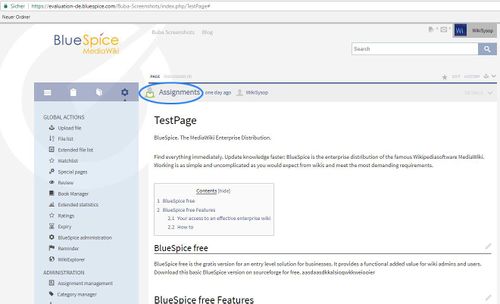
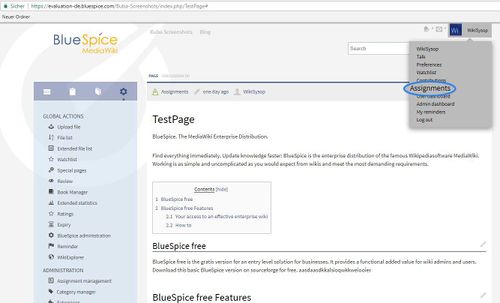
Or go to upper right corner, click on your name and in combo box you will find:"assignments". When you click on "assignments" you will get an article or articles which you are assigned to.
How to use read confirmation[edit | edit source]
Click on one of the articles that you are assigned and you will get:
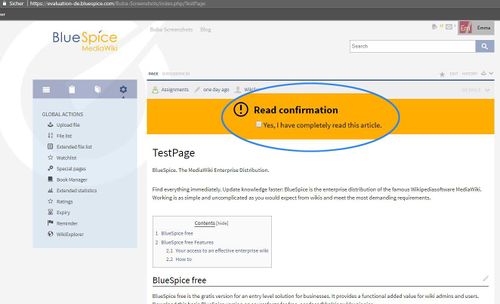
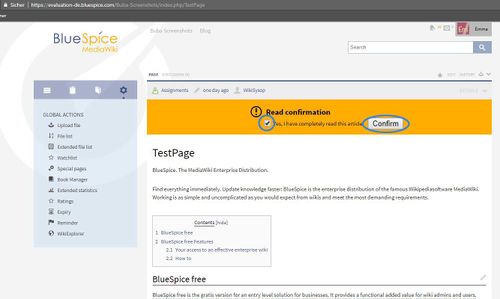
With ReadConfirmation responsible editors are required to confirm that they have had read the article. On an article they are responsible for, they will get a notification containing an option to confirm that the article has been read.
How to create a read confirmation[edit | edit source]
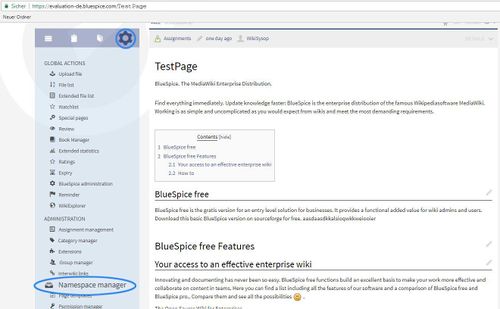
For example TestUser007 will be assigned for ReadConfirmation of TestPage.
Frst step Namespace Manager:
__HIDETITLE__<br /><bs:bookshelf src="Book:User manual" />


        __TOC__


        ==What is ReadConfirmation?==


        '''Read Confirmation''' ask for confirmation that an article was read by certain users.


        ==Where to find Assignments that you are responsible for?==


        ::: [[File:ReadConf1.jpg|500x304px]]


        Or go to upper right corner, click on your name and in combo box you will find:"assignments". When you click on "assignments" you will get an article or articles which you are assigned to.


        ::: [[File:ReadConf2.jpg|500x303px]]


        ==How to use read confirmation==


        Click on one of the articles that you are assigned and you will get:


        ::: [[File:ReadCon2a.jpg|500x304px]]


        With ReadConfirmation responsible editors are required to confirm that they have had read the article. On an article they are responsible for, they will get a notification containing an option to confirm that the article has been read.


        ::: [[File:ReadCon3.jpg|500x299px]]


        ==How to create a read confirmation==


        For example TestUser007 will be assigned for ReadConfirmation of TestPage.


        Frst step Namespace Manager:


        ::: [[File:ReadCon4_copy.jpg|500x309px]]
| Line 29: | Line 29: | ||
==How to create a read confirmation== | ==How to create a read confirmation== | ||
| − | |||
| − | |||
Frst step Namespace Manager: | Frst step Namespace Manager: | ||
::: [[File:ReadCon4_copy.jpg|500x309px]] | ::: [[File:ReadCon4_copy.jpg|500x309px]] | ||