Difference between revisions of "Manual:Extension/BlueSpiceSignHere"
| [unchecked revision] | [unchecked revision] |
(→What is Signhere?) |
Contents
What is SignhereBlueSpiceSignHere?[edit | edit source]
SignHere BlueSpice Sign Here allows you to quickly sign off a wiki article.
How to add Signhere?[edit | edit source]
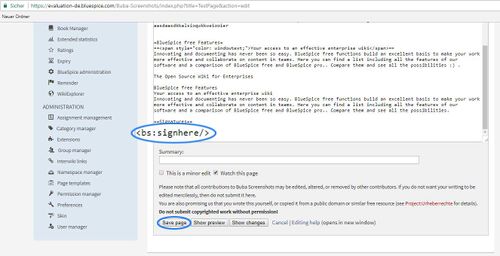
In edit mode, in article add: <bs:signhere/> as on the screenshot below, and save
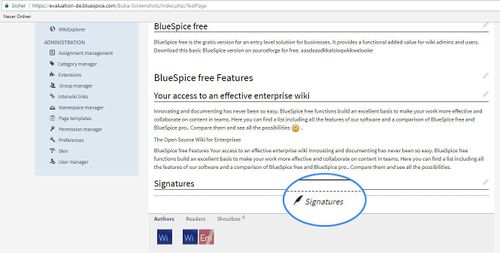
When this tag is added to a page, a field to add a signature appears:
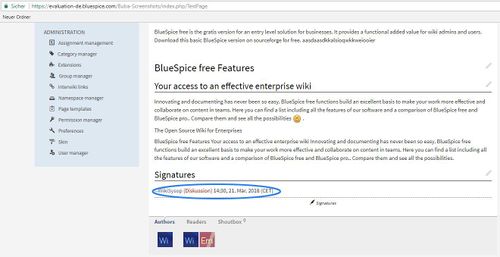
When clicked, this field will generate a signature above itself
Visibility[edit | edit source]
Will be shown in view mode of an Article. Everyone with edit right will be able to sign.
Sorting[edit | edit source]
Signatures appear in the order they were added.
Scaling[edit | edit source]
All signatures will always be shown.
Restrictions[edit | edit source]
Question of forgery was discussed. Reason is that signatures will be added as text, and therefore could be edited by other users. This is not obvious at first glance (while reading). However, every change will be visible in the log. So it can be known for sure, if the signatures have been changed after the fact.
See also[edit | edit source]
Our reference page.
__HIDETITLE__


        <bs:bookshelf src="Book:User manual" />


        __TOC__


        ==What is Signhere?==


            '''SignHereBlueSpiceSignHere?==


            '''BlueSpice Sign Here''' allows you to quickly sign off a wiki article.


        ==How to add Signhere?==


        In edit mode, in article add: '''<nowiki><bs:signhere/></nowiki>''' as on the screenshot below, and '''save'''


        ::: [[File:SgHre1.jpg|500x256px]]


        When this tag is added to a page, a field to add a signature appears:


        ::: [[File:SgnHre2.jpg|500x253px]]


        When clicked, this field will generate a signature above itself


        ::: [[File:SgnHre3.jpg|500x257px]]


        ==Visibility==


        <span class="mw-headline">Will be shown in view mode of an Article. Everyone with edit right will be able to sign.</span>


        ==Sorting==


        <span class="mw-headline">Signatures appear in the order they were added.</span>


        ==Scaling==

        All signatures will always be shown.


        ==Restrictions==

        Question of forgery was discussed. Reason is that signatures will be added as text, and therefore could be edited by other users. This is not obvious at first glance (while reading). However, every change will be visible in the log. So it can be known for sure, if the signatures have been changed after the fact.


        ==See also==

Our [https://en.help.bluespice.com/wiki/BlueSpiceSignHere reference page].| Line 4: | Line 4: | ||
__TOC__ | __TOC__ | ||
| − | ==What is | + | ==What is BlueSpiceSignHere?== |
| − | ''' | + | '''BlueSpice Sign Here''' allows you to quickly sign off a wiki article. |
==How to add Signhere?== | ==How to add Signhere?== | ||