You are viewing an old version of this page. Return to the latest version.
Difference between revisions of "Reference:BlueSpiceDashboards"
m (1 revision: Migration) |
Get an overview of important information on the wiki.
In BlueSpice there are two Dashboards: the User-Dashboard and the Admin-Dashboard. Every user can adapt his dashboard according to his needs.
Technical background[edit | edit source]
Information is available in small windows (Portlets). Every portlet can be added, adjusted or deleted.
Where do I find Dashboards?[edit | edit source]
Where do I find the user dashboard?[edit | edit source]
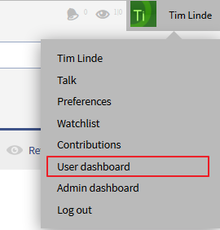
Where do I find the admin dashboard?[edit | edit source]
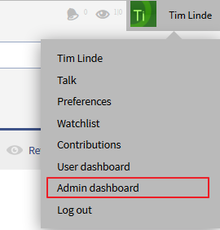
Add Portlets[edit | edit source]
Adjust you dashboard by clicking on the green plus symbol  . Choose from the list of portlets the ones you want to use.
Available portlets for the user dashboard[edit | edit source]
- RSS feed
- Calendar
- My edits
- Most edited pages
- Most viewed pages
- Most active users (by edits)
- Your responsibilities
- Number of users
- Number of edits
- Number of pages
Available portlets for the admin dashboard[edit | edit source]
- RSS feed
- My edits
- Most edited pages
- Most viewed pages
- Number of users
- Number of edits
- Number of pages
- Recent search terms
Edit dashboards[edit | edit source]
Add, adjust, edit or delete portlets:
| Symbol | Meaning |
|---|---|
 |
Fold out portlets |
 |
Fold in portlets |
 |
Edit a portlet (settings vary from portlet to portlet) |
 |
Delete a portlet (stop displaying this information - the portlet can be reactivated at any time) |
USe drag and drop to change the order of the portlets.
Example[edit | edit source]
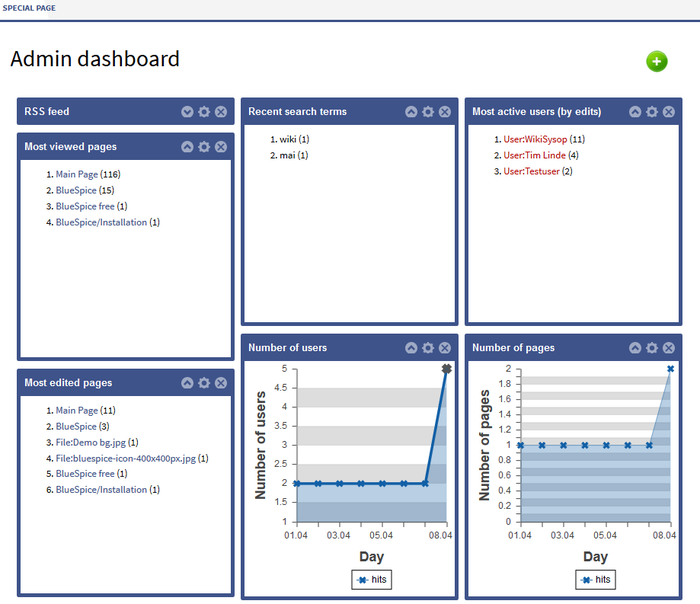


        __NOTOC__


        Get an overview of important information on the wiki. <br />

        In BlueSpice there are two Dashboards: the User-Dashboard and the Admin-Dashboard. Every user can adapt his dashboard according to his needs.


        ==Technical background==

        Information is available in small windows (Portlets). Every portlet can be added, adjusted or deleted.


        ==Where do I find Dashboards?==

        ===Where do I find the user dashboard?===

        [[File:BlueSpice223-UserDashboard-Dropdown-en.png|thumb|none|Screenshots:Zugang zum Benutzerdashboard über den Benutzerbereich.|220px]]


        ===Where do I find the admin dashboard?===

        [[File:BlueSpice223-AdminDashboard-Dropdown-en.png|thumb|none|Screenshots:Zugang zum Admincockpit über den Benutzerbereich.|220px]]


        ==Add Portlets==

        Adjust you dashboard by clicking on the green plus symbol [[File:Btn-plus.png|Btn-plus.png]]. Choose from the list of portlets the ones you want to use.


        ===Available portlets for the user dashboard===


        * RSS feed

        * Calendar

        * My edits

        * Most edited pages

        * Most viewed pages

        * Most active users (by edits)

        * Your responsibilities

        * Number of users

        * Number of edits

        * Number of pages


        ===Available portlets for the admin dashboard===


        * RSS feed

        * My edits

        * Most edited pages

        * Most viewed pages

        * Number of users

        * Number of edits

        * Number of pages

        * Recent search terms


        ==Edit dashboards==

        Add, adjust, edit or delete portlets:


        {| class="contenttable" style="width: 700px;"

        |-

        !|'''Symbol'''

        !|'''Meaning'''

        |-

        ||[[File:Btn-Cockpit-Portlet_ausklappen.png|Btn-Cockpit-Portlet_ausklappen.png]]

        ||Fold out portlets

        |-

        ||[[File:Btn-Cockpit-Portlet_einklappen.png|Btn-Cockpit-Portlet_einklappen.png]]

        ||Fold in portlets

        |-

        ||[[File:Btn-Cockpit-Portlet_bearbeiten.png|Btn-Cockpit-Portlet_bearbeiten.png]]

        ||Edit a portlet (settings vary from portlet to portlet)

        |-

        ||[[File:Btn-Cockpit-Portlet_löschen.png|Btn-Cockpit-Portlet_löschen.png]]

        ||Delete a portlet (stop displaying this information - the portlet can be reactivated at any time)

        |}


        USe drag and drop to change the order of the portlets.


        ==Example==

        [[File:BlueSpice223-AdminDashboard-en.png|thumb|none|Screenshot:Example of an admin dashboard|700px]]


        {{Box_Links | Thema1 =[[PagesVisited|Besuchte Seiten]] | Thema2 =[[WhoIsOnline| Wer ist gerade online?]] | Thema3 =[[UserSidebar|Persönliche Navigation]] | Thema4 = }}


        [[Category:BlueSpice free]]

        [[Category:Extension]]
(No difference)
|