Difference between revisions of "Manual:Extension/BlueSpiceNamespaceManager"
| [unchecked revision] | [quality revision] |
m (Text replacement - "<bs:bookshelf src="Book:User manual" />" to "") |
m (Tag: 2017 source edit) |
Contents
- 1 What is BlueSpiceNamespaceManager?
- 2 Where to find the BlueSpiceNamespaceManager?
- 3 The functionality of BlueSpiceNamespaceManager
- 4 See also
About the Namespace manager[edit | edit source]
BlueSpiceNamespaceManager displays information about the namespaces that are defined on the wiki. It also allows for creating, deleting and renaming namespaces, as well as chaning its settings.
Where to find the BlueSpiceNamespaceManager?[edit | edit source]
 Editing a namespace
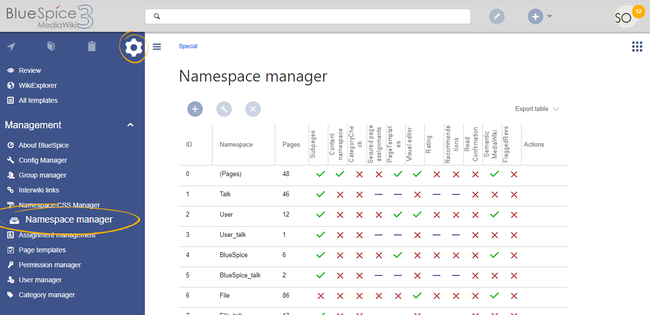
BlueSpiceNamespaceManager is availble from the right navigation, from "Global actions" tab, under "Management", or by directly accessing Special:NamespaceManager.
The Namespace manager allows a user with administrative rights to create, delete and rename namespaces and to change the settings of these namespaces. Users with edit rights can view the page, but cannot make any changes to it.
The navigation link to the Namespace manager is located under Global actions > Management. This link opens the pageSpecial:NamespaceManager.
Creating a namespace[edit | edit source]
Basic functionality allows for:
Creating new namespaces. New namespace can be added by clicking onTo create a namespace:
- Click the "Plus" icon
- at the
- top of the
- page.
- A dialog
- opens
- .
- Enter the name for the new namespace and select
-
the namespace options.
-
You can activate the following options:
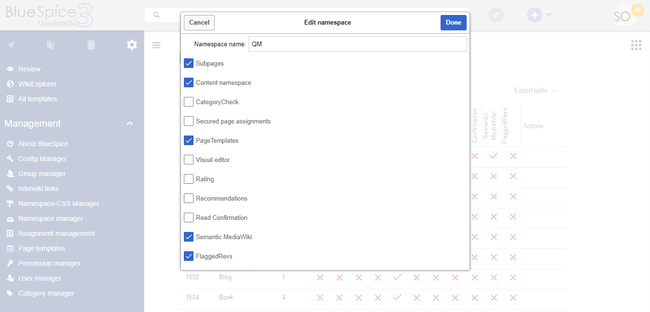
- Subpages: namespace can contain subpages (MediaWiki functionality)
- Content namespace: needs to be checked if users will create wiki pages in this namespace (MediaWiki functionality). See also mediawiki.org/wiki/Manual:ContentHandler.
- The remaining options activate a number of extensions for the namespace: CategoryCheck, Secured page assignments, PageTemplates, Visual editor, Rating, Recommendations, ReadConfirmation, Semantic MediaWiki, FlaggedRevs.
The corresponding talk namespace for the new namespace is automatically created. The ID of each namespace is assigned automatically based on wiki settings and existing namespace IDs.
Editing and deleting a namespace
- namespace[edit | edit source]
Editing a namespace: A namespace can be edited by clicking on the "wrench" icon
,in the table row or above the table
,when a namespace is selected.
Names of talk namespaces
cannot be changed, as well as namesor of system namespaces (File, MediaWiki) cannot be changed.
..
Deleting a namespace
.: Only custom
namespaces, those created by the user,(user created) namespaces can be deleted.
Delete icon will appear/be avaible only on such namespaces.
After clicking on the delete icon, a dialog will open offering options for what to do with the pages in the namespace being deleted. Options are:
- pages will be deleted
- pages will be moved to the main namespace - (Pages)
- pages will be moved to the main namespace - (Pages) but will be renamed to include prefix withe the name of the deleted namespace.
Talk namespaces for a particular namespace will be deleted when their main namespace is delted, and cannot be deleted separately.
Every namespace that exist on the wiki, has a corresponding talk namespace, eg. namespace Template has talk namespace Template_talk. Talk namespaces are ment to hold the discussions on the topics of the main namespace.
Namespace options[edit | edit source]
In BlueSpiceNamespaceManager, settings of each namespace can be adjusted. These configuration options can be changed in the dialog when creating or editing a namespace.
Some of the options are built-in, and come by default with MediaWiki, like:
- Content namespace - is the namespace ment to hold content
- Subpages - does the namespace allow for subpage creation.
Other options come from various extension. Such options include:
- Category Check - is extension BlueSpiceCategoryCheck enabled for this namespace.
- VisualEditor - is VisualEditor enabled for this namespace
More information on additional options can be found on individual pages of the extensions that are introducing those configuration options.
See also[edit | edit source]
Reference page for this extension. with the delete options appears.
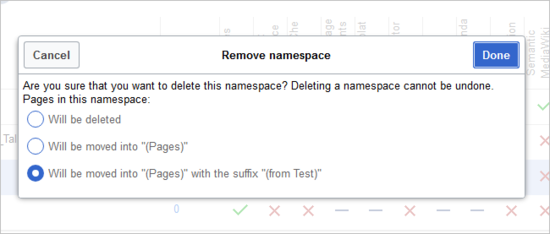
- Will be deleted: deletes the pages in this namespace together with the namespace
- Will be moved into "(Pages)": moves the pages of this namespace into the main namespace
- Will be moved into "(Pages)" with the suffix "(from [namespace name])": moves and appends the pages with "from [namespace]"
Talk namespaces are deleted with their corresponding namespace and cannot be deleted separately.
Technical details[edit | edit source]
The interface for the user manager is provided by the extension BlueSpiceNamespaceManager.
Related info
            __TOC__


            ==What is BlueSpiceNamespaceManager?==


            '''BlueSpiceNamespaceManager''' displays information about the [https://www.mediawiki.org/wiki/Help:Namespaces namespaces] that are defined on the wiki. It also allows for creating, deleting and renaming namespaces, as well as chaning its settings.


            ==Where to find the BlueSpiceNamespaceManager?==

            [[File:NamespaceManager1a.png|thumb]]

            [[File:NamespaceManager2.png|thumb|Editing a namespace]]


            BlueSpiceNamespaceManager is availble from the right navigation, from "Global actions" tab, under "Management", or by directly accessing <code>Special:NamespaceManager</code>.

            {{Clear}}


            ==The functionality of BlueSpiceNamespaceManager==


            Basic functionality allows for:


            *Creating new namespaces. New namespace can be added by clicking on the "Plus" icon above the table containing the namespaces. In the dialog that opens, enter the name for the new namespace and select desired [[#Namespace options|options]].


            Creating a new namespace will automatically create a{{DISPLAYTITLE:Namespace manager}}

            __TOC__


            ==About the Namespace manager==


            The Namespace manager allows a user with ''administrative'' rights to create, delete and rename [[mediawikiwiki:Help:Namespaces|namespaces]] and to change the settings of these namespaces. Users with ''edit'' rights can view the page, but cannot make any changes to it.


            The navigation link to the Namespace manager is located under ''Global actions > Management''. This link opens the page<code>Special:NamespaceManager</code>.<br />[[File:NamespaceManager1a.png|border|center|650x650px]]<br />

            ==Creating a namespace==


            '''To create a namespace:'''


            # '''Click''' the "Plus" icon at the top of the page. A dialog opens.

            # '''Enter''' the name for the new namespace and select the namespace options.   <br />[[File:NamespaceManager2.png|Editing a namespace|alt=Screenshot: namespace options|center|650x650px]]  You can activate the following options:

            ## ''Subpages:'' namespace can contain subpages (MediaWiki functionality)

            ## ''Content namespace:'' needs to be checked if users will create wiki pages in this namespace (MediaWiki functionality). See also [[mediawikiwiki:Manual:ContentHandler|mediawiki.org/wiki/Manual:ContentHandler]].

            ## The remaining options activate a number of extensions for the namespace: [[Manual:Extension/BlueSpiceCategoryCheck|CategoryCheck]], [[Manual:Extension/BlueSpicePageAssignments|Secured page assignments]], [[Manual:Extension/BlueSpicePageTemplates|PageTemplates]], [[Manual:VisualEditor|Visual editor]], [[Manual:Extension/BlueSpiceRating|Rating]], Recommendations, [[Manual:Extension/BlueSpiceReadConfirmation|ReadConfirmation]], [[mediawikiwiki:Extension:Semantic_MediaWiki|Semantic MediaWiki]], [[Manual:Flagged Revisions|FlaggedRevs]].


            The corresponding talk namespace for it. ID of the new namespace cannot be choosen, it will be is automatically created. The ID of each namespace is assigned automatically based on wiki settings and existing namespace IDs.


        *== Editing and deleting a namespace - namespace ==

            '''Editing a namespace:''' A namespace can be edited by clicking on the "wrench" icon, in the table row or above the table, when a namespace is selected.


        Names of talk namespaces cannot be changed, as well as names or of system namespaces (File, MediaWiki)...


            *Deleting a namespace. Only custom namespaces, those created by the user, can be deleted. Delete icon will appear/be avaible only on such namespaces.


            After clicking on  cannot be changed.


            '''Deleting a namespace:''' Only custom (user created) namespaces can be deleted.


            After clicking on the delete icon, a dialog will open offering options for what to do with the pages in the namespace being deleted.

            Options are:


            *pages will be deleted

            *pages will be moved to the main namespace - (Pages)

            *pages will be moved to the main namespace - (Pages) but will be renamed to include prefix withe the name of the deleted namespace.


            Talk namespaces for a particular namespace will be deleted when their main namespace is delted, and cannot be deleted separately.


            Every namespace that exist on the wiki, has a corresponding talk namespace, eg. namespace Template has talk namespace Template_talk. Talk namespaces are ment to hold the discussions on the topics of the main namespace.

            ===Namespace options===

            In BlueSpiceNamespaceManager, settings of each namespace can be adjusted. These configuration options can be changed in the dialog when creating or editing a namespace.


            Some of the options are built-in, and come by default with MediaWiki, like:


            *Content namespace - is the namespace ment to hold content

            *Subpages - does the namespace allow for subpage creation.


            Other options come from various extension. Such options include:


            *Category Check - is extension [[Manual:Extension/BlueSpiceCategoryCheck|BlueSpiceCategoryCheck]] enabled for this namespace.

            *VisualEditor - is [[Manual:Extension/VisualEditor|VisualEditor]] enabled for this namespace


            More information on additional options can be found on individual pages of the extensions that are introducing those configuration options.


            ==See also==


            [[Reference:NamespaceManager|Reference page]] for this extension.


        with the delete options appears.

            [[File:Manual:namespace-delete.png|alt=Screenshot: delete a namespace|border|center|550x550px]]


            <br />


            *''Will be deleted:'' deletes the pages in this namespace together with the namespace

            *''Will be moved into "(Pages)":'' moves the pages of this  namespace into the main namespace

            *''Will be moved into "(Pages)" with the suffix "(from [namespace name])":'' moves and appends the pages with "from [namespace]"


            Talk namespaces are deleted with their corresponding namespace and cannot be deleted separately.


            ==Technical details==

            The interface for the user manager is provided by the extension '''BlueSpiceNamespaceManager'''.

            {{Box Links-en|Topic1=[[Reference:NamespaceManager]]}}


        {{Translation}}
| Line 1: | Line 1: | ||
| − | + | {{DISPLAYTITLE:Namespace manager}} | |
| − | |||
__TOC__ | __TOC__ | ||
| − | == | + | ==About the Namespace manager== |
| − | |||
| − | |||
| − | |||
| − | |||
| − | |||
| − | |||
| − | |||
| − | |||
| − | |||
| − | |||
| − | |||
| − | |||
| − | |||
| − | |||
| − | |||
| − | |||
| − | |||
| − | + | The Namespace manager allows a user with ''administrative'' rights to create, delete and rename [[mediawikiwiki:Help:Namespaces|namespaces]] and to change the settings of these namespaces. Users with ''edit'' rights can view the page, but cannot make any changes to it. | |
| − | + | The navigation link to the Namespace manager is located under ''Global actions > Management''. This link opens the page<code>Special:NamespaceManager</code>.<br />[[File:NamespaceManager1a.png|border|center|650x650px]]<br /> | |
| + | ==Creating a namespace== | ||
| − | + | '''To create a namespace:''' | |
| − | |||
| − | + | # '''Click''' the "Plus" icon at the top of the page. A dialog opens. | |
| − | + | # '''Enter''' the name for the new namespace and select the namespace options. <br />[[File:NamespaceManager2.png|Editing a namespace|alt=Screenshot: namespace options|center|650x650px]] You can activate the following options: | |
| − | + | ## ''Subpages:'' namespace can contain subpages (MediaWiki functionality) | |
| + | ## ''Content namespace:'' needs to be checked if users will create wiki pages in this namespace (MediaWiki functionality). See also [[mediawikiwiki:Manual:ContentHandler|mediawiki.org/wiki/Manual:ContentHandler]]. | ||
| + | ## The remaining options activate a number of extensions for the namespace: [[Manual:Extension/BlueSpiceCategoryCheck|CategoryCheck]], [[Manual:Extension/BlueSpicePageAssignments|Secured page assignments]], [[Manual:Extension/BlueSpicePageTemplates|PageTemplates]], [[Manual:VisualEditor|Visual editor]], [[Manual:Extension/BlueSpiceRating|Rating]], Recommendations, [[Manual:Extension/BlueSpiceReadConfirmation|ReadConfirmation]], [[mediawikiwiki:Extension:Semantic_MediaWiki|Semantic MediaWiki]], [[Manual:Flagged Revisions|FlaggedRevs]]. | ||
| − | + | The corresponding talk namespace for the new namespace is automatically created. The ID of each namespace is assigned automatically based on wiki settings and existing namespace IDs. | |
| − | + | == Editing and deleting a namespace == | |
| − | + | '''Editing a namespace:''' A namespace can be edited by clicking on the "wrench" icon in the table row or above the table when a namespace is selected. | |
| − | |||
| − | + | Names of talk namespaces or of system namespaces (File, MediaWiki) cannot be changed. | |
| − | + | '''Deleting a namespace:''' Only custom (user created) namespaces can be deleted. | |
| − | |||
| − | + | After clicking on the delete icon, a dialog with the delete options appears. | |
| + | [[File:Manual:namespace-delete.png|alt=Screenshot: delete a namespace|border|center|550x550px]] | ||
| + | <br /> | ||
| − | * | + | *''Will be deleted:'' deletes the pages in this namespace together with the namespace |
| − | * | + | *''Will be moved into "(Pages)":'' moves the pages of this namespace into the main namespace |
| + | *''Will be moved into "(Pages)" with the suffix "(from [namespace name])":'' moves and appends the pages with "from [namespace]" | ||
| − | + | Talk namespaces are deleted with their corresponding namespace and cannot be deleted separately. | |
| − | == | + | ==Technical details== |
| + | The interface for the user manager is provided by the extension '''BlueSpiceNamespaceManager'''. | ||
| + | {{Box Links-en|Topic1=[[Reference:NamespaceManager]]}} | ||
| − | |||
{{Translation}} | {{Translation}} | ||