Difference between revisions of "Manual:BlueSpice Layout"
| [unchecked revision] | [quality revision] |
(Mlink-rodrigue moved page Manual:BlueSpice Layout to BlueSpice Layout) (Tag: New redirect) |
m (Tag: Visual edit) |
- REDIRECT BlueSpice Layout
BlueSpice Layout[edit | edit source]
Your wiki is divided into several unique areas that group the features of the wiki in a meaningful way. Here we give you an overview so that you can easily find the functionality that you are looking for.
Note: Some features are disabled by default in your wiki or only visible to specific user groups such as administrators.
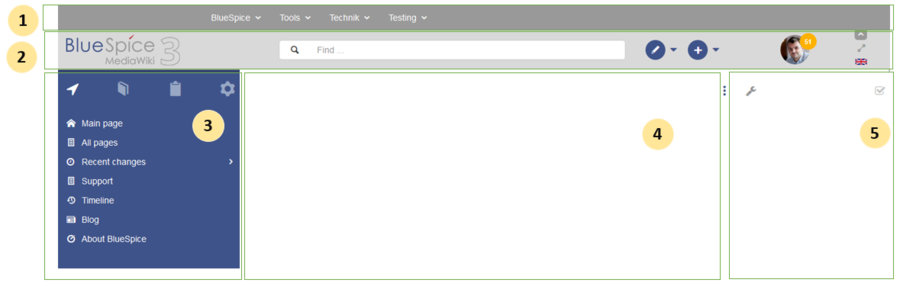
| Layout area | Description |
|---|---|
| 1-Custom menu | A wiki administrator can create custom navigation to pages inside and outside the wiki. |
| 2-Main toolbar | Contains important elements such as the logo area, the search field and access to the user profile. |
| 3-Navigation |
The "heart" of the page organization. From here, users can access all pages,
depending on their permissions. Many navigation elements can be customized. |
| 4-Content area | Here you create and edit all wiki content. Discussions are also located in this space. |
| 5-Page tools |
Powerful page management features. This includes important tools for the
quality management of a page. |
[edit | edit source]

| Layout area | Description |
|---|---|
| 1-Custom menu | With the extension BlueSpiceCustomMenu, a wiki administrator can create individual navigation to pages inside and outside the wiki. |
Main toolbar[edit | edit source]

| Layout area | Description |
|---|---|
| 1-Logo area | The BlueSpice logo can be exchanged via the Config Manager with a company logo. |
| 2-Search field | You will search pages and files with a full-text and title search, as well as a fuzzy search. With search filter and search in the metadata. |
| 3-Edit page | A button that switches a page into edit mode. Only active for users with write access. |
| 4-Create page | A button for creating a new page or uploading a file. Only active for users with write access. |
| 5-User menu |
Users manage their own settings and notifications here.
The avatar icon indicates when unread notifications are waiting for the user. |
| 6-Language selector | In multilingual wikis, you can switch between the language versions of a page. |
| 7-Fullscreen toggle | Hides the navigation and page tools at the same time. |
| 8-Custom menu toggle | Here you can hide and show the top menu. |
[edit | edit source]
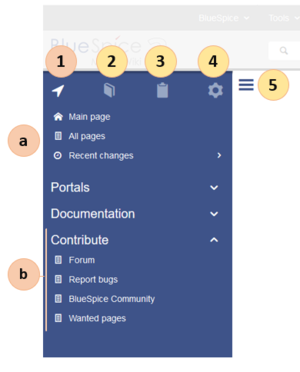
| Layout area | Description |
|---|---|
| 1-Main navigation | This is the general navigation. It can be customized by the administrator for the whole wiki. |
| 2-Books | (optional): If you use the bookshelf extension, users can go to all general and individual books to which they have access. |
| 3-My pages | This is your custom navigation bar. They can be adapted to your needs. |
| 4-Global actions | Direct links to many special pages and administration pages (for administrators). |
| 5-Navgation toggle | Shows and hides the navigation. |
Content[edit | edit source]
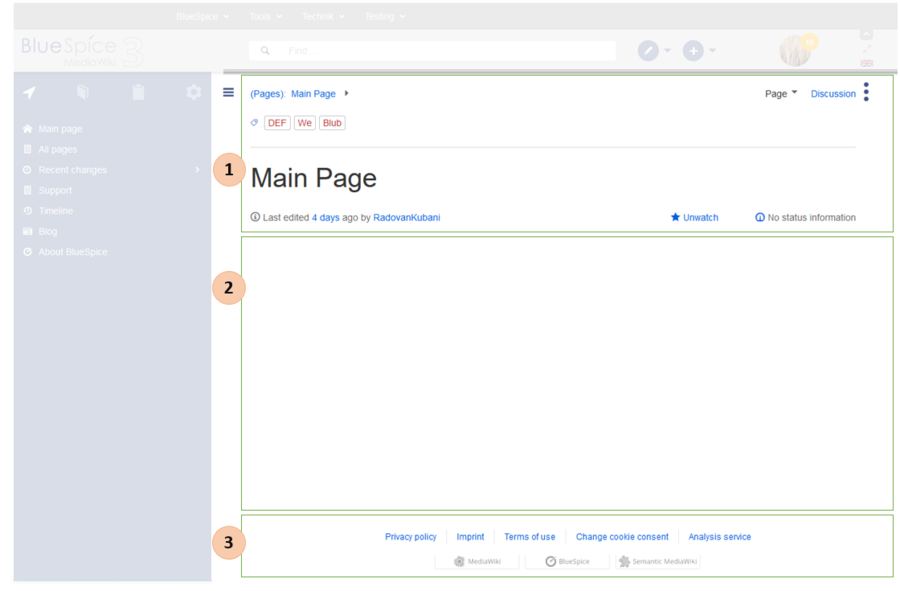
| Layout area | Description |
|---|---|
| 1-Title section |
In the title section of a page, the most important page information and page functions are put together in a
user-friendly way.
|
| 2-Work area | In the workspace, users create and edit all page content. VisualEditor simplifies the editing process. |
| 3-Footer | The footer contains links to legal information as well as to external MediaWiki websites. |
Page tools[edit | edit source]
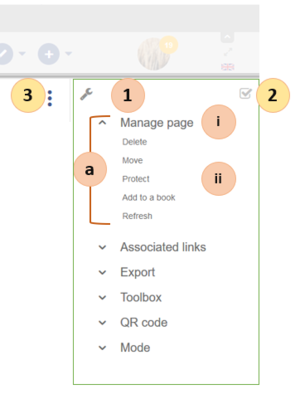
| Layout area | Description |
|---|---|
|
1-Page tools
(a) Menu (i) Menu header (ii) Menu link |
Lots of page actions and information related to this page can be found here.
|
| 2-QM tools | Lists all the important tools to manage the life cycle of a page, such as reminders and page reviews. |
| 3-Tools toggle | A switch to hide and show the page tools. |
#REDIRECT [[BlueSpice Layout]]{{DISPLAYTITLE:BlueSpice layout}}


            ==BlueSpice Layout==

            Your wiki is divided into several unique areas that group the features of the wiki in a meaningful way. Here we give you an overview so that you can easily find the functionality that you are looking for.

            {{Box Note|boxtype=note|Note text=Some features are disabled by default in your wiki or only visible to specific user groups such as administrators.}}

            [[File:Manual:layout1-en.png|center|900x900px]]

            {| class="contenttable-blue tablefullwidth"

            |+

            !Layout area

            !Description

            |-

            |1-[[Manual:BlueSpice Layout#Custom menu|Custom menu]]

            |A wiki administrator can create custom navigation to pages inside and outside the wiki.

            |-

            |2-[[Manual:BlueSpice Layout#Main toolbar|Main toolbar]]

            |Contains important elements such as the logo area, the search field and access to the user profile.

            |-

            |3-[[Manual:BlueSpice Layout#Navigation|Navigation]]

            |The "heart" of the page organization. From here, users can access all pages,

            depending on their permissions. Many navigation elements can be customized.

            |-

            |4-[[Manual:BlueSpice Layout#Content area|Content area]]

            |Here you create and edit all wiki content. Discussions are also located in this space.

            |-

            |5-[[Manual:BlueSpice Layout#Page tools|Page tools]]

            |Powerful page management features. This includes important tools for the

            quality management of a page.

            |}


            ==Custom menu==

            [[File:Manual:layout-custommenu.png|935x935px]]<br />

            {| class="contenttable-blue content table-blue"

            !Layout area

            !Description

            |-

            |1-[[Reference:BlueSpiceCustomMenu|Custom menu]]

            |With the extension BlueSpiceCustomMenu, a wiki administrator can create individual navigation to pages inside and outside the wiki.

            |}

            ==Main toolbar==

            [[File:Manual:layout2-en.png]]

            {| class="contenttable-blue"

            !Layout area

            !Description

            |-

            |1-Logo area

            |The BlueSpice logo can be exchanged via the [[Manual:Extension/BlueSpiceConfigManager|Config Manager]] with a company logo.

            |-

            |2-Search field

            |You will [[Reference:BlueSpiceExtendedSearch|search pages and files]] with a full-text and title search, as well as a fuzzy search. With search filter and search in the metadata.

            |-

            |3-Edit page

            |A button that switches a page into edit mode. Only active for users with write access.

            |-

            |4-[[Manual:Create pages|Create page]]

            |<span style="color: rgb(51, 51, 51)">A button for creating a new page or uploading a file. Only active for users with write access.</span>

            |-

            |5-User menu

            |Users manage their own settings and notifications here.


            <span style="color: rgb(51, 51, 51)">The avatar icon indicates when unread notifications are waiting for the user.</span>

            |-

            |6-[[Managing translations|Language selector]]

            |In multilingual wikis, you can switch between the language versions of a page.

            |-

            |7-Fullscreen toggle

            |Hides the navigation and page tools at the same time.

            |-

            |8-Custom menu toggle

            |Here you can hide and show the top menu.

            |}


            ==Navigation==

            [[File:Manual:layout3-en.png|372x372px]]

            {| class="contenttable-blue"

            |+

            !Layout area

            !Description

            |-

            |1-[[Navigation|Main navigation]]

            |<span style="color: rgb(51, 51, 51)">This is the general navigation. It can be customized by the administrator for the whole wiki.</span>

            |-

            |2-[[Manual:Extension/BlueSpiceBookshelf|Books]]

            |<span style="color: rgb(51, 51, 51)">(optional): If you use the [[Manual:Extension/BlueSpiceBookshelf|bookshelf extension]]</span><span style="color: rgb (51, 51, 51)">, users can go to all general and individual books to which they have access.</span>

            |-

            |3-[[Manual:Extension/Readers|My pages]]

            |<span style="color: rgb(51, 51, 51)">This is your custom navigation bar. They can be adapted to your needs.</span>

            |-

            |4-Global actions

            |Direct links to many special pages <span style="color: rgb(51, 51, 51)">and administration pages (for administrators).</span>

            |-

            |5-Navgation toggle

            |Shows and hides the navigation.

            |}


            ==Content==

            [[File:Manual:layout4-en.png|900x900px]]

            {| class="contenttable-blue tablefullwidth"

            |+

            !Layout area

            !Description

            |-

            |1-[[Layout:Titelarea|Title section]]

            |In the title section of a page, the most important page information and page functions are put together in a

            user-friendly way.<br />

            |-

            |2-Work area

            |In the workspace, users create and edit all page content. [[Manual:VisualEditor|VisualEditor]] simplifies the editing process.

            |-

            |3-[[Manual:BlueSpice Layout/Footer|Footer]]

            |The footer contains links to legal information as well as to external MediaWiki websites.

            |}


            ==Page tools==

            [[File:Manual:layout5-en.png|399x399px]]

            {| class="contenttable-blue tablefullwidth"

            |+

            !Layout area

            !Description

            |-

            |1-Page tools

            (a) Menu


            (i) Menu header


            (ii) Menu link

            |Lots of page actions and information related to this page can be found here.<br />

            |-

            |2-[[Manual:Quality management|QM tools]]

            |Lists all the important tools to manage the life cycle of a page, such as reminders and page reviews.

            |-

            |3-Tools toggle

            |A switch to hide and show the page tools.

            |}


            [[en:{{FULLPAGENAME}}]]

            [[de:Aufbau_von_BlueSpice]]

            [[Category:Organization]]
| (12 intermediate revisions by the same user not shown) | |||
| Line 1: | Line 1: | ||
| − | # | + | {{DISPLAYTITLE:BlueSpice layout}} |
| + | |||
| + | ==BlueSpice Layout== | ||
| + | Your wiki is divided into several unique areas that group the features of the wiki in a meaningful way. Here we give you an overview so that you can easily find the functionality that you are looking for. | ||
| + | {{Box Note|boxtype=note|Note text=Some features are disabled by default in your wiki or only visible to specific user groups such as administrators.}} | ||
| + | [[File:Manual:layout1-en.png|center|900x900px]] | ||
| + | {| class="contenttable-blue tablefullwidth" | ||
| + | |+ | ||
| + | !Layout area | ||
| + | !Description | ||
| + | |- | ||
| + | |1-[[Manual:BlueSpice Layout#Custom menu|Custom menu]] | ||
| + | |A wiki administrator can create custom navigation to pages inside and outside the wiki. | ||
| + | |- | ||
| + | |2-[[Manual:BlueSpice Layout#Main toolbar|Main toolbar]] | ||
| + | |Contains important elements such as the logo area, the search field and access to the user profile. | ||
| + | |- | ||
| + | |3-[[Manual:BlueSpice Layout#Navigation|Navigation]] | ||
| + | |The "heart" of the page organization. From here, users can access all pages, | ||
| + | depending on their permissions. Many navigation elements can be customized. | ||
| + | |- | ||
| + | |4-[[Manual:BlueSpice Layout#Content area|Content area]] | ||
| + | |Here you create and edit all wiki content. Discussions are also located in this space. | ||
| + | |- | ||
| + | |5-[[Manual:BlueSpice Layout#Page tools|Page tools]] | ||
| + | |Powerful page management features. This includes important tools for the | ||
| + | quality management of a page. | ||
| + | |} | ||
| + | |||
| + | ==Custom menu== | ||
| + | [[File:Manual:layout-custommenu.png|935x935px]]<br /> | ||
| + | {| class="contenttable-blue content table-blue" | ||
| + | !Layout area | ||
| + | !Description | ||
| + | |- | ||
| + | |1-[[Reference:BlueSpiceCustomMenu|Custom menu]] | ||
| + | |With the extension BlueSpiceCustomMenu, a wiki administrator can create individual navigation to pages inside and outside the wiki. | ||
| + | |} | ||
| + | ==Main toolbar== | ||
| + | [[File:Manual:layout2-en.png]] | ||
| + | {| class="contenttable-blue" | ||
| + | !Layout area | ||
| + | !Description | ||
| + | |- | ||
| + | |1-Logo area | ||
| + | |The BlueSpice logo can be exchanged via the [[Manual:Extension/BlueSpiceConfigManager|Config Manager]] with a company logo. | ||
| + | |- | ||
| + | |2-Search field | ||
| + | |You will [[Reference:BlueSpiceExtendedSearch|search pages and files]] with a full-text and title search, as well as a fuzzy search. With search filter and search in the metadata. | ||
| + | |- | ||
| + | |3-Edit page | ||
| + | |A button that switches a page into edit mode. Only active for users with write access. | ||
| + | |- | ||
| + | |4-[[Manual:Create pages|Create page]] | ||
| + | |<span style="color: rgb(51, 51, 51)">A button for creating a new page or uploading a file. Only active for users with write access.</span> | ||
| + | |- | ||
| + | |5-User menu | ||
| + | |Users manage their own settings and notifications here. | ||
| + | <span style="color: rgb(51, 51, 51)">The avatar icon indicates when unread notifications are waiting for the user.</span> | ||
| + | |- | ||
| + | |6-[[Managing translations|Language selector]] | ||
| + | |In multilingual wikis, you can switch between the language versions of a page. | ||
| + | |- | ||
| + | |7-Fullscreen toggle | ||
| + | |Hides the navigation and page tools at the same time. | ||
| + | |- | ||
| + | |8-Custom menu toggle | ||
| + | |Here you can hide and show the top menu. | ||
| + | |} | ||
| + | |||
| + | ==Navigation== | ||
| + | [[File:Manual:layout3-en.png|372x372px]] | ||
| + | {| class="contenttable-blue" | ||
| + | |+ | ||
| + | !Layout area | ||
| + | !Description | ||
| + | |- | ||
| + | |1-[[Navigation|Main navigation]] | ||
| + | |<span style="color: rgb(51, 51, 51)">This is the general navigation. It can be customized by the administrator for the whole wiki.</span> | ||
| + | |- | ||
| + | |2-[[Manual:Extension/BlueSpiceBookshelf|Books]] | ||
| + | |<span style="color: rgb(51, 51, 51)">(optional): If you use the [[Manual:Extension/BlueSpiceBookshelf|bookshelf extension]]</span><span style="color: rgb (51, 51, 51)">, users can go to all general and individual books to which they have access.</span> | ||
| + | |- | ||
| + | |3-[[Manual:Extension/Readers|My pages]] | ||
| + | |<span style="color: rgb(51, 51, 51)">This is your custom navigation bar. They can be adapted to your needs.</span> | ||
| + | |- | ||
| + | |4-Global actions | ||
| + | |Direct links to many special pages <span style="color: rgb(51, 51, 51)">and administration pages (for administrators).</span> | ||
| + | |- | ||
| + | |5-Navgation toggle | ||
| + | |Shows and hides the navigation. | ||
| + | |} | ||
| + | |||
| + | ==Content== | ||
| + | [[File:Manual:layout4-en.png|900x900px]] | ||
| + | {| class="contenttable-blue tablefullwidth" | ||
| + | |+ | ||
| + | !Layout area | ||
| + | !Description | ||
| + | |- | ||
| + | |1-[[Layout:Titelarea|Title section]] | ||
| + | |In the title section of a page, the most important page information and page functions are put together in a | ||
| + | user-friendly way.<br /> | ||
| + | |- | ||
| + | |2-Work area | ||
| + | |In the workspace, users create and edit all page content. [[Manual:VisualEditor|VisualEditor]] simplifies the editing process. | ||
| + | |- | ||
| + | |3-[[Manual:BlueSpice Layout/Footer|Footer]] | ||
| + | |The footer contains links to legal information as well as to external MediaWiki websites. | ||
| + | |} | ||
| + | |||
| + | ==Page tools== | ||
| + | [[File:Manual:layout5-en.png|399x399px]] | ||
| + | {| class="contenttable-blue tablefullwidth" | ||
| + | |+ | ||
| + | !Layout area | ||
| + | !Description | ||
| + | |- | ||
| + | |1-Page tools | ||
| + | (a) Menu | ||
| + | |||
| + | (i) Menu header | ||
| + | |||
| + | (ii) Menu link | ||
| + | |Lots of page actions and information related to this page can be found here.<br /> | ||
| + | |- | ||
| + | |2-[[Manual:Quality management|QM tools]] | ||
| + | |Lists all the important tools to manage the life cycle of a page, such as reminders and page reviews. | ||
| + | |- | ||
| + | |3-Tools toggle | ||
| + | |A switch to hide and show the page tools. | ||
| + | |} | ||
| + | |||
| + | [[en:{{FULLPAGENAME}}]] | ||
| + | [[de:Aufbau_von_BlueSpice]] | ||
| + | [[Category:Organization]] | ||