Difference between revisions of "Archive:Preferences"
(→BlueSpice - preferences) |
(→BlueSpice - preferences) |
Contents
Preferences is an extension allowing wiki administrators to change key settings of the wiki, without resorting to scripts and manual settings in LocalSetting.php file. These settings are wiki-wide, although some of them can be overriden on user level through UserPreferences.
Technical background[edit | edit source]
Preferences lets you control and set various aspects of BlueSpice extensions.
Where can I find the Preferences function?[edit | edit source]
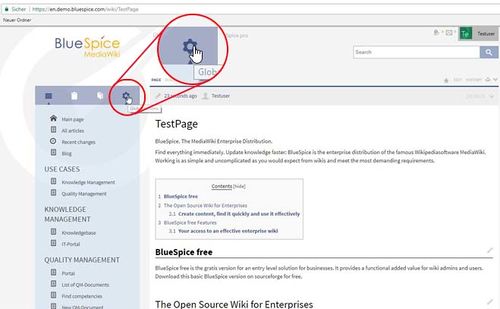
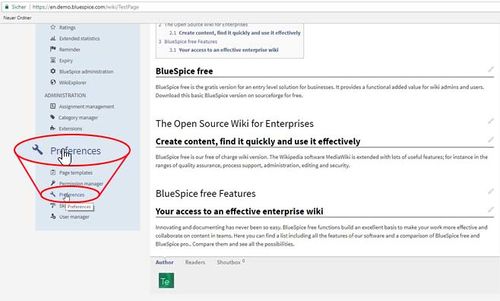
Firstly, you need to have administration permissions in order to call up Preferences. If you have the correct permissions, you will be able to see the link "Preferences" in the "Global settings" and then on "Preferences" as you see on the image below. Click on the link and you will be taken to the administration page.
The functionality of Preferences[edit | edit source]
The display shows different areas for the individual extensions.
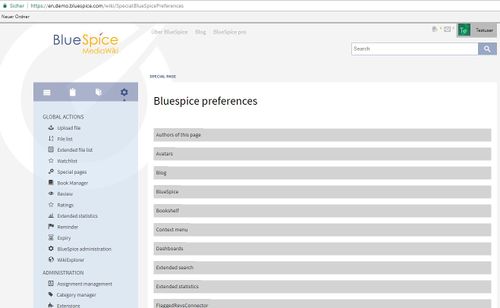
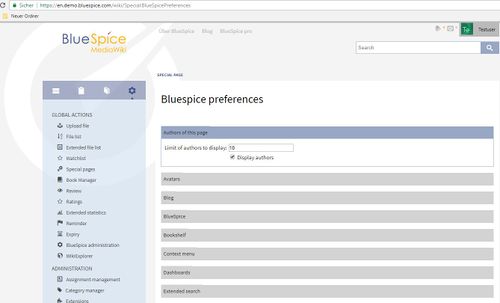
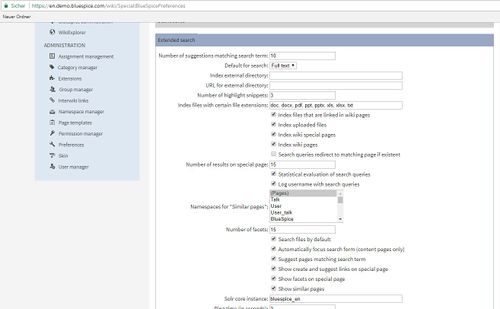
Preferences page contains many sections that are represented by expandable tabs. By default all tabs are collapsed. More information on individual settings of each of these extensions you can find on those extension's pages.
For example:
BlueSpice - preferences[edit | edit source]
| Setting | Description | |
|---|---|---|
| Authors of of this page | Preferences for profile pictures. | |
| Avatars | Size and defaults | |
| Blog | Display of blog entries | |
| BlueSpice | Special preferences for BlueSpice. You can also set which data formats allowed here (by default: png, gif, jpg, jpeg, doc, docx, pdf, xls). | |
| Bookshelf | ||
| ContextMenu | ||
| Dashboards | Link the site logo to the dashboards | |
| Extended search | ||
| Extended statistics | Settings for BlueSpice statistics e.g. exclude certain users | |
| FlaggedRevsConnector | ||
| Insert category | Insert categories include its parents | |
| Insert link | Enable links to local files | |
| Latex Renderer | ||
| Menu customizer | ||
| Page Assignments | ||
| Page information | ||
| Page templates | Above all for combining page templates with namespaces. | |
| Pages visited | Limit of entries, namespaces, ... | |
| PasteImage | ||
| Permission manager | Activate lockmode.... | |
| PiwikConnector | ||
| Rated comments | ||
| Rating | ||
| Readers | ||
| Reminder | ||
| Review | ||
| Safer editing | Organise autosaving while editing. | |
| Shoutbox | Setings for the comment box. | |
| Showtime | ||
| Skin | ||
| Smart list | Configure the latest changes function (previously called "Infobox") | |
| Status bar | Display statbar and shows the order. | |
| Syntax highlighter | e.g. link URLs | |
| Universal export | ||
| Universal export PDF module | ||
| UniversalExport Book PDF Module | ||
| UniversalExport HTML Module | ||
| Visual diff | ||
| Visual editor | Settings for the WYSIWYG editor. | |
| Watchlist | ||
| Who is online? |
Try it![edit | edit source]
__TOC__


        '''Preferences''' is an extension allowing wiki administrators to change key settings of the wiki, without resorting to scripts and manual settings in LocalSetting.php file. These settings are wiki-wide, although some of them can be overriden on user level through [[UserPreferences]].


        ==Technical background==

        Preferences lets you control and set various aspects of BlueSpice extensions.


        ==Where can I find the Preferences function?==

        Firstly, you need to have administration permissions in order to call up Preferences. If you have the correct permissions, you will be able to see the link "Preferences" in the "Global settings" and then on "Preferences" as you see on the image below. Click on the link and you will be taken to the administration page.


        ::: [[File:PreferencesHD1.jpg|500x309px]]

        ::: [[File:PreferencesHD2.jpg|500x301px]]

        ==The functionality of Preferences==

        The display shows different areas for the individual extensions.


        ::: [[File:PreferencesHD3.jpg|500x308px]]

        Preferences page contains many sections that are represented by expandable tabs. By default all tabs are collapsed. More information on individual settings of each of these extensions you can find on those extension's pages.


        For example:


        ::: [[File:PreferencesHD4.jpg|500x303px]]

        ::: [[File:PreferencesHD5.jpg|500x309px]]


        ===BlueSpice -  preferences===

        {| class="wikitable" border="0"

        |-

        ! style="width: 200px; height: 40px;"|Setting

        ! style="width: 1100px; height: 40px;"|Description

        |-

        | style="width: 200px; height: 40px;"|

        ||

        |-

        | style="width: 200px; height: 40px;"|Authors of[https://en.help.bluespice.com/wiki/Authors Authors] of this page

        ||Preferences for profile pictures.

        |-

        | style="width: 200px; height: 40px;"|Avatars


        [https://en.help.bluespice.com/wiki/Avatars Avatars]


        ||Size and defaults

        |-

        | style="width: 200px; height: 40px;"|Blog


        [https://en.help.bluespice.com/wiki/Blog Blog]


        ||Display of blog entries

        |-

        | style="width: 200px; height: 40px;"|BlueSpice

        ||Special preferences for BlueSpice. You can also set which data formats allowed here (by default: png, gif, jpg, jpeg, doc, docx, pdf, xls).

        |-

        | style="width: 200px; height: 40px;"|Bookshelf

        ||

        |-

        | style="width: 200px; height: 40px;"|ContextMenu

        ||

        |-

        | style="width: 200px; height: 40px;"|Dashboards

        ||Link the site logo to the dashboards

        |-

        | style="width: 200px; height: 40px;"|Extended search

        ||

        |-

        | style="width: 200px; height: 40px;"|Extended statistics

        ||Settings for BlueSpice statistics e.g. exclude certain users

        |-

        | style="width: 200px; height: 40px;"|FlaggedRevsConnector

        ||

        |-

        | style="width: 200px; height: 40px;"|Insert category

        ||Insert categories include its parents

        |-

        | style="width: 200px; height: 40px;"|Insert link

        ||Enable links to local files

        |-

        | style="width: 200px; height: 40px;"|Latex Renderer

        ||

        |-

        | style="width: 200px; height: 40px;"|Menu customizer

        ||

        |-

        | style="width: 200px; height: 40px;"|Page Assignments

        ||

        |-

        | style="width: 200px; height: 40px;"|Page information

        ||

        |-

        | style="width: 200px; height: 40px;"|Page templates

        ||Above all for combining page templates with namespaces.

        ||

        |-

        | style="width: 200px; height: 40px;"|Pages visited

        ||Limit of entries, namespaces, ...

        |-

        | style="width: 200px; height: 40px;"|PasteImage

        ||

        |-

        | style="width: 200px; height: 40px;"|Permission manager

        ||Activate lockmode....

        |-

        | style="width: 200px; height: 40px;"|PiwikConnector

        ||

        |-

        | style="width: 200px; height: 40px;"|Rated comments

        ||

        |-

        | style="width: 200px; height: 40px;"|Rating

        ||

        |-

        | style="width: 200px; height: 40px;"|Readers

        ||

        |-

        | style="width: 200px; height: 40px;"|Reminder

        ||

        |-

        | style="width: 200px; height: 40px;"|Review

        ||

        |-

        | style="width: 200px; height: 40px;"|Safer editing

        ||Organise autosaving while editing.

        |-

        | style="width: 200px; height: 40px;"|Shoutbox

        ||Setings for the comment box.

        |-

        | style="width: 200px; height: 40px;"|Showtime

        ||

        |-

        | style="width: 200px; height: 40px;"|Skin

        ||

        |-

        | style="width: 200px; height: 40px;"|Smart list

        ||Configure the latest changes function (previously called "Infobox")

        |-

        | style="width: 200px; height: 40px;"|Status bar

        ||Display statbar and shows the order.

        |-

        | style="width: 200px; height: 40px;"|Syntax highlighter

        ||e.g. link URLs

        |-

        | style="width: 200px; height: 40px;"|Universal export

        ||

        |-

        | style="width: 200px; height: 40px;"|Universal export PDF module

        ||

        |-

        | style="width: 200px; height: 40px;"|UniversalExport Book PDF Module

        ||

        |-

        | style="width: 200px; height: 40px;"|UniversalExport HTML Module

        ||

        |-

        | style="width: 200px; height: 40px;"|Visual diff

        ||

        |-

        | style="width: 200px; height: 40px;"|Visual editor

        ||Settings for the WYSIWYG editor.

        |-

        | style="width: 200px; height: 40px;"|Watchlist

        ||

        |-

        | style="width: 200px; height: 40px;"|Who is online?

        ||

        |}


        {{Box_Links-en | Thema1 =[[UserPreferences|User Preferences]] | Thema2 =[[ExtensionInfo|Information on installed extensions]] | Thema3 =[[Special_pages|Special Pages]] | Thema4 = }}


        [[Category:Extension]]

        [[Category:BlueSpice free]]

        [[en:{{FULLPAGENAME}}]][[de:Einstellungen]]


        ==Try it!==

[https://en.demo.bluespice.com/wiki/Main_Page BlueSpiceDemo]| Line 34: | Line 34: | ||
|| | || | ||
|- | |- | ||
| − | | style="width: 200px; height: 40px;"|Authors | + | | style="width: 200px; height: 40px;"|[https://en.help.bluespice.com/wiki/Authors Authors] of this page |
||Preferences for profile pictures. | ||Preferences for profile pictures. | ||
|- | |- | ||
| − | | style="width: 200px; height: 40px;"|Avatars | + | | style="width: 200px; height: 40px;"|[https://en.help.bluespice.com/wiki/Avatars Avatars] |
||Size and defaults | ||Size and defaults | ||
|- | |- | ||
| − | | style="width: 200px; height: 40px;"|Blog | + | | style="width: 200px; height: 40px;"|[https://en.help.bluespice.com/wiki/Blog Blog] |
||Display of blog entries | ||Display of blog entries | ||
|- | |- | ||