Difference between revisions of "Manual:Extension/BlueSpicePagesVisited"
| [unchecked revision] | [quality revision] |
m (Text replacement - "<bs:bookshelf src="Book:User manual" />" to "") |
m (Tag: 2017 source edit) |
The extension PagesVisited creates a list of your recently visited pages.
Contents
- 2.1 User's personal sidebar 2.2
- 1 What is BlueSpicePagesVisited? 2 Where to find the function BlueSpicePagesVisited?
- Personal navigation
- 2 Embedding the tag on a page
- 3 See also
[edit | edit source]
BlueSpicePagesVisited creates a list of a user's recently visited pages.
Where to find the function BlueSpicePagesVisited?[edit | edit source] Pages visited in user's personal sidebar
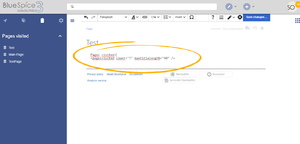 Inserting PagesVisited tag
 PagesVisited on the page
List of recently viewed pages can be found in user's personal sidebar or be embedded in a wiki page.
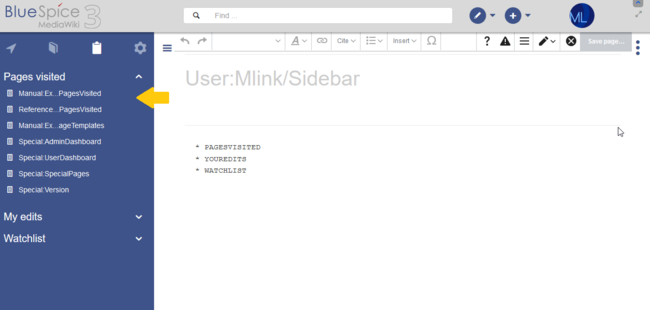
User's personal sidebar[edit | edit source]It can be found in the left navigation, click on the "Personal navigation" tab (clipboard icon).
To create a list with visited pages
one has to addThe functionality is integrated in the personal navigation menu (clipboard icon). If it has been removed, it can be re-added on the page User:<username>/Sidebar. This page is loaded when the Edit sidebar link at the bottom of the sidebar is clicked. This link is visible when you hover over any existing navigation item.
To display recently visited pages add the following item to the page:
* PAGESVISITED
at the user sidebar page
https://<YOURURL>/index.php?title=User:<USERNAME>/Sidebar
and
Embedding the tag on a page[edit | edit source]
While in source edit mode, enter the following tag anwhere on the page.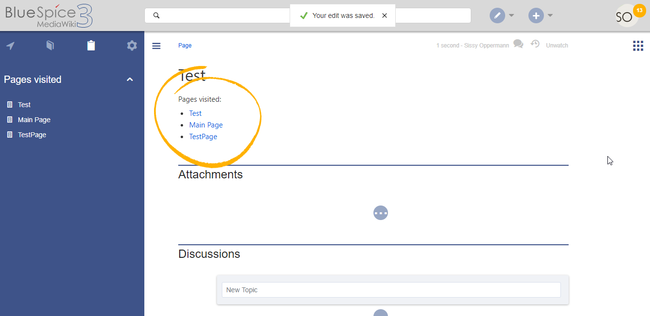
<pagesvisited count="10" />
The list of recently viewed pages will appear at the place in the page where the tag was inserted.
Options that can be passed to the tag are:
- count - number of pages to show
- maxtitlelength - maximum length of each shown page
- namespaces - list of namespaces from which to show pages. Multiple namespaces can be entered, separated by comma.
-
order - sorting of the pages displayed - can be "time" or "pagename"
See also[edit | edit source]
Reference page for this extension.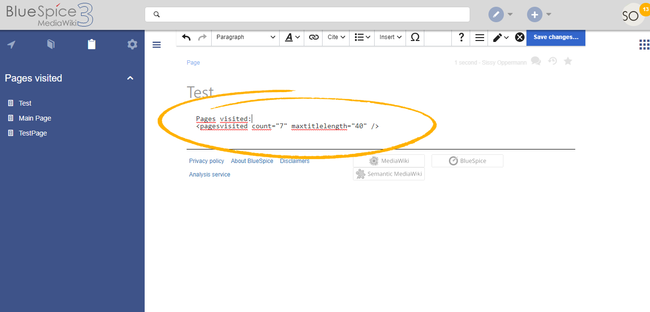


Related info
            __TOC__


            ==What is BlueSpicePagesVisited?==


            '''BlueSpicePagesVisited{{DISPLAYTITLE:Visited pages}}The extension '''PagesVisited''' creates a list of a user's your recently visited pages.


        ==Where to find the function BlueSpicePagesVisited?==

            [[File:PagesVisited1a.png|thumb|Pages visited in user's personal sidebar]]

            [[File:PagesVisited2a.png|thumb|Inserting PagesVisited tag]]

            [[File:PagesVisited3a.png|thumb|PagesVisited on the page]]


            List of recently viewed pages can be found in user's personal sidebar or be embedded in a wiki page.

            {{Clear}}


            ===User's personal sidebar===


            It can be found in the left navigation, click on the "Personal navigation" tab (clipboard icon).


            To create a list with visited pages

            * one has to add <pre>* PAGESVISITED </pre> at the user sidebar page <pre>https://<YOURURL>/index.php?title=User:<USERNAME>/Sidebar</pre> and

            * select the assigned namespaces in the personal preferences


            <br />

            ===Personal navigation==

            The functionality is integrated in the [[Manual:Extension/BlueSpiceUserSidebar|personal navigation menu]] (clipboard icon). If it has been removed, it can be re-added on the page ''User:<username>/Sidebar''. This page is loaded when the ''Edit sidebar'' link at the bottom of the sidebar is clicked. This link is visible when you hover over any existing navigation item.

            To display recently visited pages add the following item to the page:<pre>* PAGESVISITED </pre>


            [[File:Manual:personal-navigation-PagesVisited.png|alt=PagesVisited in the personal navigation|thumb|650x650px|''PagesVisited'' in the personal navigation|center]]

            ==Embedding the tag on a page===


            [[File:PagesVisited3a.png|thumb|''PagesVisited'' on the page|alt=PagesVisited on the page|center|650x650px]]While in source edit mode, enter the following tag anwhere on the page.


        <pre><pagesvisited count="10" /></pre>


        The list of recently viewed pages will appear at the place in the page where the tag was inserted.


        '''Options that can be passed to the tag are:


            *count'''


            *''count'' - number of pages to show

        *''maxtitlelength'' - maximum length of each shown page

        *''namespaces'' - list of namespaces from which to show pages. Multiple namespaces can be entered, separated by comma.

        *''order'' - sorting of the pages displayed - can be "time" or "pagename"


            ==See also==


            [[Reference:PagesVisited|Reference page]] for this extension.


            {{Translation}}<br />


            [[File:PagesVisited2a.png|thumb|Inserting the ''PagesVisited'' tag|alt=Inserting the PagesVisited tag|center|650x650px]]{{Box Links-en|Topic1=[[Reference:BlueSpicePagesVisited]]}}


            {{Translation}}

            __FORCETOC__

            [[Category:Personalization]]
| (5 intermediate revisions by 2 users not shown) | |||
| Line 1: | Line 1: | ||
| + | {{DISPLAYTITLE:Visited pages}}The extension '''PagesVisited''' creates a list of your recently visited pages. | ||
| + | ==Personal navigation== | ||
| + | The functionality is integrated in the [[Manual:Extension/BlueSpiceUserSidebar|personal navigation menu]] (clipboard icon). If it has been removed, it can be re-added on the page ''User:<username>/Sidebar''. This page is loaded when the ''Edit sidebar'' link at the bottom of the sidebar is clicked. This link is visible when you hover over any existing navigation item. | ||
| + | To display recently visited pages add the following item to the page:<pre>* PAGESVISITED </pre> | ||
| − | |||
| − | + | [[File:Manual:personal-navigation-PagesVisited.png|alt=PagesVisited in the personal navigation|thumb|650x650px|''PagesVisited'' in the personal navigation|center]] | |
| − | + | ==Embedding the tag on a page== | |
| − | + | [[File:PagesVisited3a.png|thumb|''PagesVisited'' on the page|alt=PagesVisited on the page|center|650x650px]]While in source edit mode, enter the following tag anwhere on the page. | |
| − | |||
| − | |||
| − | [[File: | ||
| − | |||
| − | [[File:PagesVisited3a.png|thumb|PagesVisited | ||
| − | |||
| − | |||
| − | |||
| − | |||
| − | |||
| − | |||
| − | |||
| − | |||
| − | |||
| − | |||
| − | |||
| − | |||
| − | |||
| − | |||
| − | |||
| − | |||
| − | While in source edit mode, enter the following tag anwhere on the page. | ||
<pre><pagesvisited count="10" /></pre> | <pre><pagesvisited count="10" /></pre> | ||
The list of recently viewed pages will appear at the place in the page where the tag was inserted. | The list of recently viewed pages will appear at the place in the page where the tag was inserted. | ||
| − | Options that can be passed to the tag are: | + | '''Options that can be passed to the tag are:''' |
| − | |||
| − | |||
| − | |||
| − | |||
| − | |||
| − | + | *''count'' - number of pages to show | |
| + | *''maxtitlelength'' - maximum length of each shown page | ||
| + | *''namespaces'' - list of namespaces from which to show pages. Multiple namespaces can be entered, separated by comma. | ||
| + | *''order'' - sorting of the pages displayed - can be "time" or "pagename"<br /> | ||
| − | [[ | + | [[File:PagesVisited2a.png|thumb|Inserting the ''PagesVisited'' tag|alt=Inserting the PagesVisited tag|center|650x650px]]{{Box Links-en|Topic1=[[Reference:BlueSpicePagesVisited]]}} |
{{Translation}} | {{Translation}} | ||
| + | __FORCETOC__ | ||
| + | [[Category:Personalization]] | ||