You are viewing an old version of this page. Return to the latest version.
Difference between revisions of "Archive:SearchOptions"
RichardHeigl (talk | contribs) |
m (Mlink-rodrigue moved page SearchOptions to Archive:SearchOptions without leaving a redirect: does not apply to BSp3) |
Search options is a special page for wiki admins to administrate the wiki search.
How to administrate the search?[edit | edit source]
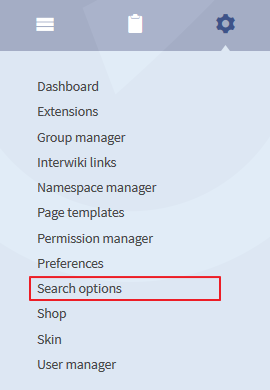
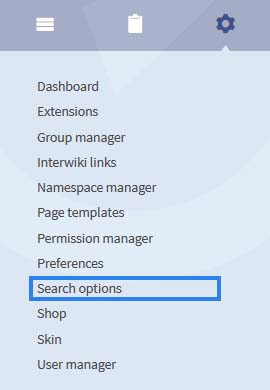
To find the search options have a look at the admin navigation. There you will find a link to the special page.
Administrators can do the following actions:
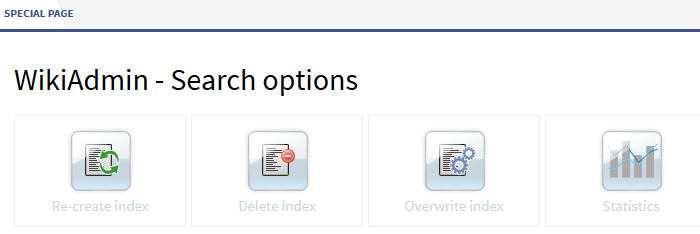

- Re-create index: a click on this button will start the indexing
- Delete index: a click on this button wil will delete the index
- Overwrite index: a click on this button will start overwriting the index
- Statistic: if you click on this button you can start a request
If you click on statistics you will be redirected to Special:ExtendedStatistics .
Choose "search queries" as data base and limit the date range.
<bookshelf src="Book:Admin manual" />


        '''Search options''' is a special page for wiki admins to administrate the wiki search.


        ==How to administrate the search?==

        To find the search options have a look at the admin navigation. There you will find a link to the special page.


        [[File:BlueSpice223-SearchOptions-Navigation-en.png|none|thumb|270px|Screenshot:Zugang zu den Suchoptionen über die Admin Navigation]]


            ::: [[File:SrOp1.jpg]]


        Administrators can do the following actions:

        [[File:BlueSpice223-SearchOptions-Spezialseite-en.png|thumb|none|700px|none|Screenshot: Überblick über Sucheinstellungen]]


        * '''Re-create index''': a click on this button will start the indexing

        * '''Delete index''': a click on this button wilwill delete the index

        * '''Overwrite inde'''x: a click on this button will start overwriting the index

        * '''Statistic''': if you click on this button you can start a request


        If you click on statistics you will be redirected to <code>Special:ExtendedStatistics</code> . <br />

        Choose "search queries" as data base and limit the date range.


        {{Box_Links-en | Thema1 =[[Reference:ExtendedSearch|Extended Search]] | Thema2 =[[Reference:ExtendedStatistics|Statistic tool]] | Thema3 =[[Archive:WikiAdmin|Pages for Administrators]] | Thema4 = }}


        [[Category:BlueSpice_public]]

            [[Category:BlueSpice_free]]

            [[Category:BlueSpice_docu]]

            [[Category:Extension


            [[de:Suchoptionen]][[en:{{FULLPAGENAME}}]]
| (13 intermediate revisions by 8 users not shown) | |||
| Line 1: | Line 1: | ||
<bookshelf src="Book:Admin manual" /> | <bookshelf src="Book:Admin manual" /> | ||
| − | Search options is a special page for wiki admins to administrate the wiki search. | + | '''Search options''' is a special page for wiki admins to administrate the wiki search. |
==How to administrate the search?== | ==How to administrate the search?== | ||
To find the search options have a look at the admin navigation. There you will find a link to the special page. | To find the search options have a look at the admin navigation. There you will find a link to the special page. | ||
| − | [[File: | + | |
| + | |||
| + | ::: [[File:SrOp1.jpg]] | ||
Administrators can do the following actions: | Administrators can do the following actions: | ||
| − | [[File:BlueSpice223-SearchOptions-Spezialseite-en.png|thumb|700px | + | [[File:BlueSpice223-SearchOptions-Spezialseite-en.png|thumb|none|700px|Screenshot: Überblick über Sucheinstellungen]] |
| + | |||
* '''Re-create index''': a click on this button will start the indexing | * '''Re-create index''': a click on this button will start the indexing | ||
| − | * '''Delete index''': a click on this button | + | * '''Delete index''': a click on this button will delete the index |
* '''Overwrite inde'''x: a click on this button will start overwriting the index | * '''Overwrite inde'''x: a click on this button will start overwriting the index | ||
* '''Statistic''': if you click on this button you can start a request | * '''Statistic''': if you click on this button you can start a request | ||
If you click on statistics you will be redirected to <code>Special:ExtendedStatistics</code> . <br /> | If you click on statistics you will be redirected to <code>Special:ExtendedStatistics</code> . <br /> | ||
| − | Choose "search queries" as data base and limit the date range. | + | Choose "search queries" as data base and limit the date range. |
| + | |||
| + | |||
| + | |||
| + | {{Box_Links-en | Thema1 =[[Reference:ExtendedSearch|Extended Search]] | Thema2 =[[Reference:ExtendedStatistics|Statistic tool]] | Thema3 =[[Archive:WikiAdmin|Pages for Administrators]] | Thema4 = }} | ||
| − | |||
| − | [[ | + | [[de:Suchoptionen]][[en:{{FULLPAGENAME}}]] |
| − | [[ | ||
| − | |||
| − | |||