Difference between revisions of "Manual:Extension/BlueSpiceContextMenu"
| [quality revision] | [quality revision] |
m (Tag: 2017 source edit) |
(Changed categories.) |
ContextMenu replaces the default browser context menu with wiki functions - depending on the context and user permissions.
[edit | edit source]
Context menu opens when right clicking components that support ContextMenu functionitly, namely, internal links and file links.
The context menu opens when you right-click on a component, such as a link or an image.
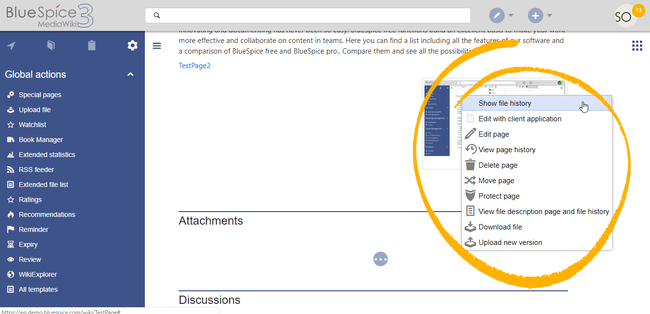
On internal links, the context menu display quick links for basic page actions, like:
- Editing page
- Viewing page history
- Moving page
- Deleting page...
On file links, some additional options are shown, like:
- Opening file page
- Downloading file
- Uploading new version of the file
- Opening files using client application (when available)
Exact content of ContextMenu menu depends on the wiki configuration
Settings[edit | edit source]
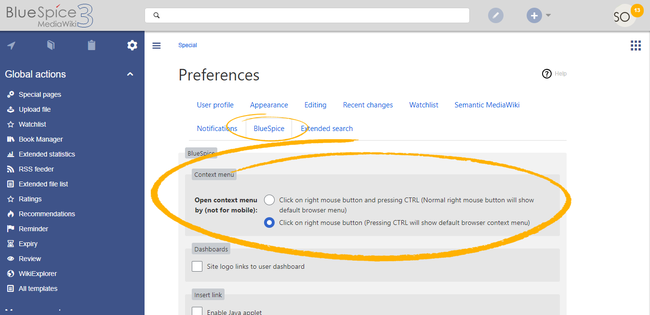


Settings for the context menu are located in the user preferences (page Special:Preferences), under the "Appearance" tab. The setting is applied separate for each user.
The context menu has two modes:
- Click using the right mouse button and pressing CTRL (Normal right mouse button will show default browser menu)
- Click using the right mouse button (Pressing CTRL will show default browser context menu)
Related info
{{DISPLAYTITLE:Context menu}}


        '''ContextMenu''' replaces the default browser context menu with wiki functions - depending on the context and user permissions.


        ==Using the context menu==

        Context menu opens when right clicking components that support ContextMenu functionitly, namely, internal links and file links.


        The context menu opens when you right-click on a component, such as a link or an image.


        <br />


        [[File:ContextMenu3.png|thumb|Context menu on  a file (image)|alt=Context menu on a file (image)|center|650x650px]]


        On internal links, the context menu display quick links for basic page actions, like:


        *Editing page

        *Viewing page history

        *Moving page

        *Deleting page...


        On file links, some additional options are shown, like:


        *Opening file page

        *Downloading file

        *Uploading new version of the file

        *Opening files using client application (when available)


        Exact content of ContextMenu menu depends on the wiki configuration


        ==Settings==

        [[File:ContextMenu1.png|User preference settings|alt=User preference settings|center|650x650px|thumb]]


        Settings for the context menu are located in the user preferences (page ''Special:Preferences''), under the "Appearance" tab. The setting is applied  separate for each user.


        The context menu has two modes:


        *Click  using the right mouse button and pressing CTRL (Normal right mouse button will show default browser menu)

        *Click using the right mouse button (Pressing CTRL will show default browser context menu)


        {{Box Links-en|Topic1=[[Reference:BlueSpiceContextMenu]]}}


        {{Translation}}

        __FORCETOC__

[[Category:Editing]]| (One intermediate revision by the same user not shown) | |||
| Line 43: | Line 43: | ||
{{Translation}} | {{Translation}} | ||
__FORCETOC__ | __FORCETOC__ | ||
| + | [[Category:Editing]] | ||