Page is a draft due to changes in included resources
You are viewing an old version of this page. Return to the latest version.
Version of 15:21, 23 March 2018 by Lsireta
Difference between revisions of "Manual:Extension/BlueSpiceGroupManager"
| [unchecked revision] | [quality revision] |
(Created page with "__HIDETITLE__ <bs:bookshelf src="Book:User manual" /> __TOC__ ==What is GroupManager?==") |
(Changed categories.) |
Contents
The interface for the Group manager is provided by the extension GroupManager. It allows adding, renaming and deleting groups.
Functionality[edit | edit source]
An administrator can go to Global actions > Management > Group manager. This opens the page Special:GroupManager.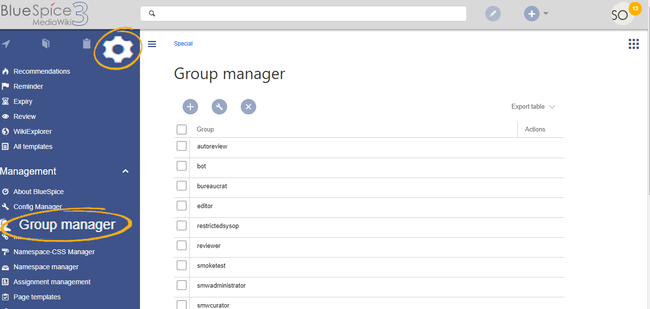
The group manager has the following features:
- Viewing groups: All existing groups in the wiki are listed.
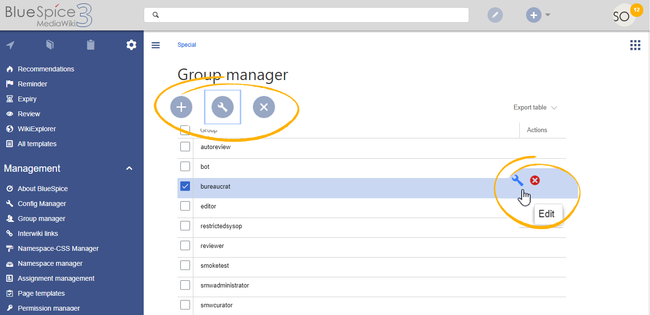
- Creating new groups: Clicking on the "plus" button opens a dialog for adding a new group.
- Renaming groups: A group can be renamed by selecting it and then clicking the wrench icon. System groups and groups declared by other extensions cannot be renamed.
- Deleting a group: A group can be deleted by selecting it and then clicking the "x" button. System groups cannot be deleted.
Assigning roles and users to groups[edit | edit source]
To assign users to groups, use the User manager. To assign roles (permissions) to groups, use the Permission manager.
Related info
__HIDETITLE__


            <bs:bookshelf src="Book:User manual" />


            __TOC__


            ==What is GroupManager?=={{DISPLAYTITLE:Group manager}}The interface for the Group manager is provided by the extension '''GroupManager'''. It allows adding, renaming and deleting groups.

            ==Functionality==

            An administrator can go to ''Global actions > Management > Group manager''. This opens the page ''Special:GroupManager''.<br />[[File:GroupManager1.png|alt=Screenshot: group manager|border|center|650x650px]].

            The group manager has the following features:


            *'''Viewing groups:''' All existing groups in the wiki are listed.

            *'''Creating new groups:''' Clicking on the "plus" button opens a dialog for adding a new group.

            *'''Renaming groups:''' A group can be renamed by selecting it  and then clicking the wrench icon. System groups and groups declared by other extensions cannot be renamed.

            *'''Deleting a group:''' A group can be deleted by selecting it and then clicking the "x" button. System groups cannot be deleted.


            <br />[[File:GroupManager2.png|alt=Screenshot: editing groups|center|650x650px]]

            ==Assigning roles and users to groups==

            To assign users to groups, use the [[Manual:Extension/BlueSpiceUserManager|User manager]].

            To assign roles (permissions) to groups, use the [[Manual:Extension/BlueSpicePermissionManager|Permission manager]].


            {{Box Links-en

            |Topic1=[[Reference:BlueSpiceGroupManager]]

            |Topic2=[[Manual:Extension/BlueSpicePermissionManager|Managing permissions]]}}


            <br />


            [[de:Handbuch:Erweiterung/{{SUBPAGENAME}}]]

            [[en:Manual:Extension/{{SUBPAGENAME}}]]

            __FORCETOC__

            [[Category:Permissions]]
| (46 intermediate revisions by 3 users not shown) | |||
| Line 1: | Line 1: | ||
| − | + | {{DISPLAYTITLE:Group manager}}The interface for the Group manager is provided by the extension '''GroupManager'''. It allows adding, renaming and deleting groups. | |
| − | < | + | ==Functionality== |
| + | An administrator can go to ''Global actions > Management > Group manager''. This opens the page ''Special:GroupManager''.<br />[[File:GroupManager1.png|alt=Screenshot: group manager|border|center|650x650px]]. | ||
| + | The group manager has the following features: | ||
| − | + | *'''Viewing groups:''' All existing groups in the wiki are listed. | |
| + | *'''Creating new groups:''' Clicking on the "plus" button opens a dialog for adding a new group. | ||
| + | *'''Renaming groups:''' A group can be renamed by selecting it and then clicking the wrench icon. System groups and groups declared by other extensions cannot be renamed. | ||
| + | *'''Deleting a group:''' A group can be deleted by selecting it and then clicking the "x" button. System groups cannot be deleted. | ||
| − | == | + | <br />[[File:GroupManager2.png|alt=Screenshot: editing groups|center|650x650px]] |
| + | ==Assigning roles and users to groups== | ||
| + | To assign users to groups, use the [[Manual:Extension/BlueSpiceUserManager|User manager]]. | ||
| + | To assign roles (permissions) to groups, use the [[Manual:Extension/BlueSpicePermissionManager|Permission manager]]. | ||
| + | |||
| + | {{Box Links-en | ||
| + | |Topic1=[[Reference:BlueSpiceGroupManager]] | ||
| + | |Topic2=[[Manual:Extension/BlueSpicePermissionManager|Managing permissions]]}} | ||
| + | <br /> | ||
| + | |||
| + | |||
| + | [[de:Handbuch:Erweiterung/{{SUBPAGENAME}}]] | ||
| + | [[en:Manual:Extension/{{SUBPAGENAME}}]] | ||
| + | __FORCETOC__ | ||
| + | [[Category:Permissions]] | ||