Difference between revisions of "Manual:Extension/BlueSpiceSmartList"
| [unchecked revision] | [quality revision] |
(Tag: Visual edit) |
Contents
The extension SmartList allows to insert a list of pages in a wiki page using the tags smartlist, newbies, or toplist. The selection criteria can be set using a dialog box.
Contents
Available tags[edit | edit source]
SmartList introduces a tag that can be placed on any page to show a list of most relevant pages. Type of content it will display, as well as number of entries can be configured using different options in the tag.
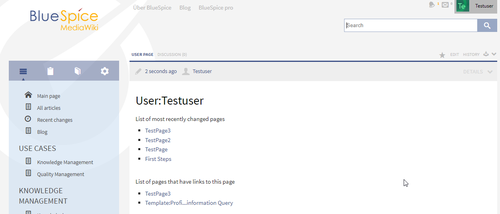
Where to find the function SmartList?[edit | edit source]You can integrate SmartList into an article, the widget bar or the user sidebar.
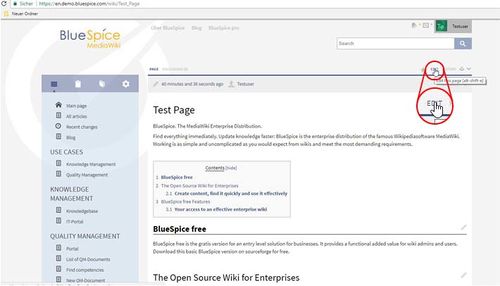
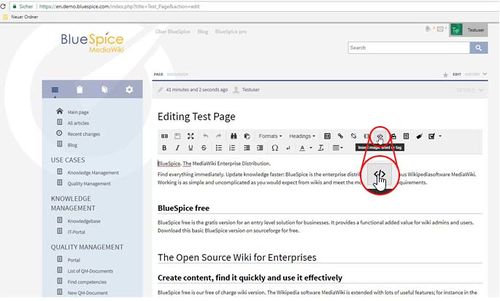
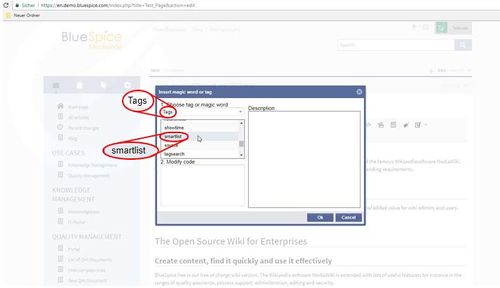
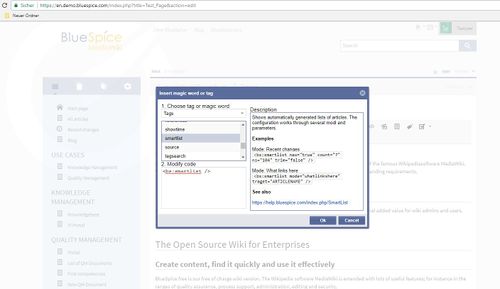
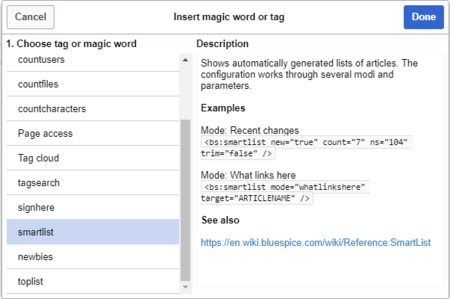
The extension SmartList offers three different tags:
-
<bs:smartlist />- display a list of pages based on different criteria -
<bs:newbies />- display a list of recentrly registered users -
<bs:toplist />- display a list of most visited pages
All of the tags listed above can be added through the menu Insert > Magic word in VisualEditor. For more information on how to insert magic words, see InsertMagic.
Smartlist[edit | edit source]
Add the tag where you want. <smartlist/> Add the parameters you want, for example:
<bs:smartlist new="true" count="7" ns="104" trim="false" />
Recentchanges or Changesofweek[edit | edit source]
There are two basic options which you can choose using the parameter "mode":
- recentchanges shows the most recent changes. This is the default option.
- changesofweek shows the articles which have been chosen as a "Change of the week".
Example:
<smartlist mode="changesofweek" />
Note: The relevant Hallo Welt extension must be activated to use 'changesofweek'.
Parameters for 'recentchanges'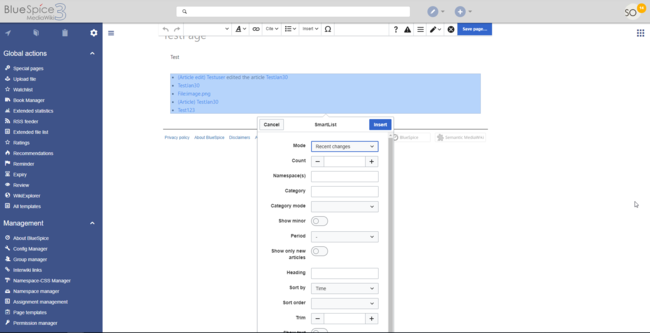


Parameters[edit | edit source]
The SmartList can be limited or extended with the following parameters:
| Label | Parameter | Values | Description |
|
Count |
count | number |
The number of articles to be shown. Default value: 5 |
|
Namespace(s) |
ns | number or name |
Only articles from |
|
given namespace will be listed. The namespaces can be entered |
|
by IDs or by names. Several namespaces can be named with |
|
pipes: ns="0 |
|
|2 |
|
|5" |
excludens
|
or ns="Help|User|Test". Default: |
|
All namespaces are included. |
|||
|
Category |
cat | name |
Only articles from |
|
given category will be listed. Selecting several categories is not possible. Default: |
|
All categories. |
nominor
|
Category mode |
catmode | AND, OR |
Show pages if they are in at least one of the categories (OR) or show pages if they are tagged with all categories (AND). |
|
Show minor |
minor | true, false |
Minor changes (changes marked with an "m" in the recent changes) will not be listed. Default: Minor changes are listed. |
|
Period |
period | -, month, week, day |
Only changes within |
|
given period are shown. |
|
Default: No limit. |
|||
|
Show only new articles |
new | true, false |
Only new pages will be listed. Default: All pages are shown |
| Heading | heading | text | Adds a heading above the list |
| Sort by | sort | Title, Time | Sort results by title or by latest edited. |
| Sort order | order | asc, desc | Ascending or descending sort order. |
|
Trim |
trim | number |
Long article names are not cropped. Default: The title is cut off |
|
after 30 characters. |
|||
|
Show text |
showtext | true, false |
With this option, a line of the article contents will be shown alongside the title |
|
. |
|||
|
Trim text |
trimtext | number |
"trimtext" sets the number of characters of an article's content shown. This is only relevant when showtext="true"). Note: trimtext="0" is not possible. |
The parameters are added to the tag.
Example:
<smartlist new="true" count="7" ns="104" trim="false" />
This SmartList lists the seven newest articles from a particular namespace without shortening their titles. Parameters for 'changesofweek'[edit | edit source]
|
count |
The number of articles to be shown. Default value: 5 |
|
period |
Only changes within this period are shown. Possible values: 'month', 'week', 'day'. Default: No limit. |
Example:
<smartlist mode="changesofweek" count="10" />
What links here[edit | edit source]
A smartlist with the mode mode="whatlinkshere" shows all sites that link to this site - if you don't define a special site through "target" then smartlist will show all links to the page the smartlist-tag is used at. You can use all parameters of the mode 'recentchanges'.
| target | page title - default: site on which the tag is used. |
Beispiel:
<bs:smartlist mode="whatlinkshere" target="Portal:Test" count="7" ns="0"| Show namespaces | showns | true, false | If true, the namespace prefix is shown with the page names. |
| Number with text | numwithtext | number | Anzahl der Artikel die mit Einführungstext angezeigt werden sollen. Nur effektiv wenn showtext=true |
| Meta | meta | true | The username and date for the last edit are shown. |
| Target | target | - | Obsolete |
|
Exclude namespace(s) |
excludens | number or name |
Articles from given namespaces will not be shown. The namespaces can be entered by IDs or by names (comma-separated). Default: All namespaces are included. |
<bs:smartlist category="ISO9001" new="true" count="7" ns="104" trim="false" />
SmartList in the widgetsNewbies[edit | edit source]
The SmartList in the widgets can only changed by an admin under Preferences.
Ratings
tag <bs:newbies /> shows recently registered wiki users.
Parameters[edit | edit source]
If the extension Ratings integrated into the wiki, an overview of the most commonly evaluated pages can be inserted in the wiki code where you want (e.g. the start page) using SmartList. This happens via the wiki tag <smartlist mode="ratings" />. This will show the pages which have been evaluated most often. It does not matter whether they have had positive or negative evaluations. Only the amount of evaluations made is important.
The SmartList of the pages evaluated also has some parameters for customisation:
| Label | Parameter | Values | Description |
|
Count - count |
The number of |
|
users to be shown; the default value is |
ns
Only articles from these namespace which have been evaluated will be listed.
excludens
No articles from this namespace will be listed.
showtext
With this option, a line of the article contents will be shown alongside the title. (showtext="true")
trimtext
Limits the number of characters shown of the article's contents. (trimtext="50")
showvotes
The number of evaluations made is given alongside the title. (showvotes="true")
Example:
<smartlist mode="ratings" count="9" showtext="true" />
In this example, 9 articles will be listed which have been evaluated most often. At the same time, a line of each article will be shown. Approval
|
10. |
Example in wikicode[edit | edit source]
An example for displaying approvals (the right extension is needed):
<smartlist mode="flaggedrevisions" ns="502" <bs:newbies count="7"/>
Further functionsToplist[edit | edit source]
Most clicked article[edit | edit source]
The <bs:toplist /> tag creates This tag shows a list of the most clicked articles in the wiki.
The following are possible parameters:
count
visited pages.
Parameters[edit | edit source]
| Label | Paramter | Values | Description |
|---|---|---|---|
|
Count |
count | number |
The number of articles to be shown; the default value is 10. |
|
Namespaces |
ns | text, text |
Only articles from these namespace will be shown. You can put several namespaces here, separated by commas. |
|
Category |
cat | text, text |
Only articles from this category will be shown. You can put several categories here, separated by commas. |
|
Period |
period | month, alltime |
The period that should be used |
|
. The default is alltime. |
New membersExample in wikicode[edit | edit source]
The<bs:newbies/> tag shows the newest members of the wiki.
The following are possible parameters:
|
count |
The number of members to be shown; the default value is 10. |
See also[edit | edit source]
Our reference page.
<bs:toplist count="7" ns="Help|QM" />
Related info
__HIDETITLE__


            <bs:bookshelf src="Book:User manual" />


            __TOC__


            ==What is SmartList?==


            '''SmartList''' introduces a tag that can be placed on any page to show a list of most relevant pages. Type of content it will display, as well as number of entries can be configured using different options in the tag.


            ==Where to find the function SmartList?==

            You can integrate SmartList into an article, the widget bar or the user sidebar.


            ::: [[File:SmartList1.jpg|500x286px]]

            ::: [[File:SmartList2.jpg|500x301px]]

            ::: [[File:SmartList3.jpg|500x288px]]

            ::: [[File:SmartList4.jpg|500x289px]]

            ::: [[File:SmartList5.png|500x214px]]


            ==The functionality of SmartList==

            Add the tag where you want. <nowiki><smartlist/> </nowiki> Add the parameters you want, for example:


            <pre><bs:smartlist new="true" count="7" ns="104" trim="false" /></pre>


            ==Recentchanges or Changesofweek==

            There are two basic options which you can choose using the parameter "mode":


            * '''recentchanges''' shows the most recent changes. This is the default option.

            * '''changesofweek''' shows the articles which have been chosen as a "Change of the week".


            '''Example''':


            <pre><smartlist mode="changesofweek" /></pre>


            '''Note''': The relevant Hallo Welt extension must be activated to use 'changesofweek'.


            ===Parameters for 'recentchanges'{{DISPLAYTITLE:Generate page lists (smart lists)}}


            The extension '''SmartList''' allows to insert a list of pages in a wiki page using the tags ''smartlist'', ''newbies,'' or ''toplist''. The selection criteria can be set using a dialog box.


            ==Available tags==

            [[File:Smartlist2.png|Magic word ''smartlist'' in VisualEditor|alt=Magic word smartlist in VisualEditor|center|450x450px|thumb]]


            The extension SmartList offers three different tags:


            *<code><nowiki><bs:smartlist /></nowiki></code> - display a list of pages based on different criteria

            *<code><nowiki><bs:newbies /></nowiki></code> - display a list of recentrly registered users

            *<code><nowiki><bs:toplist /></nowiki></code> - display a list of most visited pages


            All of the tags listed above can be added through the menu ''Insert > Magic word''  in [[Manual:Extension/VisualEditor|VisualEditor]]. For more information on how to insert magic words, see [[Manual:Extension/BlueSpiceInsertMagic|InsertMagic]].


            ==Smartlist==

            [[File:Smartlist3.png|Options of the ''smartlist'' tag|alt=Options of the smartlist tag|center|650x650px|thumb]]


            ===Parameters===

        The SmartList can be limited or extended with the following parameters:


        {| class="contenttable" style="width: 531px; height: 373px;100%;" cellspacing="0" cellpadding="5" border="0"

        |-

            | style="border: 1px solid #ebecec;"|

            '''count'''


            | style="border: 1px solid #ebecec;"Label

            |Parameter

            |Values

            |Description

            |-

            | style="" |

            Count

            |'''count'''

            |number

            | style="" |

        The number of articles to be shown. Default value: 5


        |-

        | style="border: 1px solid #ebecec;"|

            '''ns'''


            | style="border: 1px solid #ebecec;"|

            Only articles from these" |

            Namespace(s)

            |'''ns'''

            |number or name

            | style="" |

            Only articles from given namespace will be listed. The namespaces can be entered numerically by IDs or by names. Several namespaces can be named with commaspipes: ns="0,|2,|5". Default: No limit.


            |-

            | style="border: 1px solid #ebecec;"|

            '''excludens'''


            | style="border: 1px solid #ebecec;"|

            Articles from these namespaces will not be shown. At the moment, the namespaces can be entered numerically or by names. Several namespaces can be named with commas: excludens="0,2,5". Default: No limit.


            |-

            | style="border: 1px solid #ebecec;"|

            '''cat'''


            | style="border: 1px solid #ebecec;"|

            Only articles from this category will be listed. Selecting several categories is not possible. Default: No limit.


            |-

            | style="border: 1px solid #ebecec;"|

            '''nominor'''


            | style="border: 1px solid #ebecec;" or ns="Help|User|Test". Default: All namespaces are included.


            |-

            | style="" |

            Category

            |'''cat'''

            |name

            | style="" |

            Only articles from given category will be listed. Selecting several categories is not possible. Default: All categories.


            |-

            | style="" |

            Category mode

            |'''catmode'''

            |AND, OR

            | style="" |

            Show pages  if they are in at least one of the categories (OR) or show pages if they are tagged with all categories (AND).


            |-

            | style="" |

            Show minor

            |'''minor'''

            |true, false

            | style="" |

        Minor changes (changes marked with an "m" in the recent changes) will not be listed. Default: Minor changes are listed.


        |-

        | style="border: 1px solid #ebecec;"|

            '''period'''


            | style="border: 1px solid #ebecec;"|

            Only changes within this period are shown. Possible values: 'month', 'week', 'day'. " |

            Period

            |'''period'''

            | -, month, week, day

            | style="" |

            Only changes within given period are shown. Default: No limit.


        |-

        | style="border: 1px solid #ebecec;"|

            '''new'''


            | style="border: 1px solid #ebecec;"" |

            Show only new articles

            |'''new'''

            |true, false

            | style="" |

        Only new pages will be listed. Default: All pages are shown


            |-

            | style="border: 1px solid #ebecec;"|

            '''trim'''


            | style="border: 1px solid #ebecec;"|-

            |Heading

            |'''heading'''

            |text

            |Adds a heading above the list

            |-

            |Sort by

            |'''sort'''

            |Title, Time

            |Sort results by title or by latest edited.

            |-

            |Sort order

            |'''order'''

            |asc, desc

            |Ascending or descending sort order.

            |-

            | style="" |

            Trim

            |'''trim'''

            |number

            | style="" |

        Long article names are not cropped. Default: The title is cut off atafter 30 characters.


        |-

        | style="border: 1px solid #ebecec;"|

            '''showtext'''


            | style="border: 1px solid #ebecec;"" |

            Show text

            |'''showtext'''

            |true, false

            | style="" |

        With this option, a line of the article contents will be shown alongside the title: showtext="true".


            |-

            | style="border: 1px solid #ebecec;"|

            '''trimtext'''


            | style="border: 1px solid #ebecec;".


            |-

            | style="" |

            Trim text

            |'''trimtext'''

            |number

            | style="" |

        "trimtext" sets the number of characters of an article's content shown. This is only relevant when ''showtext="true"''). ''Note'': trimtext="0" is <u>not</u> possible.


            |}

            The parameters are added to the tag.<br />'''Example''':


            <pre><smartlist new="true" count="7" ns="104" trim="false" /></pre>


            <br /> This SmartList lists the seven newest articles from a particular namespace without shortening their titles.


            ===Parameters for 'changesofweek'===

            {| class="contenttable" style="width: 531px; height: 65px;" cellspacing="0" cellpadding="5" border="0"

            |-

            | style="border: 1px solid #ebecec;"|

            '''count'''


            | style="border: 1px solid #ebecec;"|

            The number of articles to be shown. Default value: 5


            |-

            | style="border: 1px solid #ebecec;"|

            '''period'''


            | style="border: 1px solid #ebecec;"|

            Only changes within this period are shown. Possible values: 'month', 'week', 'day'. Default: No limit.


            |}


            '''Example''':


            <pre><smartlist mode="changesofweek" count="10" /></pre>


            ===What links here===

            A smartlist with the mode <code>mode="whatlinkshere"</code> shows all sites that link to this site - if you don't define a special site through "target" then smartlist will show all links to the page the smartlist-tag is used at. You can use all parameters of the mode 'recentchanges'.


            ===Additional parameters for 'whatlinkshere'===

            {| class="contenttable-black"

            |-

            | style="border: 1px solid #ebecec;"|'''target'''

            | style="border: 1px solid #ebecec;"|page title - default: site on which the tag is used.

            |}

            '''Beispiel''':


            <pre><nowiki><bs:smartlist mode="whatlinkshere" target="Portal:Test" count="7" ns="0" trim="false"/></nowiki></pre>


            ===SmartList in the widgets===

            The SmartList in the widgets can only changed by an admin under [[Preferences]].


            ===Ratings===

            If the extension [[Rating|Ratings]] integrated into the wiki, an overview of the most commonly evaluated pages can be inserted in the wiki code where you want (e.g. the start page) using SmartList. This happens via the wiki tag <nowiki><smartlist mode="ratings" /></nowiki>. This will show the pages which have been evaluated most often. It does not matter whether they have had positive or negative evaluations. Only the amount of evaluations made is important.


            The SmartList of the pages evaluated also has some parameters for customisation:


        |-

            |Show namespaces

            |'''showns'''

            |true, false

            |If true, the namespace prefix is shown with the page names.

            |-

            |Number with text

            |'''numwithtext'''

            |number

            |Anzahl der Artikel die mit Einführungstext angezeigt werden sollen. Nur effektiv wenn ''showtext=true''

            |-

            |Meta

            |'''meta'''

            |true

            |The username and date for the last edit are shown.

            |-

            |Target

            |'''target'''

            | -

            |Obsolete

            |-

            | style="" |

            Exclude namespace(s)

            |'''excludens'''

            |number or name

            | style="" |

            Articles from given namespaces will not be shown. The namespaces can be entered by IDs or by names (comma-separated). Default: All namespaces are included.


            |}'''Example output in source code:'''


            <nowiki><bs:smartlist category="ISO9001" new="true" count="7" ns="104" trim="false" /></nowiki>

            ==Newbies==

            The tag <code><nowiki><bs:newbies /></nowiki></code> shows  recently registered wiki users.

            ===Parameters===


        {| class="contenttable" style="width: 531px; height: 65px;100%;" cellspacing="0" cellpadding="5" border="0"

        |-

            | style="border: 1px solid #ebecec;"|

            '''count'''


            | style="border: 1px solid #ebecec;"|

            The number of articles to be shown; the default value is 5.


            |-

            | style="border: 1px solid #ebecec;"|

            '''ns'''


            | style="border: 1px solid #ebecec;"|

            Only articles from these namespace which have been evaluated will be listed.


            |-

            | style="border: 1px solid #ebecec;"|

            '''excludens'''


            | style="border: 1px solid #ebecec;"|

            No articles from this namespace will be listed.


            |-

            | style="border: 1px solid #ebecec;"|

            '''showtext'''


            | style="border: 1px solid #ebecec;"|

            With this option, a line of the article contents will be shown alongside the title. (showtext="true")


            |-

            | style="border: 1px solid #ebecec;"|

            '''trimtext'''


            | style="border: 1px solid #ebecec;"|

            Limits the number of characters shown of the article's contents. (trimtext="50")


            |-

            | style="border: 1px solid #ebecec;"|

            '''showvotes'''


            | style="border: 1px solid #ebecec;"|

            The number of evaluations made is given alongside the title. (showvotes="true")


            |}


            '''Example:'''


            <pre><smartlist mode="ratings" count="9" showtext="true" /> </pre>


            <br /> In this example, 9 articles will be listed which have been evaluated most often. At the same time, a line of each article will be shown.


            ===Approval===

            An example for displaying approvals (the right extension is needed):


            <pre><smartlist mode="flaggedrevisions" ns="502" count="7"/> </pre>


            ==Further functions==

            ===Most clicked article===

            The <nowiki><bs:toplist /></nowiki> tag createsLabel

            |Parameter

            |Values

            |Description

            |-

            | style="" |

            Count - '''count'''

            |

            |

            | style="" |

            The number of users to be shown; the default value is 10.


            |}


            ===Example in wikicode===


            <pre><bs:newbies count="7"/></pre>


            ==Toplist==

            This tag shows a list of the most clicked articles in the wiki.


            The following are possible parameters:


        visited pages.


            ===Parameters===


        {| class="contenttable" style="width: 531px; height: 65px;100%;" cellspacing="0" cellpadding="5" border="0"


        |-

            | style="border: 1px solid #ebecec;"|

            '''count'''


            | style="border: 1px solid #ebecec;"!Label

            !Paramter

            !Values

            !Description

            |-

            | style="" |

            Count

            |'''count'''

            |number

            | style="" |

        The number of articles to be shown; the default value is 10.


        |-

        | style="border: 1px solid #ebecec;"|

            '''ns'''


            | style="border: 1px solid #ebecec;"" |

            Namespaces

            |'''ns'''

            |text, text

            | style="" |

        Only articles from these namespace will be shown. You can put several namespaces here, separated by commas.


        |-

        | style="border: 1px solid #ebecec;"|

            '''cat'''


            | style="border: 1px solid #ebecec;"" |

            Category

            |'''cat'''

            |text, text

            | style="" |

        Only articles from this category will be shown. You can put several categories here, separated by commas.


        |-

        | style="border: 1px solid #ebecec;"|

            '''period'''


            | style="border: 1px solid #ebecec;"" |

            Period

            |'''period'''

            |month, alltime

            | style="" |

        The period that should be used (alltime or month). The default is alltime.


        |}


        ===New members===

            The<nowiki><bs:newbies/></nowiki> tag shows the newest members of the wiki.


            The following are possible parameters:


            {| class="contenttable" style="width: 531px; height: 65px;" cellspacing="0" cellpadding="5" border="0"

            |-

            | style="border: 1px solid #ebecec;"|

            '''count'''


            | style="border: 1px solid #ebecec;"|

            The number of members to be shown; the default value is 10.


            |}


            ==See also==


            Our [[SmartList|reference page.Example in wikicode===


            <pre><bs:toplist count="7" ns="Help|QM" /></pre>


            {{Box Links-en|Topic1=[[Reference:BlueSpiceSmartList]]|Topic2=[[Reference:BlueSpiceInsertMagic]]}}


            {{Translation}}

            __FORCETOC__


            [[Category:Organization]]
| (27 intermediate revisions by 4 users not shown) | |||
| Line 1: | Line 1: | ||
| − | + | {{DISPLAYTITLE:Generate page lists (smart lists)}} | |
| − | |||
| − | + | The extension '''SmartList''' allows to insert a list of pages in a wiki page using the tags ''smartlist'', ''newbies,'' or ''toplist''. The selection criteria can be set using a dialog box. | |
| − | == | + | ==Available tags== |
| + | [[File:Smartlist2.png|Magic word ''smartlist'' in VisualEditor|alt=Magic word smartlist in VisualEditor|center|450x450px|thumb]] | ||
| − | |||
| − | + | The extension SmartList offers three different tags: | |
| − | |||
| − | : | + | *<code><nowiki><bs:smartlist /></nowiki></code> - display a list of pages based on different criteria |
| − | : | + | *<code><nowiki><bs:newbies /></nowiki></code> - display a list of recentrly registered users |
| − | : | + | *<code><nowiki><bs:toplist /></nowiki></code> - display a list of most visited pages |
| − | |||
| − | |||
| − | + | All of the tags listed above can be added through the menu ''Insert > Magic word'' in [[Manual:Extension/VisualEditor|VisualEditor]]. For more information on how to insert magic words, see [[Manual:Extension/BlueSpiceInsertMagic|InsertMagic]]. | |
| − | |||
| − | + | ==Smartlist== | |
| + | [[File:Smartlist3.png|Options of the ''smartlist'' tag|alt=Options of the smartlist tag|center|650x650px|thumb]] | ||
| − | + | ===Parameters=== | |
| − | |||
| − | |||
| − | |||
| − | |||
| − | |||
| − | |||
| − | |||
| − | |||
| − | |||
| − | |||
| − | |||
| − | ===Parameters | ||
The SmartList can be limited or extended with the following parameters: | The SmartList can be limited or extended with the following parameters: | ||
| − | {| class="contenttable" style="width: | + | {| class="contenttable" style="width:100%;" cellspacing="0" cellpadding="5" border="0" |
| + | |Label | ||
| + | |Parameter | ||
| + | |Values | ||
| + | |Description | ||
|- | |- | ||
| − | | style=" | + | | style="" | |
| − | '''count''' | + | Count |
| − | + | |'''count''' | |
| − | | style=" | + | |number |
| + | | style="" | | ||
The number of articles to be shown. Default value: 5 | The number of articles to be shown. Default value: 5 | ||
|- | |- | ||
| − | | style=" | + | | style="" | |
| − | '''ns''' | + | Namespace(s) |
| − | + | |'''ns''' | |
| − | | style=" | + | |number or name |
| − | Only articles from | + | | style="" | |
| + | Only articles from given namespace will be listed. The namespaces can be entered by IDs or by names. Several namespaces can be named with pipes: ns="0|2|5" or ns="Help|User|Test". Default: All namespaces are included. | ||
|- | |- | ||
| − | | style=" | + | | style="" | |
| − | ''' | + | Category |
| − | + | |'''cat''' | |
| − | | style=" | + | |name |
| − | + | | style="" | | |
| + | Only articles from given category will be listed. Selecting several categories is not possible. Default: All categories. | ||
|- | |- | ||
| − | | style=" | + | | style="" | |
| − | ''' | + | Category mode |
| − | + | |'''catmode''' | |
| − | | style=" | + | |AND, OR |
| − | + | | style="" | | |
| + | Show pages if they are in at least one of the categories (OR) or show pages if they are tagged with all categories (AND). | ||
|- | |- | ||
| − | | style=" | + | | style="" | |
| − | ''' | + | Show minor |
| − | + | |'''minor''' | |
| − | | style=" | + | |true, false |
| + | | style="" | | ||
Minor changes (changes marked with an "m" in the recent changes) will not be listed. Default: Minor changes are listed. | Minor changes (changes marked with an "m" in the recent changes) will not be listed. Default: Minor changes are listed. | ||
|- | |- | ||
| − | | style=" | + | | style="" | |
| − | '''period''' | + | Period |
| − | + | |'''period''' | |
| − | | style=" | + | | -, month, week, day |
| − | Only changes within | + | | style="" | |
| + | Only changes within given period are shown. Default: No limit. | ||
|- | |- | ||
| − | | style=" | + | | style="" | |
| − | '''new''' | + | Show only new articles |
| − | + | |'''new''' | |
| − | | style=" | + | |true, false |
| + | | style="" | | ||
Only new pages will be listed. Default: All pages are shown | Only new pages will be listed. Default: All pages are shown | ||
| − | |||
|- | |- | ||
| − | | | + | |Heading |
| − | ''' | + | |'''heading''' |
| − | + | |text | |
| − | | | + | |Adds a heading above the list |
| − | |||
| − | |||
|- | |- | ||
| − | | | + | |Sort by |
| − | ''' | + | |'''sort''' |
| − | + | |Title, Time | |
| − | | | + | |Sort results by title or by latest edited. |
| − | |||
| − | |||
|- | |- | ||
| − | | | + | |Sort order |
| − | ''' | + | |'''order''' |
| − | + | |asc, desc | |
| − | | | + | |Ascending or descending sort order. |
| − | |||
| − | |||
| − | | | ||
| − | |||
| − | |||
| − | |||
| − | |||
| − | |||
| − | |||
| − | |||
|- | |- | ||
| − | | style=" | + | | style="" | |
| − | ''' | + | Trim |
| − | + | |'''trim''' | |
| − | | style=" | + | |number |
| − | + | | style="" | | |
| + | Long article names are not cropped. Default: The title is cut off after 30 characters. | ||
|- | |- | ||
| − | | style=" | + | | style="" | |
| − | ''' | + | Show text |
| − | + | |'''showtext''' | |
| − | | style=" | + | |true, false |
| − | + | | style="" | | |
| − | + | With this option, a line of the article contents will be shown alongside the title. | |
| − | |||
| − | |||
| − | |||
| − | |||
| − | |||
| − | |||
| − | |||
| − | |||
| − | |||
| − | |||
|- | |- | ||
| − | | style=" | + | | style="" | |
| − | | style=" | + | Trim text |
| − | + | |'''trimtext''' | |
| − | ''' | + | |number |
| − | + | | style="" | | |
| − | + | "trimtext" sets the number of characters of an article's content shown. This is only relevant when ''showtext="true"''). ''Note'': trimtext="0" is <u>not</u> possible. | |
| − | |||
| − | |||
| − | |||
| − | |||
| − | |||
| − | |||
| − | |||
| − | |||
| − | |||
| − | |||
|- | |- | ||
| − | | | + | |Show namespaces |
| − | ''' | + | |'''showns''' |
| − | + | |true, false | |
| − | | | + | |If true, the namespace prefix is shown with the page names. |
| − | |||
| − | |||
|- | |- | ||
| − | | | + | |Number with text |
| − | ''' | + | |'''numwithtext''' |
| − | + | |number | |
| − | | | + | |Anzahl der Artikel die mit Einführungstext angezeigt werden sollen. Nur effektiv wenn ''showtext=true'' |
| − | |||
| − | |||
|- | |- | ||
| − | | | + | |Meta |
| − | ''' | + | |'''meta''' |
| − | + | |true | |
| − | | | + | |The username and date for the last edit are shown. |
| − | |||
| − | |||
|- | |- | ||
| − | | | + | |Target |
| − | ''' | + | |'''target''' |
| − | + | | - | |
| − | | | + | |Obsolete |
| − | |||
| − | |||
|- | |- | ||
| − | | style=" | + | | style="" | |
| − | ''' | + | Exclude namespace(s) |
| + | |'''excludens''' | ||
| + | |number or name | ||
| + | | style="" | | ||
| + | Articles from given namespaces will not be shown. The namespaces can be entered by IDs or by names (comma-separated). Default: All namespaces are included. | ||
| − | | | + | |}'''Example output in source code:''' |
| − | + | <nowiki><bs:smartlist category="ISO9001" new="true" count="7" ns="104" trim="false" /></nowiki> | |
| + | ==Newbies== | ||
| + | The tag <code><nowiki><bs:newbies /></nowiki></code> shows recently registered wiki users. | ||
| + | ===Parameters=== | ||
| + | {| class="contenttable" style="width:100%;" cellspacing="0" cellpadding="5" border="0" | ||
| + | |Label | ||
| + | |Parameter | ||
| + | |Values | ||
| + | |Description | ||
|- | |- | ||
| − | | style=" | + | | style="" | |
| − | ''' | + | Count - '''count''' |
| − | + | | | |
| − | | style=" | + | | |
| − | The number of | + | | style="" | |
| + | The number of users to be shown; the default value is 10. | ||
|} | |} | ||
| − | + | ===Example in wikicode=== | |
| + | <pre><bs:newbies count="7"/></pre> | ||
| − | + | ==Toplist== | |
| − | + | This tag shows a list of the most visited pages. | |
| − | === | + | ===Parameters=== |
| − | |||
| − | + | {| class="contenttable" style="width:100%;" cellspacing="0" cellpadding="5" border="0" | |
| − | + | !Label | |
| − | + | !Paramter | |
| − | + | !Values | |
| − | + | !Description | |
| − | |||
| − | |||
| − | |||
| − | {| class="contenttable" style="width: | ||
|- | |- | ||
| − | | style=" | + | | style="" | |
| − | '''count''' | + | Count |
| − | + | |'''count''' | |
| − | | style=" | + | |number |
| + | | style="" | | ||
The number of articles to be shown; the default value is 10. | The number of articles to be shown; the default value is 10. | ||
|- | |- | ||
| − | | style=" | + | | style="" | |
| − | '''ns''' | + | Namespaces |
| − | + | |'''ns''' | |
| − | | style=" | + | |text, text |
| + | | style="" | | ||
Only articles from these namespace will be shown. You can put several namespaces here, separated by commas. | Only articles from these namespace will be shown. You can put several namespaces here, separated by commas. | ||
|- | |- | ||
| − | | style=" | + | | style="" | |
| − | '''cat''' | + | Category |
| − | + | |'''cat''' | |
| − | | style=" | + | |text, text |
| + | | style="" | | ||
Only articles from this category will be shown. You can put several categories here, separated by commas. | Only articles from this category will be shown. You can put several categories here, separated by commas. | ||
|- | |- | ||
| − | | style=" | + | | style="" | |
| − | '''period''' | + | Period |
| − | + | |'''period''' | |
| − | | style=" | + | |month, alltime |
| − | The period that should be used | + | | style="" | |
| + | The period that should be used. The default is alltime. | ||
|} | |} | ||
| − | === | + | ===Example in wikicode=== |
| − | + | <pre><bs:toplist count="7" ns="Help|QM" /></pre> | |
| − | |||
| − | { | + | {{Box Links-en|Topic1=[[Reference:BlueSpiceSmartList]]|Topic2=[[Reference:BlueSpiceInsertMagic]]}} |
| − | |||
| − | | | ||
| − | |||
| − | |||
| − | | | ||
| − | |||
| − | |||
| − | |||
| − | + | {{Translation}} | |
| + | __FORCETOC__ | ||
| − | + | [[Category:Organization]] | |