Page is a draft due to changes in included resources
You are viewing an old version of this page. Return to the latest version.
Difference between revisions of "Manual:Extension/BlueSpicePageAccess"
| [quality revision] | [quality revision] |
m (Tag: 2017 source edit) |
(Changed categories.) |
What is BlueSpicePageAccess?[edit | edit source]
BlueSpicePageAccess restricts access to a page to specified user groups. It is inserted with the tag pageaccess. Access restriction per page is done on a group basis. "Access" here means all actions, including read and edit.
Usage[edit | edit source]
To add this tag with VisualEditor:
- Position the cursor at the beginning of your page.
- Select Insert > Magic word.
- Select Page access in the dialog box.
- Click Done.
- Add the groups to the Page access dialog box.
-
Click Insert.
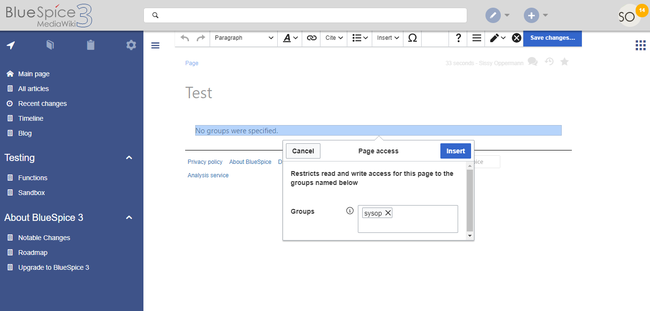
The page now shows an info header that shows the groups that have access.

<bs:pageaccess groups="sysop" />
To add more groups, use commas to separate:
<bs:pageaccess groups="sysop,secure1,secure2" />
A user can only restrict access to the groups this user belongs to. This is a security feature to prevent users from locking themselves out of a page.
Related info
{{DISPLAYTITLE:Page access restrictions}}

        __TOC__

        ==What is BlueSpicePageAccess?==


        '''BlueSpicePageAccess''' restricts access to a page to specified user groups. It is inserted with the tag ''pageaccess''.  Access restriction per page is done on a group basis. "Access" here means all actions, including read and edit. <br />

        ==Usage==

        '''To add this tag with [[Manual:VisualEditor|VisualEditor]]:'''


        #'''Position''' the cursor at the beginning of your page.

        #'''Select''' ''Insert > Magic word.''

        #'''Select''' ''Page access'' in the dialog box.

        #'''Click''' ''Done''.

        #'''Add''' the groups to the Page access dialog box.

        #'''Click''' ''Insert''.<br />[[File:PageAccess1.png|Editing the PageAccess tag in VisualEditor|link=https://en.wiki.bluespice.com/wiki/File:PageAccess1.png|alt=Screenshot: Page access dialog box|border|center|650x650px]]


        The page now shows an info header that shows the groups that have access.

        [[File:Manual:magicword-pageacess.png|alt=Screenshot page access message|center|350x350px]]

        In source view, the tag looks like this:<pre><nowiki>

         <bs:pageaccess groups="sysop" />


        </nowiki></pre>


        To add more groups, use commas to separate:


        <pre><nowiki>

         <bs:pageaccess groups="sysop,secure1,secure2" />


        </nowiki></pre>


        A user can only restrict access to the groups this user belongs to. This is a security feature to prevent users from locking themselves out of a page.

        {{Box Links-en|Topic1=[[Reference:BlueSpicePageAccess]]}}{{Translation}}

[[Category:Administration]]| Line 28: | Line 28: | ||
A user can only restrict access to the groups this user belongs to. This is a security feature to prevent users from locking themselves out of a page. | A user can only restrict access to the groups this user belongs to. This is a security feature to prevent users from locking themselves out of a page. | ||
{{Box Links-en|Topic1=[[Reference:BlueSpicePageAccess]]}}{{Translation}} | {{Box Links-en|Topic1=[[Reference:BlueSpicePageAccess]]}}{{Translation}} | ||
| + | [[Category:Administration]] | ||