You are viewing an old version of this page. Return to the latest version.
Difference between revisions of "Manual:Extension/BlueSpicePagesVisited"
| [unchecked revision] | [unchecked revision] |
(Tag: 2017 source edit) |
m (Lsireta moved page Manual:Extension/PagesVisited to Manual:Extension/BlueSpicePagesVisited) |
Contents
What is BlueSpicePagesVisited?[edit | edit source]
BlueSpicePagesVisited creates a list of a user's recently visited pages.



Where to find the function BlueSpicePagesVisited?[edit | edit source]
List of recently viewed pages can be found in user's personal sidebar or be embedded in a wiki page.
User's personal sidebar[edit | edit source]
It can be found in the left navigation, click on the "Personal navigation" tab (clipboard icon).
Embedding the tag on a page[edit | edit source]
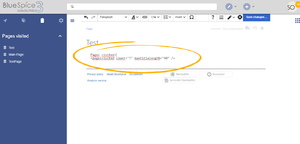
While in source edit mode, enter the following tag anwhere on the page.
<pagesvisited count="10" />
The list of recently viewed pages will appear at the place in the page where the tag was inserted.
Options that can be passed to the tag are:
- count - number of pages to show
- maxtitlelength - maximum length of each shown page
- namespaces - list of namespaces from which to show pages. Multiple namespaces can be entered, separated by comma.
- order - sorting of the pages displayed - can be "time" or "pagename"
See also[edit | edit source]
Reference page for this extension.
<bs:bookshelf src="Book:User manual" />


        __TOC__


        ==What is BlueSpicePagesVisited?==


        '''BlueSpicePagesVisited''' creates a list of a user's recently visited pages.

        [[File:PagesVisited1a.png|thumb|Pages visited in user's personal sidebar]]

        [[File:PagesVisited2a.png|thumb|Inserting PagesVisited tag]]

        [[File:PagesVisited3a.png|thumb|PagesVisited on the page]]


        ==Where to find the function BlueSpicePagesVisited?==

        List of recently viewed pages can be found in user's personal sidebar or be embedded in a wiki page.

        === User's personal sidebar ===


        It can be found in the left navigation, click on the "Personal navigation" tab (clipboard icon).

        === Embedding the tag on a page ===

        While in source edit mode, enter the following tag anwhere on the page.


        <pre><pagesvisited count="10" /></pre>


        The list of recently viewed pages will appear at the place in the page where the tag was inserted.


        Options that can be passed to the tag are:

        * count - number of pages to show

        * maxtitlelength - maximum length of each shown page

        * namespaces - list of namespaces from which to show pages. Multiple namespaces can be entered, separated by comma.

        * order - sorting of the pages displayed - can be "time" or "pagename"


        ==See also==


        [[Reference:PagesVisited|Reference page]] for this extension.
(No difference)
|