Page is a draft due to changes in included resources
You are viewing an old version of this page. Return to the latest version.
Difference between revisions of "Manual:Extension/BlueSpiceGroupManager"
| [unchecked revision] | [unchecked revision] |
(Tag: 2017 source edit) |
Fbaeckmann (talk | contribs) m (Tag: 2017 source edit) |
Contents
What is BlueSpiceGroupManager?[edit | edit source]
BlueSpiceGroupManager is a tool for managing groups on the wiki. It allows adding, renaming and deleting groups.
Where to find BlueSpiceGroupManager?[edit | edit source]

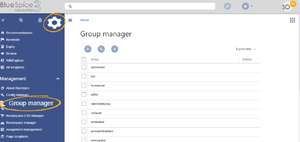
BlueSpiceGroupManager provides a special page Special:GroupManager which is availble from the right navigation in Global Actions tab, Management group.
The functionality of BlueSpiceGroupManager[edit | edit source]

Following functinality is provided by this extension:
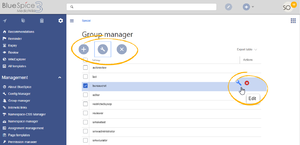
- Overview of the groups - list of all user groups available on the wiki
- Creating new groups - clicking on "plus" button above the table will open a dialog to insert new a new group.
- Renaming a group - group can be renamed by selecting desired group and clicking a "wrench" icon above the table, or by clicking a "wrench" icon that appears in the table row, once the group is selected. System groups - ones provided by MediaWiki by default, or declared by other extensions cannot be renamed.
- Deleting a group - much like with renaming, groups can be deleted by clicking "x" button above the table once the group is selected or by clicking the "x" button in the group table row. System groups cannot be deleted.
Further operations with groups[edit | edit source]
To assign users to groups use BlueSpiceUserManager. To assign roles (permissions) to groups use BlueSpicePermissionManager.
See also[edit | edit source]
Reference page for this extension.
<bs:bookshelf src="Book:User manual" />


        __TOC__


        ==What is BlueSpiceGroupManager?==


        '''BlueSpiceGroupManager''' is a tool for managing groups on the wiki. It allows adding, renaming and deleting groups.


        ==Where to find BlueSpiceGroupManager?==


        [[File:GroupManager1.png|thumb]]

        BlueSpiceGroupManager provides a special page Special:GroupManager which is availble from the right navigation in Global Actions tab, Management group.


            [[File:GroupManager1.png|thumb]]

            [[File:GroupManager2.png|thumb]]


        {{Clear}}


        ==The functionality of BlueSpiceGroupManager==


        [[File:GroupManager2.png|thumb]]

        Following functinality is provided by this extension:


        *Overview of the groups - list of all user groups available on the wiki

        *Creating new groups - clicking on "plus" button above the table will open a dialog to insert new a new group.

        *Renaming a group - group can be renamed by selecting desired group and clicking a "wrench" icon above the table, or by clicking a "wrench" icon that appears in the table row, once the group is selected. System groups - ones provided by MediaWiki by default, or declared by other extensions cannot be renamed.

        *Deleting a group - much like with renaming, groups can be deleted by clicking "x" button above the table once the group is selected or by clicking the "x" button in the group table row. System groups cannot be deleted.


        {{Clear}}


        ===Further operations with groups===

        To assign users to groups use [[Manual:Extension/BlueSpiceUserManager|BlueSpiceUserManager]].

        To assign roles (permissions) to groups use [[Manual:Extension/BlueSpicePermissionManager|BlueSpicePermissionManager]].


        ==See also==


        [[Reference:GroupManager|Reference page]] for this extension.


            [[de:Handbuch:Erweiterung/{{SUBPAGENAME}}]]

            [[en:Manual/{{SUBPAGENAME}}]]
| Line 8: | Line 8: | ||
==Where to find BlueSpiceGroupManager?== | ==Where to find BlueSpiceGroupManager?== | ||
| − | + | [[File:GroupManager1.png|thumb]] | |
BlueSpiceGroupManager provides a special page Special:GroupManager which is availble from the right navigation in Global Actions tab, Management group. | BlueSpiceGroupManager provides a special page Special:GroupManager which is availble from the right navigation in Global Actions tab, Management group. | ||
| + | {{Clear}} | ||
| − | + | ==The functionality of BlueSpiceGroupManager== | |
[[File:GroupManager2.png|thumb]] | [[File:GroupManager2.png|thumb]] | ||
| − | |||
| − | |||
| − | |||
Following functinality is provided by this extension: | Following functinality is provided by this extension: | ||
| Line 22: | Line 20: | ||
*Renaming a group - group can be renamed by selecting desired group and clicking a "wrench" icon above the table, or by clicking a "wrench" icon that appears in the table row, once the group is selected. System groups - ones provided by MediaWiki by default, or declared by other extensions cannot be renamed. | *Renaming a group - group can be renamed by selecting desired group and clicking a "wrench" icon above the table, or by clicking a "wrench" icon that appears in the table row, once the group is selected. System groups - ones provided by MediaWiki by default, or declared by other extensions cannot be renamed. | ||
*Deleting a group - much like with renaming, groups can be deleted by clicking "x" button above the table once the group is selected or by clicking the "x" button in the group table row. System groups cannot be deleted. | *Deleting a group - much like with renaming, groups can be deleted by clicking "x" button above the table once the group is selected or by clicking the "x" button in the group table row. System groups cannot be deleted. | ||
| + | {{Clear}} | ||
===Further operations with groups=== | ===Further operations with groups=== | ||
| Line 28: | Line 27: | ||
==See also== | ==See also== | ||
| + | [[Reference:GroupManager|Reference page]] for this extension. | ||
| − | [[ | + | [[de:Handbuch:Erweiterung/{{SUBPAGENAME}}]] |
| + | [[en:Manual/{{SUBPAGENAME}}]] | ||