Difference between revisions of "Manual:Extension/BlueSpiceSmartList"
| [quality revision] | [quality revision] |
(Changed categories.) |
m (Tag: 2017 source edit) |
The extension SmartList allows to insert a list of pages in a wiki page using the tags smartlist, newbies, or toplist. The selection criteria can be set using a dialog box.
Contents
Available tags[edit | edit source]
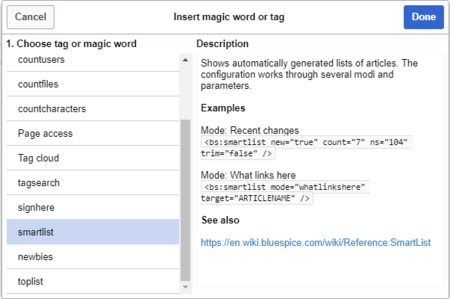
The extension SmartList offers three different tags:
-
<bs:smartlist />- display a list of pages based on different criteria -
<bs:newbies />- display a list of recentrly registered users -
<bs:toplist />- display a list of most visited pages
All of the tags listed above can be added through the menu Insert > Magic word in VisualEditor. For more information on how to insert magic words, see InsertMagic.
Smartlist[edit | edit source]


Parameters[edit | edit source]
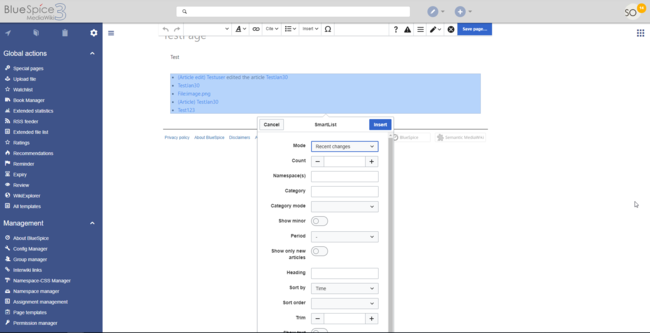
The SmartList can be limited or extended with the following parameters:
|
Count -count |
The number of articles to be shown. Default value: 5 |
|
Namespaces - ns |
Only articles from given namespace will be listed. The namespaces can be entered by IDs or by names. Several namespaces can be named with pipes: ns="0|2|5" or ns="Help|User|Test". Default: All namespaces are included. |
|
Exclude NS - excludens |
Articles from given namespaces will not be shown. The namespaces can be entered by IDs or by names. Several namespaces can be named with pipes: ns="0|2|5" or ns="Help|User|Test". Default: All namespaces are included. |
|
Category - cat |
Only articles from given category will be listed. Selecting several categories is not possible. Default: All categories. |
|
Show minor - nominor |
Minor changes (changes marked with an "m" in the recent changes) will not be listed. Default: Minor changes are listed. |
|
Period - period |
Only changes within given period are shown. Possible values: 'month', 'week', 'day'. Default: No limit. |
|
Show only new articles - new |
Only new pages will be listed. Default: All pages are shown |
|
Trim - trim |
Long article names are not cropped. Default: The title is cut off after 30 characters. |
|
Show text showtext |
With this option, a line of the article contents will be shown alongside the title. |
|
Trim text - trimtext |
"trimtext" sets the number of characters of an article's content shown. This is only relevant when showtext="true"). Note: trimtext="0" is not possible. |
<bs:smartlist mode="recentchanges" new="true" count="7" ns="104" trim="false" />
Newbies[edit | edit source]
The tag <bs:newbies /> shows recently registered wiki users.
Parameters[edit | edit source]
|
Count - count |
The number of users to be shown; the default value is 10. |
Example in wikicode[edit | edit source]
<bs:newbies count="7"/>
Toplist[edit | edit source]
This tag shows a list of the most visited pages.
Parameters[edit | edit source]
|
Count - count |
The number of articles to be shown; the default value is 10. |
|
Namespaces - ns |
Only articles from these namespace will be shown. You can put several namespaces here, separated by commas. |
|
Category - cat |
Only articles from this category will be shown. You can put several categories here, separated by commas. |
|
Period - period |
The period that should be used (alltime or month). The default is alltime. |
Example in wikicode[edit | edit source]
<bs:toplist count="7" ns="Help|QM" />
Related info
{{DISPLAYTITLE:GeneratingGenerate page lists (smart lists)}}


        The extension '''SmartList''' allows to insert a list of pages in a wiki page using the tags ''smartlist'', ''newbies,'' or ''toplist''. The selection criteria can be set using a dialog box.


        ==Available tags==

        [[File:Smartlist2.png|Magic word ''smartlist'' in VisualEditor|alt=Magic word smartlist in VisualEditor|center|450x450px|thumb]]


        The extension SmartList offers three different tags:


        *<code><nowiki><bs:smartlist /></nowiki></code> - display a list of pages based on different criteria

        *<code><nowiki><bs:newbies /></nowiki></code> - display a list of recentrly registered users

        *<code><nowiki><bs:toplist /></nowiki></code> - display a list of most visited pages


        All of the tags listed above can be added through the menu ''Insert > Magic word''  in [[Manual:Extension/VisualEditor|VisualEditor]]. For more information on how to insert magic words, see [[Manual:Extension/BlueSpiceInsertMagic|InsertMagic]].


        ==Smartlist==

        [[File:Smartlist3.png|Options of the ''smartlist'' tag|alt=Options of the smartlist tag|center|650x650px|thumb]]


        ===Parameters===

        The SmartList can be limited or extended with the following parameters:


        {| class="contenttable" style="width:531px;" cellspacing="0" cellpadding="5" border="0"

        |-

        | style="" |

        Count -'''count'''


        | style="" |

        The number of articles to be shown. Default value: 5


        |-

        | style="" |

        Namespaces - '''ns'''


        | style="" |

        Only articles from given namespace will be listed. The namespaces can be entered by IDs or by names. Several namespaces can be named with pipes: ns="0|2|5" or ns="Help|User|Test". Default: All namespaces are included.


        |-

        | style="" |

        Exclude NS - '''excludens'''


        | style="" |

        Articles from given namespaces will not be shown. The namespaces can be entered by IDs or by names. Several namespaces can be named with pipes: ns="0|2|5" or ns="Help|User|Test". Default: All namespaces are included.


        |-

        | style="" |

        Category - '''cat'''


        | style="" |

        Only articles from given category will be listed. Selecting several categories is not possible. Default: All categories.


        |-

        | style="" |

        Show minor - '''nominor'''


        | style="" |

        Minor changes (changes marked with an "m" in the recent changes) will not be listed. Default: Minor changes are listed.


        |-

        | style="" |

        Period - '''period'''


        | style="" |

        Only changes within given period are shown. Possible values: 'month', 'week', 'day'. Default: No limit.


        |-

        | style="" |

        Show only new articles - '''new'''


        | style="" |

        Only new pages will be listed. Default: All pages are shown


        |-

        | style="" |

        Trim - '''trim'''


        | style="" |

        Long article names are not cropped. Default: The title is cut off after 30 characters.


        |-

        | style="" |

        Show text '''showtext'''


        | style="" |

        With this option, a line of the article contents will be shown alongside the title.


        |-

        | style="" |

        Trim text - '''trimtext'''


        | style="" |

        "trimtext" sets the number of characters of an article's content shown. This is only relevant when ''showtext="true"''). ''Note'': trimtext="0" is <u>not</u> possible.


        |}'''Example output in source code:'''


        <nowiki><bs:smartlist mode="recentchanges" new="true" count="7" ns="104" trim="false" /></nowiki>

        ==Newbies==

        The tag <code><nowiki><bs:newbies /></nowiki></code> shows  recently registered wiki users.

        ===Parameters===


        {| class="contenttable" style="width:531px;" cellspacing="0" cellpadding="5" border="0"

        |-

        | style="" |

        Count - '''count'''


        | style="" |

        The number of users to be shown; the default value is 10.


        |}


        ===Example in wikicode===


        <pre><bs:newbies count="7"/></pre>


        ==Toplist==

        This tag shows a list of the most visited pages.


        ===Parameters===


        {| class="contenttable" style="width:531px;" cellspacing="0" cellpadding="5" border="0"

        |-

        | style="" |

        Count - '''count'''


        | style="" |

        The number of articles to be shown; the default value is 10.


        |-

        | style="" |

        Namespaces - '''ns'''


        | style="" |

        Only articles from these namespace will be shown. You can put several namespaces here, separated by commas.


        |-

        | style="" |

        Category - '''cat'''


        | style="" |

        Only articles from this category will be shown. You can put several categories here, separated by commas.


        |-

        | style="" |

        Period - '''period'''


        | style="" |

        The period that should be used (alltime or month). The default is alltime.


        |}


        ===Example in wikicode===


        <pre><bs:toplist count="7" ns="Help|QM" /></pre>


        {{Box Links-en|Topic1=[[Reference:BlueSpiceSmartList]]|Topic2=[[Reference:BlueSpiceInsertMagic]]}}


        {{Translation}}

        __FORCETOC__

[[Category:Editing]]| Line 1: | Line 1: | ||
| − | {{DISPLAYTITLE: | + | {{DISPLAYTITLE:Generate page lists (smart lists)}} |
The extension '''SmartList''' allows to insert a list of pages in a wiki page using the tags ''smartlist'', ''newbies,'' or ''toplist''. The selection criteria can be set using a dialog box. | The extension '''SmartList''' allows to insert a list of pages in a wiki page using the tags ''smartlist'', ''newbies,'' or ''toplist''. The selection criteria can be set using a dialog box. | ||