Difference between revisions of "Archive:WikiAdmin"
Extension: WikiAdmin
| Overview | |||
|---|---|---|---|
| Description: | A container where an administrator can find special admin functions. | ||
| State: | stable | Dependency: | BlueSpice |
| Developer: | HalloWelt | License: | - |
| Type: | BlueSpice | Category: | Administration |
| Edition: | BlueSpice free, BlueSpice pro | ||
Features[edit source]
WikiAdmin is a container (tab in the left navigation), where an administrator can find special admin functions.
Technical background[edit | edit source]
Alternative to special page Special:WikiAdmin. The WikiAdmin page contains lots of useful management options, which can be done in a very uncomfortable way or only in the script with MediaWiki.
Where do I find Wiki Admin functions?[edit | edit source]
There is also an overview of the most important administration functions on the special page "WikiAdmin". Please go to Special:WikiAdmin to open this page.
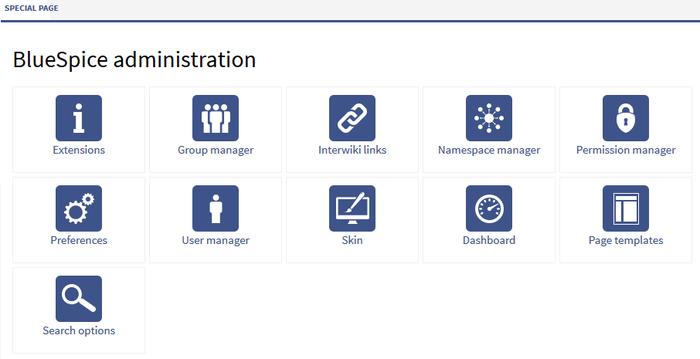

Functions of WikiAdmin[edit | edit source]
In the wiki admin area you will find functions that can be used only by administrators. The links in the sidebar are arranged alphabetically.
What are admin functions?[edit | edit source]
- Extensions: This page shows you every installed extension and gives information about the current version of every extension.
- Group manager: You can add groups and manage them here.
- Interwiki links: You will find the InterWiki manager on this page, where you can create, configure or delete Interwiki links (links to another wiki, e.g. Wikipedia).
- Namespace manager: Create new namespaces and manage them on this page.
- Permission manager: Manage all rights e.g. for groups and namespaces here.
- Preferences: Lots of settings can be done here, for example defining if your wiki can be accessed from everyone or only for registered users.
- User manager: This page gives you the possibility to add new users, manage group memberships and to assign passwords.
- Skin: Change the skin of your wiki.
- Dashboard: Create your personal admin dashboard.
- Page templates: On this page you can integrate new page templates and edit or delete already existing templates.
- Search options: Settings for the search
Permissions[edit | edit source]
All wiki admin preferences are only for users with administration permissions.
There are three steps:
- wikiadmin: is allowed to do everything
- editadmin: is allowed to do everything concerning editing: page templates, search, interwiki, namespaces
- useradmin: is allowed to do everything concerning users: user manager, group manager, permission manager
{{BSExtensionInfobox

        |desc=A container  where an administrator can find special admin functions.

        |status=stable

        |developer=HalloWelt

        |type=BlueSpice

        |edition=BlueSpice free, BlueSpice pro

        |active=Yes

        |compatible=BlueSpice

        |category=Administration

        |docu=https://www.mediawiki.org/wiki/Extension%CB%90WikiAdmin

        }}


        <bookshelf src="Book:Admin manual" />

        WikiAdmin is a container (tab in the left navigation), where an administrator can find special admin functions.


        ==Technical background==

        Alternative to special page <code>Special:WikiAdmin</code>. The WikiAdmin page contains lots of useful management options, which can be done in a very uncomfortable way or only in the script with [[MediaWiki]].


        ==Where do I find Wiki Admin functions?==

        There is also an overview of the most important administration functions on the special page "WikiAdmin". Please go to <code>Special:WikiAdmin</code> to open this page.


        [[File:BlueSpice223-WikiAdmin-en.png|thumb|none|700px|Screenshot: Overview of admin functions on the special page]]


        ==Functions of WikiAdmin==

        In the wiki admin area you will find functions that can be used only by administrators. The links in the sidebar are arranged alphabetically.


        ===What are admin functions?===

        * [[ExtensionInfo|Extensions]]: This page shows you every installed extension and gives information about the current version of every extension.

        * [[GroupManager|Group manager]]: You can add groups and manage them here.

        * [[Interwikilinks|Interwiki links]]: You will find the InterWiki manager on this page, where you can create, configure or delete Interwiki links (links to another wiki, e.g. Wikipedia).

        * [[Namespacemanager|Namespace manager]]: Create new namespaces and manage them on this page.

        * [[PermissionManager|Permission manager]]: Manage all rights e.g. for groups and namespaces here.

        * [[Preferences]]: Lots of settings can be done here, for example defining if your wiki can be accessed from everyone or only for registered users.

        * [[UserManager|User manager]]: This page gives you the possibility to add new users, manage group memberships and to assign passwords.

        * [[FlexiSkin|Skin]]: Change the skin of your wiki.

        * [[DashBoards|Dashboard]]: Create your personal admin dashboard.

        * [[PageTemplates|Page templates]]: On this page you can integrate new page templates and edit or delete already existing templates.

        * [[SearchOptions|Search options]]: Settings for the search


        ==Permissions==

        All wiki admin preferences are only for users with administration permissions.


        There are three steps:


        * wikiadmin: is allowed to do everything

        * editadmin: is allowed to do everything concerning editing: page templates, search, interwiki, namespaces

        * useradmin: is allowed to do everything concerning users: user manager, group manager, permission manager


        [[en

            [[de:{{FULLPAGENAME}}]][[de:WikiAdminen:{{FULLPAGENAME}}]]

[[Category:Extension]]| Line 49: | Line 49: | ||
| − | [[ | + | |
| + | [[de:{{FULLPAGENAME}}]][[en:{{FULLPAGENAME}}]] | ||
[[Category:Extension]] | [[Category:Extension]] | ||