You are viewing an old version of this page. Return to the latest version.
Difference between revisions of "UserManual:Template/Example/Translate"
Bookmanager (talk | contribs) |
Bookmanager (talk | contribs) |
If you maintain different language versions as subpages on a single wiki, you can use a template to show country flags anywhere on the page to switch between the different language versions.
To switch from an English main page to its German subpage, you can use the following template.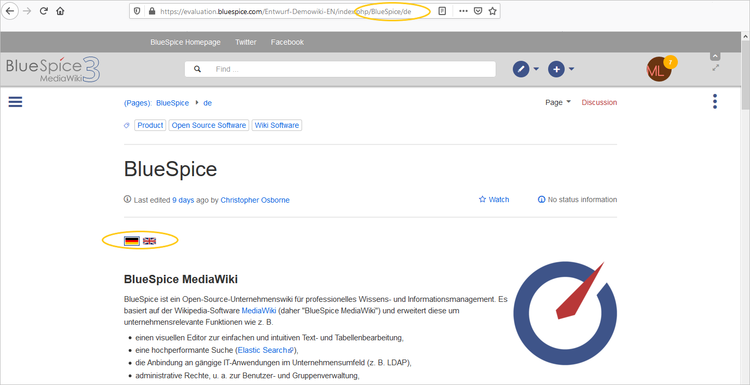

                    {{#if: {{{1|}}}| {{DISPLAYTITLE:{{{1}}} }} |}}
<div>
{{#switch: {{SUBPAGENAME}}
|de=[[File:De-active.png|link=]] [[File:En.png|link={{NAMESPACE}}:{{BASEPAGENAME}}]]
|[[File:De.png|link={{ARTICLEPAGENAME}}/de]] [[File:En-active.png|link=]]
}}
</div>
<br /><br />
{{Translate|Pagename_here}}
The page switch then inserts the links as language flags:
You can download the images here and upload them to the main namespace on your wiki:


<bookshelf src="Book:User manual" />


        If you maintain different language versions as subpages on a single wiki, you can use a template to show country flags anywhere on the page to switch between the different language versions.


        [[File:translate-subpages.png|alt=switching between language-specific pages|center|750x750px|thumb|switching between language-specific pages]]


        To switch from an English main page to its German subpage, you can use the following template.<syntaxhighlight lang="html">

        {{#if: {{{1|}}}| {{DISPLAYTITLE:{{{1}}} }} |}}


        <div>

        {{#switch: {{SUBPAGENAME}}

        |de=[[File:De-active.png|link=]] [[File:En.png|link={{NAMESPACE}}:{{BASEPAGENAME}}]]

        |[[File:De.png|link={{ARTICLEPAGENAME}}/de]] [[File:En-active.png|link=]]

        }}


        </div>


        <br /><br />


        </syntaxhighlight>On the English main page and the German subpage, include the template reference with the main page name in source editing mode at the top of the pages:


        <code><nowiki>{{Translate|</nowiki>''Pagename_here''<nowiki>}}</nowiki></code>


        The page switch then inserts the links as language flags:


        You can download the images here and upload them to the main namespace on your wiki:


        *[[:File:De.png]]

        *[[:File:En.png]]

        *[[:File:De-active.png]]

        *[[:File:En-active.png]]


        <br />


        [[en:{{FULLPAGENAME}}]]

        [[de:Vorlagen/Beispiel/Translate]]
| Line 1: | Line 1: | ||
| + | <bookshelf src="Book:User manual" /> | ||
If you maintain different language versions as subpages on a single wiki, you can use a template to show country flags anywhere on the page to switch between the different language versions. | If you maintain different language versions as subpages on a single wiki, you can use a template to show country flags anywhere on the page to switch between the different language versions. | ||