Difference between revisions of "UserManual:Extension/BlueSpiceWikiExplorer"
Bookmanager (talk | contribs) |
Contents
With WikiExplorer, you can The extension WikiExplorer allows to quickly filter and sort all Wiki pages based on your own filter criteria. You can find individual special pages to help with Wiki maintenance on a variety of Special pages. WikiExplorer combines the functionality of many of these maintenance pages. By combining different filters, you can quickly find matching pages.
UsageContents
Accessing WikiExplorer[edit source]
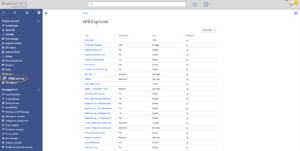
To access Wiki Exporer, go to Global actions and select WikiExplorer. This opens the special page Special:WikiExplorer.
Choosing the sorting criteria[edit source]
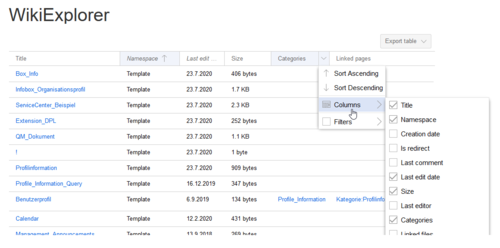
Sorting criteria and visible columns can be changed by clicking on the arrow icon in the header of any list column.

Sorting sequence[edit source]
Clicking on the header of any column (not on the arrow) sorts the table based on the values of that column. Changing the sorting order (ascending, descending) can be switched by clicking on the header multiple times.
Using filters[edit source]
For some content, there are specially adapted filters available which can be used to sort the list. Filters can be accessed by clicking on the "arrow" icon in the column that should be filtered.
The following columns support filtering:
| Content | Possible filters | Sortable |
|---|---|---|
|
Title (Page name) |
starts with, ends with, contains, contains not, equals, equals not | Yes |
| Namespace | starts with, ends with, contains, contains not, equals, equals not | Yes |
| Accesses | less than, greater than, equals | Yes |
| Creation date | None | No |
| Is redirect | None | Yes |
| Last comment | None | Yes |
| Last edit date | None | No |
| Size | less than, greater than, equals | Yes |
| Last editor | None | Yes |
| Categories | None | No |
| Linked files | None | No |
| Linked pages | None | No |
| Links to this page | None | No |
| Assigned editors | None | Yes |
|
Released |
(only visible when package Teamwork is installed)
| yes, no | Yes |
|
Release date |
(only visible when package Teamwork is installed)
| less than, greater than, equals | Yes | |
|
New version waits for release |
None | Yes |
Technical details[edit source]
Wiki Explorer is provided by the extension BlueSpiceWikiExplorer.Related info
<bookshelf src="Book:User manual" />


        {{DISPLAYTITLE:WikiExplorer}}


        __TOC__


            ==What is WikiExplorer?==


            With WikiExplorer, you can

            The extension '''WikiExplorer''' allows to quickly filter and sort all Wiki pages based on your own filter criteria. You can find individual special pages to help with Wiki maintenance on a variety of Special pages. WikiExplorer combines the functionality of many of these maintenance pages. By combining different filters, you can quickly find matching pages.


        ==Usage==

            [[File:WikiExplorer1a.png|thumb]]


        Accessing WikiExplorer==


        To access Wiki Exporer, go to ''Global actions''  and select ''WikiExplorer.''  This opens the special page ''Special:WikiExplorer.''


        ===Choosing the sorting criteria===

        Sorting criteria and visible columns can be changed by clicking on the arrow icon in the header of any list column.


            ===Sorting sequence===[[File:Manual:Mediawiki Extension WikiExplorer.png|alt=WikiExplorer|center|thumb|500x500px|WikiExplorer]]


            ==Sorting sequence==

        Clicking on the header of any column (not on the arrow) sorts the table based on the values of that column. Changing the sorting order (ascending, descending) can be switched by clicking on the header multiple times.


        ===Using filters===


        For some content, there are specially adapted filters available which can be used to sort the list. Filters can be accessed by clicking on the "arrow" icon in the column that should be filtered.


        The following columns support filtering:


        <br />


        {| class="contenttable-blue" style="width: 100%; margin-left: auto; margin-right: auto;" cellspacing="0" cellpadding="0" border="0"

        |-

        ! class="background-color" style="width:40%;" |'''Content'''

            ! class="background-color" style="width:25%;" |'''Possible filters'''

            ! class="background-color" style="width:25%;" class="background-color" |'''Content'''

            ! style="width:25%;" class="background-color" |'''Possible filters'''

            ! style="width:25%;" class="background-color" |'''Sortable'''

        |-

        | height="34" |

        Title (Page name)


        | width="208" |starts with, ends with, contains, contains not, equals, equals not

        | class="background-color" style="width:208px;" class="background-color" width="208" |'''<span style="color: #008000">Yes</span>'''

        |-

        | height="34" |Namespace

        | width="208" |starts with, ends with, contains, contains not, equals, equals not

        | class="background-color" style="width:208px;" class="background-color" width="208" |'''<span style="color: #008000">Yes</span>'''

        |-

        | height="51" |Accesses

        | width="208" |less than, greater than, equals

        | class="background-color" style="width:208px;" class="background-color" width="208" |'''<span style="color: #008000">Yes</span>'''

        |-

        | height="51" |Creation date

        | class="background-color" style="width:208px;" class="background-color" width="208" |'''<span style="color: #d92727">None</span>'''

        | class="background-color" style="width:208px;" class="background-color" width="208" |'''<span style="color: #d92727">No</span>'''

        |-

        | height="51" |Is redirect

        | class="background-color" style="width:208px;" class="background-color" width="208" |'''<span style="color: #d92727">None</span>'''

        | class="background-color" style="width:208px;" class="background-color" width="208" |<span style="color: #008000">'''Yes'''</span>

        |-

        | height="51" |Last comment

        | class="background-color" style="width:208px;" class="background-color" width="208" |'''<span style="color: #d92727">None</span>'''

        | class="background-color" style="width:208px;" class="background-color" width="208" |<span style="color: #008000">'''Yes'''</span>

        |-

        | height="51" |Last edit date

        | class="background-color" style="width:208px;" class="background-color" width="208" |'''<span style="color: #d92727">None</span>'''

        | class="background-color" style="width:208px;" class="background-color" width="208" |<span style="color: #008000">'''<span style="color: #d92727">No</span>'''</span>

        |-

        | height="51" |Size

        | width="208" |less than, greater than, equals

        | class="background-color" style="width:208px;" class="background-color" width="208" |<span style="color: #008000">'''Yes'''</span>

        |-

        | height="51" |Last editor

        | class="background-color" style="width:208px;" class="background-color" width="208" |'''<span style="color: #d92727">None</span>'''

        | class="background-color" style="width:208px;" class="background-color" width="208" |<span style="color: #008000">'''Yes'''</span>

        |-

        | height="51" |Categories

        | class="background-color" style="width:208px;" class="background-color" width="208" |'''<span style="color: #d92727">None</span>'''

        | class="background-color" style="width:208px;" class="background-color" width="208" |<span style="color: #008000">'''<span style="color: #d92727">No</span>'''</span>

        |-

        | height="51" |Linked files

        | class="background-color" style="width:208px;" class="background-color" width="208" |'''<span style="color: #d92727">None</span>'''

        | class="background-color" style="width:208px;" class="background-color" width="208" |<span style="color: #008000">'''<span style="color: #d92727">No</span>'''</span>

        |-

        | height="51" |Linked pages

        | class="background-color" style="width:208px;" class="background-color" width="208" |'''<span style="color: #d92727">None</span>'''

        | class="background-color" style="width:208px;" class="background-color" width="208" |<span style="color: #008000">'''<span style="color: #d92727">No</span>'''</span>

        |-

        | height="51" |Links to this page

        | class="background-color" style="width:208px;" class="background-color" width="208" |'''<span style="color: #d92727">None</span>'''

        | class="background-color" style="width:208px;" class="background-color" width="208" |<span style="color: #008000">'''<span style="color: #d92727">No</span>'''</span>

        |-

        | height="51" |Assigned editors

        | class="background-color" style="width:208px;" class="background-color" width="208" |'''<span style="color: #d92727">None</span>'''

        | class="background-color" style="width:208px;" class="background-color" width="208" |<span style="color: #008000">'''Yes'''</span>

        |-

        | height="51" |

        Released


        (only visible when package '''Teamwork''' is installed)


        | width="208" |yes, no

        | class="background-color" style="width:208px;" class="background-color" width="208" |<span style="color: #008000">'''Yes'''</span>

        |-

        | height="51" |

        Release date


        (only visible when package '''Teamwork''' is installed)


        | width="208" |less than, greater than, equals

        | class="background-color" style="width:208px;" class="background-color" width="208" |<span style="color: #008000">'''Yes'''</span>

        |-

        | height="51" |

        New version waits for release


        | class="background-color" style="width:208px;" class="background-color" width="208" |'''<span style="color: #d92727">None</span>'''

        | class="background-color" style="width:208px;" class="background-color" width="208" |<span style="color: #008000">'''Yes'''</span>

        |}


            ==Technical details==

            Wiki Explorer is provided by the extension '''BlueSpiceWikiExplorer.'''{{Box Links-en|Topic1=[[UserManualReference:BlueSpiceWikiExplorer]]}}<br />{{translation}}

            [[Category:Quality]]
| Line 1: | Line 1: | ||
| − | |||
{{DISPLAYTITLE:WikiExplorer}} | {{DISPLAYTITLE:WikiExplorer}} | ||
| − | |||
| − | + | The extension '''WikiExplorer''' allows to quickly filter and sort all Wiki pages based on your own filter criteria. WikiExplorer combines the functionality of many maintenance pages. By combining different filters, you can quickly find matching pages. | |
| − | |||
| − | |||
| − | |||
| − | |||
| − | |||
| + | ==Accessing WikiExplorer== | ||
To access Wiki Exporer, go to ''Global actions'' and select ''WikiExplorer.'' This opens the special page ''Special:WikiExplorer.'' | To access Wiki Exporer, go to ''Global actions'' and select ''WikiExplorer.'' This opens the special page ''Special:WikiExplorer.'' | ||
| − | + | ==Choosing the sorting criteria== | |
Sorting criteria and visible columns can be changed by clicking on the arrow icon in the header of any list column. | Sorting criteria and visible columns can be changed by clicking on the arrow icon in the header of any list column. | ||
| + | [[File:Manual:Mediawiki Extension WikiExplorer.png|alt=WikiExplorer|center|thumb|500x500px|WikiExplorer]] | ||
| − | + | ==Sorting sequence== | |
Clicking on the header of any column (not on the arrow) sorts the table based on the values of that column. Changing the sorting order (ascending, descending) can be switched by clicking on the header multiple times. | Clicking on the header of any column (not on the arrow) sorts the table based on the values of that column. Changing the sorting order (ascending, descending) can be switched by clicking on the header multiple times. | ||
| − | + | ==Using filters== | |
For some content, there are specially adapted filters available which can be used to sort the list. Filters can be accessed by clicking on the "arrow" icon in the column that should be filtered. | For some content, there are specially adapted filters available which can be used to sort the list. Filters can be accessed by clicking on the "arrow" icon in the column that should be filtered. | ||
| Line 26: | Line 21: | ||
<br /> | <br /> | ||
| − | {| class="contenttable-blue" style="width: 100% | + | {| class="contenttable-blue" style="width:100%;" cellspacing="0" cellpadding="0" border="0" |
|- | |- | ||
| − | ! | + | ! style="width:40%;" class="background-color" |'''Content''' |
| − | ! | + | ! style="width:25%;" class="background-color" |'''Possible filters''' |
| − | ! | + | ! style="width:25%;" class="background-color" |'''Sortable''' |
|- | |- | ||
| height="34" | | | height="34" | | ||
| Line 36: | Line 31: | ||
| width="208" |starts with, ends with, contains, contains not, equals, equals not | | width="208" |starts with, ends with, contains, contains not, equals, equals not | ||
| − | | | + | | style="width:208px;" class="background-color" width="208" |'''<span style="color: #008000">Yes</span>''' |
|- | |- | ||
| height="34" |Namespace | | height="34" |Namespace | ||
| width="208" |starts with, ends with, contains, contains not, equals, equals not | | width="208" |starts with, ends with, contains, contains not, equals, equals not | ||
| − | | | + | | style="width:208px;" class="background-color" width="208" |'''<span style="color: #008000">Yes</span>''' |
|- | |- | ||
| height="51" |Accesses | | height="51" |Accesses | ||
| width="208" |less than, greater than, equals | | width="208" |less than, greater than, equals | ||
| − | | | + | | style="width:208px;" class="background-color" width="208" |'''<span style="color: #008000">Yes</span>''' |
|- | |- | ||
| height="51" |Creation date | | height="51" |Creation date | ||
| − | | | + | | style="width:208px;" class="background-color" width="208" |'''<span style="color: #d92727">None</span>''' |
| − | | | + | | style="width:208px;" class="background-color" width="208" |'''<span style="color: #d92727">No</span>''' |
|- | |- | ||
| height="51" |Is redirect | | height="51" |Is redirect | ||
| − | | | + | | style="width:208px;" class="background-color" width="208" |'''<span style="color: #d92727">None</span>''' |
| − | | | + | | style="width:208px;" class="background-color" width="208" |<span style="color: #008000">'''Yes'''</span> |
|- | |- | ||
| height="51" |Last comment | | height="51" |Last comment | ||
| − | | | + | | style="width:208px;" class="background-color" width="208" |'''<span style="color: #d92727">None</span>''' |
| − | | | + | | style="width:208px;" class="background-color" width="208" |<span style="color: #008000">'''Yes'''</span> |
|- | |- | ||
| height="51" |Last edit date | | height="51" |Last edit date | ||
| − | | | + | | style="width:208px;" class="background-color" width="208" |'''<span style="color: #d92727">None</span>''' |
| − | | | + | | style="width:208px;" class="background-color" width="208" |<span style="color: #008000">'''<span style="color: #d92727">No</span>'''</span> |
|- | |- | ||
| height="51" |Size | | height="51" |Size | ||
| width="208" |less than, greater than, equals | | width="208" |less than, greater than, equals | ||
| − | | | + | | style="width:208px;" class="background-color" width="208" |<span style="color: #008000">'''Yes'''</span> |
|- | |- | ||
| height="51" |Last editor | | height="51" |Last editor | ||
| − | | | + | | style="width:208px;" class="background-color" width="208" |'''<span style="color: #d92727">None</span>''' |
| − | | | + | | style="width:208px;" class="background-color" width="208" |<span style="color: #008000">'''Yes'''</span> |
|- | |- | ||
| height="51" |Categories | | height="51" |Categories | ||
| − | | | + | | style="width:208px;" class="background-color" width="208" |'''<span style="color: #d92727">None</span>''' |
| − | | | + | | style="width:208px;" class="background-color" width="208" |<span style="color: #008000">'''<span style="color: #d92727">No</span>'''</span> |
|- | |- | ||
| height="51" |Linked files | | height="51" |Linked files | ||
| − | | | + | | style="width:208px;" class="background-color" width="208" |'''<span style="color: #d92727">None</span>''' |
| − | | | + | | style="width:208px;" class="background-color" width="208" |<span style="color: #008000">'''<span style="color: #d92727">No</span>'''</span> |
|- | |- | ||
| height="51" |Linked pages | | height="51" |Linked pages | ||
| − | | | + | | style="width:208px;" class="background-color" width="208" |'''<span style="color: #d92727">None</span>''' |
| − | | | + | | style="width:208px;" class="background-color" width="208" |<span style="color: #008000">'''<span style="color: #d92727">No</span>'''</span> |
|- | |- | ||
| height="51" |Links to this page | | height="51" |Links to this page | ||
| − | | | + | | style="width:208px;" class="background-color" width="208" |'''<span style="color: #d92727">None</span>''' |
| − | | | + | | style="width:208px;" class="background-color" width="208" |<span style="color: #008000">'''<span style="color: #d92727">No</span>'''</span> |
|- | |- | ||
| height="51" |Assigned editors | | height="51" |Assigned editors | ||
| − | | | + | | style="width:208px;" class="background-color" width="208" |'''<span style="color: #d92727">None</span>''' |
| − | | | + | | style="width:208px;" class="background-color" width="208" |<span style="color: #008000">'''Yes'''</span> |
|- | |- | ||
| height="51" | | | height="51" | | ||
Released | Released | ||
| − | |||
| − | |||
| width="208" |yes, no | | width="208" |yes, no | ||
| − | | | + | | style="width:208px;" class="background-color" width="208" |<span style="color: #008000">'''Yes'''</span> |
|- | |- | ||
| height="51" | | | height="51" | | ||
Release date | Release date | ||
| − | |||
| − | |||
| width="208" |less than, greater than, equals | | width="208" |less than, greater than, equals | ||
| − | | | + | | style="width:208px;" class="background-color" width="208" |<span style="color: #008000">'''Yes'''</span> |
|- | |- | ||
| height="51" | | | height="51" | | ||
New version waits for release | New version waits for release | ||
| − | | | + | | style="width:208px;" class="background-color" width="208" |'''<span style="color: #d92727">None</span>''' |
| − | | | + | | style="width:208px;" class="background-color" width="208" |<span style="color: #008000">'''Yes'''</span> |
|} | |} | ||
| − | + | {{Box Links-en|Topic1=[[Reference:BlueSpiceWikiExplorer]]}}<br />{{translation}} | |
| − | + | [[Category:Quality]] | |
| − | |||