You are viewing an old version of this page. Return to the latest version.
Difference between revisions of "UserManual:Extension/BlueSpiceCategoryCheck"
Bookmanager (talk | contribs) |
(Replaced content with "<bookshelf src="Book:User manual" /> {{Manual:Extension/BlueSpiceCategoryCheck}}") (Tags: Replaced, 2017 source edit) |
Contents
The extension CategoryCheck reminds users to assign a category to a page before saving it.
Using the category check[edit | edit source]
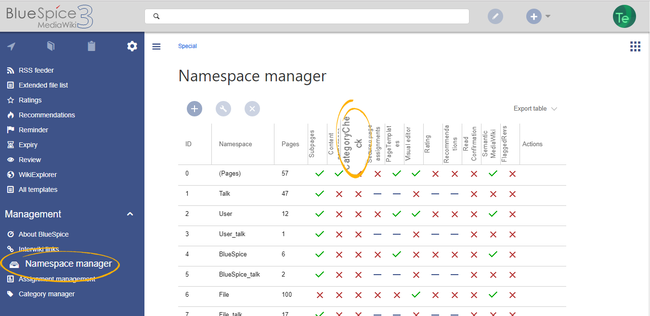
To use this feature, it must first be enabled for individual namespaces in the Namespace manager
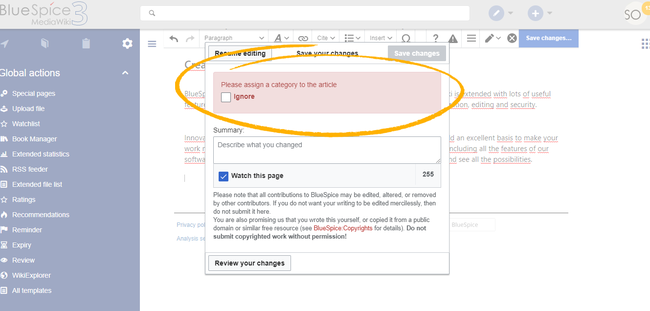
When saving a page in a namespace that has the category check enabled, the user is reminded to assign a category before saving. This message only appears if the page does not have at least one category assigned. The page can still be saved without assigning a category, but the user must explicitly check the "Ignore" checkbox.


Related info
<bookshelf src="Book:User manual" />

        {{DISPLAYTITLE:CategoryCheck}}

            __TOC__


            The extension '''CategoryCheck''' reminds users to assign a category to a page before saving it.

            ==Using the category check==


            To use this feature, it must first be enabled for individual namespaces in the[[Manual:Extension/NamespaceManager| Namespace manager]]


            <br />[[File:CategoryCheck1.png|thumb|alt=Namespace manager|center|650x650px|Namespace manager]]


            When saving a page in a namespace that has the category check enabled, the user is reminded to assign a category before saving.

            This message only appears if the page does not have at least one category assigned. The page can still be saved without assigning a category, but the user must explicitly check the "Ignore" checkbox.


            <br />[[File:CategoryCheck2.png|thumb|alt=Warning notice when saving the page|center|650x650px|Warning notice when saving the page]]<br />{{Box Links-en|Topic1=[[Reference:BlueSpiceCategoryCheck]]}}


            {{Translation}}Manual:Extension/BlueSpiceCategoryCheck}}
| Line 1: | Line 1: | ||
<bookshelf src="Book:User manual" /> | <bookshelf src="Book:User manual" /> | ||
| − | {{ | + | {{Manual:Extension/BlueSpiceCategoryCheck}} |
| − | |||
| − | |||
| − | |||
| − | |||
| − | |||
| − | |||
| − | |||
| − | |||
| − | |||
| − | |||
| − | |||
| − | |||
| − | |||
| − | |||
| − | |||
| − | |||