You are viewing an old version of this page. Return to the latest version.
Difference between revisions of "UserManual:Extension/BlueSpiceQrCode"
Bookmanager (talk | contribs) |
Contents
The extension QrCode creates a QR code on each content page of the wiki.A QR Code (also Quick Response code) is a technology that was developed for the logistics needs of Toyota. Today,
With the extension BlueSpiceQrCode, usersUsing the QR code
is implemented in many different products.[edit source]
Users can open a wiki page quickly on their mobile device by simply scanning the QR code on their desktop page. In addition, the QR code for a wiki page can be attached to a product or included on a printed page. Scanning the QR code on the product or the page leads directly to the wiki page.
Usage[edit source]
The QR Code added by this extension is located in the Tools menu, as menu item page tools menu under QR Code. To open the current wiki page with a mobile phone, simply scan it directly from the screen or from a printed page or packaging: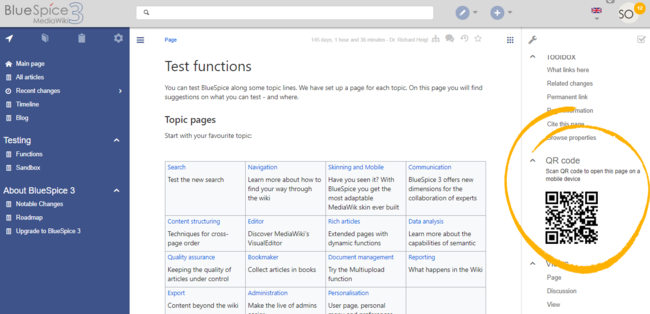
Related info
<bookshelf src="Book:User manual" />


        {{DISPLAYTITLE:QR Code}}


        __TOC__


            ==What is a QR code?==


            The extension '''QrCode''' creates a QR code on each content page of the wiki.A QR Code (also Quick Response code) is a technology that was developed for the logistics needs of Toyota. Today,


            == Using the QR code is implemented in many different products.


            With the extension '''BlueSpiceQrCode''', users ==

            Users can open a wiki page quickly on their mobile device by simply scanning the QR code on their desktop page. In addition, the QR code for a wiki page can be attached to a product or included on a printed page. Scanning the QR code on the product or the page leads directly to the wiki page.


        ==Usage==


        The QR Code added by this extension is located in the Tools menu, as menu itempage tools menu under ''QR Code.'' To open the current wiki page with a mobile phone, simply scan it directly from the screen or from a printed page or packaging:<br />[[File:QRCode1a.png|QR code on page|center|650x650px]]


        <br />{{Box Links-en|Topic1=[[UserManualReference:BlueSpiceQrCode]]}}


        {{Translation}}
| Line 1: | Line 1: | ||
| − | |||
{{DISPLAYTITLE:QR Code}} | {{DISPLAYTITLE:QR Code}} | ||
| − | |||
| − | + | The extension '''QrCode''' creates a QR code on each content page of the wiki.A QR Code (also Quick Response code) is a technology that was developed for the logistics needs of Toyota. | |
| − | A QR Code (also Quick Response code) is a technology that was developed for the logistics needs of Toyota | ||
| − | + | == Using the QR code == | |
| + | Users can open a wiki page quickly on their mobile device by simply scanning the QR code on their desktop page. In addition, the QR code for a wiki page can be attached to a product or included on a printed page. Scanning the QR code on the product or the page leads directly to the wiki page. | ||
| − | + | The QR Code added by this extension is located in the page tools menu under ''QR Code.'' To open the current wiki page with a mobile phone, simply scan it directly from the screen or from a printed page or packaging:<br />[[File:QRCode1a.png|QR code on page|center|650x650px]] | |
| − | The QR Code added by this extension is located in the | ||
| − | <br />{{Box Links-en|Topic1=[[ | + | <br />{{Box Links-en|Topic1=[[Reference:BlueSpiceQrCode]]}} |
{{Translation}} | {{Translation}} | ||