Difference between revisions of "UserManual:Extension/BlueSpiceRating"
Bookmanager (talk | contribs) |
The extension BlueSpiceRating allows users to rate a page with up to five stars or to recommend the page.
Contents
-
Rating
- 1 What are page ratings? 2
- Rating or recommending a page
- 3 List of ratings 4
- 2 Special pages
- 3 Disabling rating on a page 5
- 4 Disabling rating in a namespace
- 6 5 Related info
What are page ratings?Rating or recommending a page[edit source]
The rating extension allows users to rate pages with up to five stars.
A user A user simply selects the amount of stars for a rating. The number of stars are then hightlighted in yellow during the selection process. A mouse-click confirms the rating.
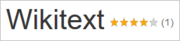
Only one rating per user is counted. New votes only change the average evaluation, but not the number of ratings.
Users can change their rating at any time by choosing less or more stars. The average evaluation, as well as the number of ratings is shown next to the page title:A user simply selects the amount of stars for a rating. The number of stars are then hightlighted in yellow. A mouse-click confirms the rating:

Rating a page[edit source]
To recommend a page, a user clicks on the link "Recommend". To retract the recommendation, the user clicks on the link again.

Special pages[edit source]
The special page Special:RatingsRating lists all pages that have been rated.
The special page Special:Recommendations lists all pages that have been recommended.
Disabling rating on a page[edit source]
You can also exclude pages from the rating system. You can do this with a so-called "Behaviour Switch". Insert the switch at the bottom of the page in source view: __NORATING__
Disabling rating in a namespace[edit source]
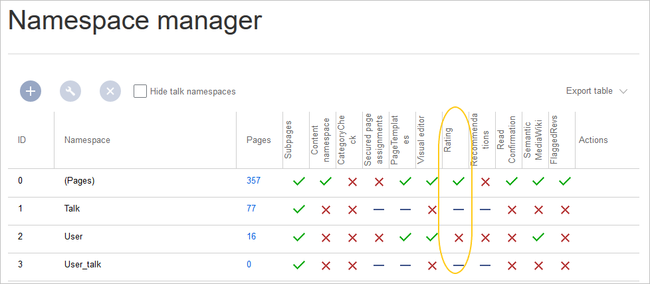
Administrators can turn on the rating feature for individual namespaces. To enable or disable ratings, go to Global actions > Namespace manager and edit the namespaces:
Related info
<bookshelf src="Book:User manual" />


        {{DISPLAYTITLE:Page ratings}}

            __TOC__


            ==What are page ratings?==


            The rating extension  and recommendations}}


            The extension '''BlueSpiceRating''' allows users to rate pages a page with up to five stars.


            A user can change their rating at any time by choosing less or more stars. The average evaluation, as well as the number of ratings is shown next to the page title:

            [[File:Manual:ratings-display.png|alt=Screenshot: page ratings|center|180x180px]]


         or to recommend the page.


            ==Rating or recommending a page==

            A user simply selects the amount of stars for a rating. The number of stars are then hightlighted in yellow during the selection process.  A mouse-click confirms the rating.

            [[File:ratings-vote.png|alt=Screenshot: submit a rating|center|180x180px]]


        Only one rating per user is counted. New votes only change the average evaluation, but not the number of ratings.


        ==Rating a page==

            A user simply selects the amount of stars for a rating. The number of stars are then hightlighted in yellow. A mouse-click confirms the rating:

            [[File:ratings-vote.png|alt=Screenshot: submit a rating|center|180x180px]]


            ==List of ratingsUsers can change their rating at any time by choosing less or more stars. The average evaluation, as well as the number of ratings is shown next to the page title:[[File:Manual:rating-title-EN.png|alt=Rating and recommending a page|center|thumb|300x300px|Rating and recommending a page|link=https://en.wiki.bluespice.com/wiki/File:Manual:rating-title-EN.png]]To recommend a page,  a user clicks on the link "Recommend". To retract the recommendation, the user clicks on the link again.


            ==Special pages==

        The special page <code>Special:RatingsRating</code> lists all pages that have been rated.


        The special page <code>Special:Recommendations</code> lists all pages that have been recommended.


        ==Disabling rating on a page==


        You can also exclude pages from the rating system. You can do this with a so-called "Behaviour Switch". Insert the switch at the bottom of the page in source view: <code><nowiki>__NORATING__</nowiki></code>


        ==Disabling rating in a namespace==

        Administrators can turn on the rating feature for individual namespaces. To enable or disable ratings, go to ''Global actions > Namespace manager'' and edit the namespaces:


        <br />

        [[File:ratings-namespace.png|alt=Screenshot: Namespace settings|center|650x650px]]


        <br />


        {{Box Links-en|Topic1=[[UserManualReference:BlueSpiceRating]]}}


        [[en:{{FULLPAGENAME}}]]

        [[UserManual:De:de:Handbuch:Erweiterung/Rating]]
| Line 1: | Line 1: | ||
| − | + | {{DISPLAYTITLE:Page ratings and recommendations}} | |
| − | {{DISPLAYTITLE:Page ratings}} | ||
| − | |||
| − | + | The extension '''BlueSpiceRating''' allows users to rate a page with up to five stars or to recommend the page. | |
| − | The rating | + | ==Rating or recommending a page== |
| + | A user simply selects the amount of stars for a rating. The number of stars are then hightlighted in yellow during the selection process. A mouse-click confirms the rating. | ||
| + | [[File:ratings-vote.png|alt=Screenshot: submit a rating|center|180x180px]] | ||
| + | Only one rating per user is counted. New votes only change the average evaluation, but not the number of ratings. | ||
| − | + | Users can change their rating at any time by choosing less or more stars. The average evaluation, as well as the number of ratings is shown next to the page title:[[File:Manual:rating-title-EN.png|alt=Rating and recommending a page|center|thumb|300x300px|Rating and recommending a page|link=https://en.wiki.bluespice.com/wiki/File:Manual:rating-title-EN.png]]To recommend a page, a user clicks on the link "Recommend". To retract the recommendation, the user clicks on the link again. | |
| − | [[File:Manual: | ||
| + | ==Special pages== | ||
| + | The special page <code>Special:Rating</code> lists all pages that have been rated. | ||
| − | + | The special page <code>Special:Recommendations</code> lists all pages that have been recommended. | |
| − | |||
| − | |||
| − | |||
| − | |||
| − | |||
| − | |||
| − | The special page <code>Special: | ||
==Disabling rating on a page== | ==Disabling rating on a page== | ||
| − | |||
You can also exclude pages from the rating system. You can do this with a so-called "Behaviour Switch". Insert the switch at the bottom of the page in source view: <code><nowiki>__NORATING__</nowiki></code> | You can also exclude pages from the rating system. You can do this with a so-called "Behaviour Switch". Insert the switch at the bottom of the page in source view: <code><nowiki>__NORATING__</nowiki></code> | ||
==Disabling rating in a namespace== | ==Disabling rating in a namespace== | ||
| − | Administrators can turn on the rating feature for individual namespaces. To enable or disable ratings, go to Global actions > Namespace manager and edit the namespaces: | + | Administrators can turn on the rating feature for individual namespaces. To enable or disable ratings, go to ''Global actions > Namespace manager'' and edit the namespaces: |
<br /> | <br /> | ||
| Line 31: | Line 25: | ||
<br /> | <br /> | ||
| − | {{Box Links-en|Topic1=[[ | + | {{Box Links-en|Topic1=[[Reference:BlueSpiceRating]]}} |
[[en:{{FULLPAGENAME}}]] | [[en:{{FULLPAGENAME}}]] | ||
| − | [[ | + | [[de:Handbuch:Erweiterung/Rating]] |