Difference between revisions of "UserManual:Extension/BlueSpiceSocialProfile"
(Copied from Manual:Extension/BlueSpiceSocialProfile, revision 21768) |
Bookmanager (talk | contribs) m (Tag: 2017 source edit) |
BlueSpiceSocialProfile provides the SocialEntity of type profile. Furthermore, the user page is converted into a complete user profile.
User profile info[edit source]
The first part of the profile page contains elements related to the user's profile info.
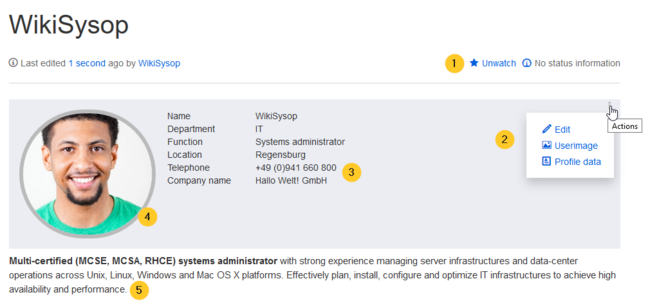
(1) Watchlist: The profile page is by default on the user's watchlist to send notifications about any changes to the page.
(2) Actions menu: In the edit menu, users can edit their profile description (5) below their profile picture, upate their user image and enter their profile data (3).
(3) Profile data: Users can enter their profile details, such as department and phone number.
(4) User image: The user image can be uploaded from the actions menu. For users without a user image, an avatar image is displayed instead.
(5) Description: The edit link in the Actions menu allows to edit the page content itself. This content is displayed directly below the profile box.
Social timeline[edit source]
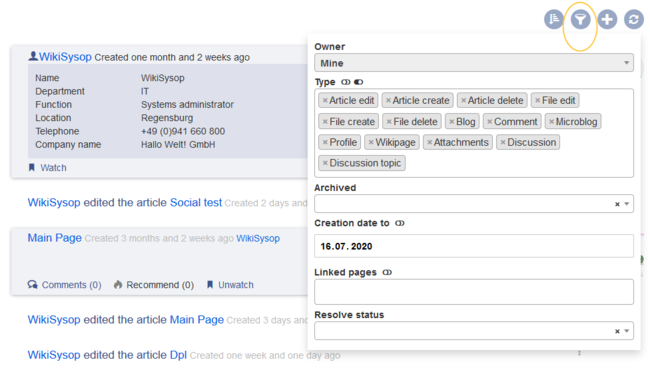
Below the user profile information, a timeline of the user contributions is shown in the form of social entities. A filter allows all users to change what types of actions are displayed in the list.


Related info
<bookshelf src="Book:User manual" />{{DISPLAYTITLE:User profile}}

        '''BlueSpiceSocialProfile''' provides the SocialEntity of type profile. Furthermore, the user page is converted into a complete user profile.


        == User profile info ==

        The first part of the profile page contains elements related to the user's profile info.


        <br />

        [[File:Manual:SocialProfile-userinfo.png|alt=user profile|center|thumb|650x650px|User profile]]

        (1) '''Watchlist:''' The profile page is by default on the user's watchlist to send notifications about any changes to the page.


        (2) '''Actions menu:''' In the edit menu, users can edit their profile description (5) below their profile picture, upate their user image and enter their profile data (3).


        (3) '''Profile data:''' Users can enter their profile details, such as department and phone number.


        (4) '''User image:''' The user image can be uploaded from the actions menu. For users without a user image, an [[Manual:Extension/BlueSpiceAvatars|avatar]]  image is displayed instead.


        (5) '''Description:''' The edit link in the Actions menu allows to edit the page content itself. This content is displayed directly  below the profile box.


        == Social timeline ==

        Below the user profile information, a timeline of the user contributions is shown in the form of social entities. A filter allows all users to change what types of actions are displayed in the list.

        [[File:Manual:SocialProfile-userinfo-timeline.png|alt=Timeline of user actions|center|thumb|650x650px|Timeline of user actions]]


        {{Box Links-en

        |Topic1=[[Manual:Extension/BlueSpiceSocialBlog|Blog]]

        |Topic5=[[Manual:Extension/BlueSpiceSocialComments|Social comments]]

        |Topic4=[[Manual:Extension/BlueSpiceSocialMicroBlog|Microblog]]

        |Topic3=[[Manual:Extension/BlueSpiceSocialTopics|Discussion topics]]

        |Topic2=[[Manual:Extension/BlueSpiceSocialWikiPage|Discussions and Attachments]]

        |Topic6=[[Reference:BlueSpiceSocial]]

        }}


        {{Translation}}

        [[Category:Social]]
| Line 1: | Line 1: | ||
| − | {{DISPLAYTITLE:User profile}} | + | <bookshelf src="Book:User manual" />{{DISPLAYTITLE:User profile}} |
'''BlueSpiceSocialProfile''' provides the SocialEntity of type profile. Furthermore, the user page is converted into a complete user profile. | '''BlueSpiceSocialProfile''' provides the SocialEntity of type profile. Furthermore, the user page is converted into a complete user profile. | ||